Owner’s manual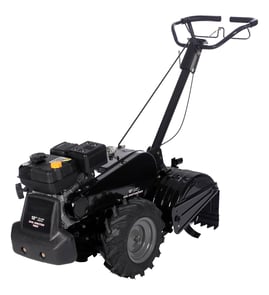



What is the bar on the back of a tiller for?
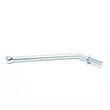
On the Craftsman 917297120 rear-tine tiller, the bar at the back is the depth stake (also called a drag stake). We use it to control how deep the tines dig, help the tiller “bite” into the soil, and keep the machine from lunging forward.
What the depth stake does
- Sets tilling depth: higher stake position typically allows deeper digging; lower stake position limits depth for cultivating.
- Adds control: it drags in the soil to steady the tiller and reduce bouncing.
- Helps with transport: lowering it to the transport position helps prevent the tines from scuffing the ground.
- Improves traction and consistency: keeps the tiller from racing ahead in loose soil.
How we adjust it (typical steps)
Always shut the engine off and wait for moving parts to stop before adjusting.
- Remove the depth stake pin.
- Slide the depth stake up or down to the hole that matches the depth you want.
- Reinstall the pin fully so the stake locks in place.
For the exact hole positions and recommended settings for cultivating vs deep tilling, use the 917297120 owner's manual.
Quick guide: common settings
| Task | Depth stake position | What you will notice |
|---|---|---|
| Cultivating / shallow tilling | Higher (shallower setting) | Less digging, smoother control |
| Breaking new ground | Lower (deeper setting) | More resistance, slower forward travel |
| Moving around the yard | Transport position | Tines stay out of the ground |
Why it matters
A correctly set depth stake protects the drivetrain, improves tilling results, and reduces operator fatigue. If the tiller bogs down, skips, or feels too aggressive, adjusting the depth stake is one of the first fixes we recommend.
Last updated: January 2026
How often should I change the oil in my tiller?
For the Craftsman 917297120 rear-tine tiller, we change the engine oil after every 25 hours of operation, or at least once a year if you do not reach 25 hours. We also check the oil level before starting and after each 5 hours of continuous use (see the 917297120 owner’s manual).
Recommended oil-change schedule (what to follow)
- Before each use: check engine oil level.
- During long jobs: re-check oil level after 5 hours of continuous use.
- Oil change interval: every 25 hours of operation.
- Low-use interval: at least once per year.
- Heavy load or high heat: change oil more often.
- Dusty/dirty conditions: service maintenance items more often (oil checks plus air cleaner service).
Quick oil type guidance
The manual calls for a high-quality detergent oil meeting API service classification SG-SL, with viscosity based on temperature.
| Typical conditions | Common viscosity choice | Notes |
|---|---|---|
| Warm weather use | SAE 30 | Common for many small engines in warmer temps |
| Mixed temps | 10W-30 | Multi-viscosity oils can increase consumption above 32°F (0°C); check level more often |
| Cold starts | 5W-30 | Helps starting; monitor oil level closely |
Basic oil-change steps (high level)
- Run the engine briefly so the oil is warm (warm oil drains better).
- Park the tiller on a level surface and use a suitable drain pan.
- Remove the drain plug and tip the tiller forward to drain completely.
- Reinstall and tighten the drain plug securely.
- Refill with the correct oil type and re-check the level.
Why it matters
Fresh oil protects internal engine parts from wear and overheating. On a rear-tine tiller like the Craftsman 917297120, consistent oil changes also help prevent hard starting, rough running, and shortened engine life.
Last updated: January 2026
Where is the model number on a tiller?
On the Craftsman rear-tine tiller model 917297120, the model number is shown in the documentation as 917.297120; on the machine itself, it’s typically printed on a product ID label attached to the frame, often near the tine shield/guard area or close to the engine and fuel tank.
Where to look first (fast checks)
- Check the tine shield/guard area (rear tine tillers often place the label where it’s protected from debris).
- Look on the main frame rails near the wheels or transmission housing.
- Check near the engine mounting area and around the fuel tank.
- Inspect the handle support area where cables and controls route.
- Wipe dirt and oil off the frame; labels can be hard to see under grime.
What the label usually looks like
Most tillers use a small sticker or metal tag that includes:
- Model number (for this unit: 917297120)
- Sometimes a “product number” or “serial” number
- Brand name (Craftsman)
If the label is damaged, we recommend using the parts diagrams and identification details in the 917297120 owner’s manual to confirm the exact model.
Why it matters
The model number is the key to matching the correct parts (like a drive belt, clutch cable, or chain) and to following the right adjustment and maintenance steps for your specific Craftsman tiller.
Quick reference
| What you need | Example for this tiller | What it’s used for |
|---|---|---|
| Model number | 917297120 | Finding correct parts and diagrams |
| Brand | Craftsman | Narrowing parts and manuals |
| Product type | Rear-tine tiller | Choosing the right repair steps |
Last updated: January 2026
What are the common problems with lawn tillers?
Common problems on the Craftsman 917297120 rear-tine tiller include hard starting, poor tilling performance (tines not penetrating or bouncing), and drive issues where the wheels or tines do not pull correctly. Many problems trace back to fuel/ignition maintenance, soil conditions, or worn drive components.
Quick checks we recommend first
- Disconnect the spark plug wire before inspecting moving parts.
- Confirm the throttle and choke controls move freely and return smoothly.
- Check for wrapped vines or long grass around the tine shaft (this can slow or stop tilling).
- Verify you are not trying to till too deep too fast; best tilling depth is typically 4 to 6 inches.
- If the tiller is overloaded or jammed, inspect tine shear pins (they are designed to break to protect the transmission).
Most common symptoms and likely causes
| Symptom | Most likely causes | What to do next |
|---|---|---|
| Engine will not start | Old fuel, clogged fuel path, fouled spark plug, incorrect choke/throttle setting | Refresh fuel, check spark plug condition, verify control settings per the 917297120 owner's manual |
| Tiller bounces or will not dig | Soil too dry or too hard; depth stake set too deep | Moisten hard soil before tilling, reduce depth, make slower passes |
| Poor tilling or tines slow down | Wrapped debris on tine shaft; broken shear pin; drive slippage | Clear debris, inspect shear pins, check belt tension and condition |
| Wheels/tines do not pull consistently | Worn belt, cable out of adjustment, drivetrain wear | Inspect and replace worn drive parts such as the rear-tine tiller drive belt 591372401 if glazed, cracked, or stretched |
Drive and control problems to watch for
On rear-tine tillers like the 917297120, drive complaints often come from wear in the belt-and-cable system.
- A stretched or damaged belt can slip under load.
- A clutch cable that is out of adjustment can prevent full engagement.
- A chain or gearcase issue can show up as grinding noises or intermittent drive.
If the tiller moves but struggles under load, the belt is a top suspect; if engagement feels weak at the handle, the cable adjustment is a top suspect.
Why it matters
Running a tiller overloaded (too deep, too fast) increases bounce, reduces control, and can break shear pins to protect the transmission. Correct depth, soil moisture, and timely replacement of wear parts helps the tiller dig consistently and prevents bigger drivetrain repairs.
For step-by-step troubleshooting and safe operating guidance, use the 917297120 owner's manual.
Last updated: January 2026