 Owner’s manual
 Error Codes




What is the capacity of the Bosch WTVC5530UC?
The Bosch WTVC5530UC dryer uses a large stainless steel drum rated for up to 17.6 lb (8 kg) of laundry (dry weight). For the most accurate loading guidance by cycle and fabric type, follow the WTVC5530UC owner's manual.
What “capacity” means on this Bosch dryer
Bosch commonly lists dryer capacity by weight (lb/kg) rather than cubic feet. That weight rating is a practical way to prevent overloading, improve drying performance, and reduce wrinkling.
Typical load examples (by weight)
- Small load (3 to 6 lb): a few shirts, light items
- Medium load (7 to 12 lb): mixed everyday laundry
- Large load (13 to 17.6 lb): towels or heavier cottons (do not pack tightly)
How to load for best drying results
Overloading is a top cause of long dry times and damp spots. We recommend:
- Fill the drum loosely; items should tumble freely
- Mix similar fabrics and weights (avoid one heavy item with many light items)
- Use sensor cycles when available; they adjust time based on moisture
- Clean the lint screen before every load
- Avoid tightly rolled bedding; it can trap moisture
Quick reference
| Spec | What to expect on WTVC5530UC |
|---|---|
| Capacity rating | Up to 17.6 lb (8 kg) |
| Drum material | Stainless steel |
| Wrinkle reduction | Wrinkle Block option (intermittent tumbling after cycle) |
Why it matters
Staying within the 17.6 lb (8 kg) capacity helps the moisture sensors and airflow system dry evenly, keeps energy use down, and reduces wear on moving parts such as drum support components.
Last updated: January 2026
How do I reset a Bosch dryer?
On the Bosch WTVC5530UC dryer, a “reset” is usually done by turning the program selector to OFF, then selecting a cycle and pressing Start/Pause again. If the dryer stopped due to a fault (often airflow or overheating related), correct the cause first so it does not immediately shut down again; see the WTVC5530UC manual.
Quick reset steps (most common)
- Turn the program selector to OFF.
- Wait 30 seconds.
- Select a cycle such as Extra Dry.
- Close the door fully.
- Press Start/Pause.
- If it still will not run, switch to OFF and check the troubleshooting table in the manual.
What to check first (so the reset “sticks”)
A Bosch dryer can stop or refuse to start when it senses unsafe conditions. Check these basics before repeating the reset:
- Airflow: clean the lint screen and make sure the exhaust duct is not kinked or blocked.
- Door: confirm the door latches firmly.
- Power: verify the outlet has power and the breaker is on.
- Load: make sure the drum is not overloaded.
- Heat symptoms: if the dryer runs but does not heat, focus on airflow and heating diagnostics.
If you’re commissioning the dryer after install
The manual’s appliance test is a reliable way to confirm operation:
| Step | What you do | What you should notice |
|---|---|---|
| 1 | Set to Extra Dry and press Start/Pause | Dryer starts tumbling |
| 2 | After 3 to 5 minutes, press Start/Pause and open door | Interior feels warm |
| 3 | Turn selector to OFF | Test ends safely |
Why it matters
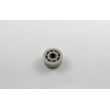
Repeatedly “resetting” without fixing airflow or a recurring fault can lead to longer dry times, overheating shutdowns, and unnecessary wear on components like drum support parts (for example a worn wheel 00613598 can add drag and noise).
Helpful DIY references
Last updated: January 2026
What does E09 mean on a Bosch dryer?
E09 on a Bosch dryer indicates an electronics-related fault. On the Bosch WTVC5530UC, this code typically points to a control or sensor circuit issue that requires professional diagnosis and repair using the troubleshooting steps in the WTVC5530UC manual.
What you can do right away
- Turn the dryer off, then restore power (unplug for 2 minutes, then plug back in) and retry a cycle.
- Cancel the cycle and start a timed dry cycle to see if the code returns immediately.
- Check that the lint screen is clean and airflow is not restricted (poor airflow can trigger abnormal temperature readings).
- Let the dryer cool for 30 minutes, then try again (overheating conditions can cascade into electronic faults).
- If the code returns, stop using the dryer until it is checked to prevent repeated overheating or component damage.
Why E09 often shows up
Bosch dryers use sensor-controlled drying that monitors moisture and temperature to regulate heat and cycle time. When the control detects an abnormal reading or a communication problem in the electronics, it can display an error like E09.
Parts that are commonly involved (and why)
We match parts to symptoms after diagnosis. For E09, the most common suspects are temperature-sensing and control-related components.
| What may be affected | What it does | What you may notice |
|---|---|---|
| Temperature sensor circuit (NTC) | Reports temperature to the control | Stops mid-cycle, overheating, error returns quickly |
| Main control electronics | Interprets sensor signals and runs the heater/motor | Random errors, won’t run correctly, inconsistent operation |
| Wiring/connectors | Carries sensor and power signals | Intermittent errors when vibrating or warming up |
If testing confirms a temperature-sensing issue, the ntc 10010119 is one of the model-matched parts we list for this dryer.
Why it matters
An electronics fault can cause the dryer to heat incorrectly or shut down unexpectedly. Addressing E09 quickly helps protect fabrics, reduce overheating risk, and prevent secondary damage to the control system.
Last updated: January 2026





