How do you clean the sensor on Electrolux dryer?
On the Electrolux EWMGD70JSS2 dryer, clean the moisture sensor by wiping the two sensor bars inside the drum with rubbing alcohol on a soft cloth; this removes residue that can cause long dry times or damp loads.
Where the sensor is and what to use
The moisture sensor is typically a pair of metal bars mounted inside the drum (often near the lint screen housing area). Use:
- Isopropyl (rubbing) alcohol
- A soft cloth or microfiber cloth
- A flashlight (to see the bars clearly)
- Optional: mild dish soap and warm water for a first pass (dry fully afterward)
Step-by-step: cleaning the moisture sensor bars
- Turn the dryer off and let the drum cool.
- Open the door and locate the two metal sensor bars inside the drum.
- Dampen a soft cloth with rubbing alcohol (do not pour alcohol directly on the bars).
- Firmly wipe both bars end-to-end several times.
- Let the alcohol evaporate for a minute, then run a short timed dry cycle to confirm normal operation.
If drying is still slow after cleaning
Sensor residue is common, but airflow problems are even more common. Check these next:
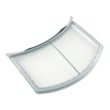
- Clean the lint screen every load; replace it if the mesh is damaged or warped (see kenmore dryer lint screen 134793600).
- Make sure the exhaust vent is not crushed, kinked, or clogged.
- Confirm strong airflow at the outside vent hood.
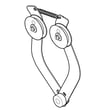
- If the drum turns but you hear squealing or thumping, inspect drum support components (see dryer drum support roller 5304523152).
- If the dryer runs but heat is inconsistent on a gas model, ignition components can be involved (see booster coil 5303931775).
Quick comparison: symptoms and likely causes
| What you notice | Most likely cause | What to do first |
|---|---|---|
| Auto cycles end too soon, clothes still damp | Dirty moisture sensor bars | Clean sensor bars with alcohol |
| Auto cycles run too long | Restricted venting | Check/clean venting and lint screen |
| Timed dry works, auto dry is unreliable | Sensor contamination or wiring issue | Clean sensor; then check airflow |
| Dryer tumbles but makes rumbling noise | Worn roller/belt | Inspect roller/belt components |
Why it matters
A clean moisture sensor helps the EWMGD70JSS2 detect dampness accurately, so it can stop at the right time. That prevents overdrying (extra wear and energy use) and underdrying (damp loads and repeat cycles).
Last updated: February 2026
What is error 32 on Electrolux dryer?
Error 32 on an Electrolux dryer (including model EWMGD70JSS2) points to an airflow or pressure-sensing problem, most often caused by a restricted venting system or a sensor/wiring issue. We start by restoring proper airflow, then check the sensor circuit and control if the code returns.
What to check first (fast fixes)
- Clean the lint screen completely; wash it with warm water if you use dryer sheets.
- Inspect the exhaust duct for kinks, crushing, or long runs.
- Clear lint buildup in the blower housing and internal ducting.
- Confirm the outside vent hood opens fully and is not blocked.
- Run a timed dry cycle with the vent disconnected briefly (only to test airflow).
If the code comes back: likely causes
| Likely cause | What you may notice | Typical fix |
|---|---|---|
| Clogged vent or restricted airflow | Long dry times, hot cabinet, burning smell | Clean/shorten venting, clear lint |
| Pressure sensor or wiring issue | Code appears even with good airflow | Inspect harness, reseat connectors |
| Control not reading sensor correctly | Intermittent code, odd cycle behavior | Diagnose control inputs, replace if failed |
Parts that can be involved
These parts are not the “cause” by themselves, but they are commonly inspected during airflow and heat diagnostics on EWMGD70JSS2:
- Dryer thermistor 134711300 (temperature feedback that affects heat control)
- Frigidaire dryer blower wheel and housing assembly 134690800 (moves air through the drum and vent)
Why it matters
A true airflow restriction can overheat the dryer, increase dry times, and trigger repeated fault codes. Fixing venting and lint buildup first prevents unnecessary part replacement and helps the dryer heat and dry normally.
For code lookups and code-specific checks, use our Electrolux iq-touch dryer error codes reference.
Last updated: February 2026
How do I reset the error code E63 on my Electrolux dryer?
On the Electrolux EWMGD70JSS2 dryer, error code E63 points to a heater circuit problem (commonly an open heater circuit). We reset the code by entering the control reset key sequence, but the code will return until the underlying heating issue is corrected.
How to clear (reset) E63
- Make sure the dryer is powered on.
- Press and hold the far-left key under the display and the Cancel button at the same time for 3 seconds.
- Release the buttons; the display should clear so you can try another cycle.
What usually causes E63 on this model
E63 is most often triggered when the dryer cannot complete the heating circuit. Common causes include:
- A failed heater circuit component (model dependent)
- Loose, burned, or broken wiring at the heater circuit connections
- A failed temperature sensor input (for example, a bad thermistor)
- Restricted airflow causing overheating and protective shutdown
- A control problem if all heater circuit components test good
If you suspect a temperature-sensing issue, the kenmore dryer thermistor 134711300 is one of the temperature-related parts listed for EWMGD70JSS2.
Quick checks before replacing parts
- Unplug the dryer and let it cool.
- Clean the lint screen and confirm strong airflow at the outside vent.
- Inspect visible wiring for discoloration, loose terminals, or damaged insulation.
- If the dryer is gas and not heating, ignition components can be involved; use our gas dryer wont heat troubleshooting video to narrow it down.
Symptom-to-check guide
| What you notice | What to check first | What it can point to |
|---|---|---|
| Runs but no heat | Airflow and venting | Overheat protection, poor drying |
| Stops mid-cycle with code | Lint buildup, restricted vent | Temperature spike, safety shutdown |
| Code returns immediately after reset | Heater circuit wiring, sensor inputs | Open circuit or failed component |
Why it matters
Resetting E63 gets you back to the start screen, but fixing the heater circuit problem prevents repeat shutdowns, long dry times, and overheating that can damage components.
Last updated: February 2026
Why is my Electrolux dryer not working?
If your Electrolux dryer model EWMGD70JSS2 is not working at all (no power, no start, or it stops mid-cycle), the most common causes are a tripped breaker, a door switch or control issue, or the motor overheating from airflow restrictions or overloading.
Quick checks first (fastest fixes)
- Confirm the dryer is plugged in and the outlet has power.
- Reset the house breaker; many dryers need a full 240V supply to run correctly.
- Make sure the door fully closes and latches; a misaligned hinge can prevent starting.
- Clean the lint screen and check the vent for blockage (restricted airflow can overheat the motor).
- Try a different cycle and reselect options; a stuck control can look like a “dead” dryer.
If it runs but stops, overheats, or won’t restart
Motor overheating is common when airflow is restricted or the drum is hard to turn.
- Check for a clogged lint screen or crushed vent hose.
- Reduce load size; heavy loads strain the drive system.
- Listen for squealing, thumping, or grinding (signs of belt or roller wear).
Parts that commonly cause “not working” symptoms
| Symptom you notice | Likely area to inspect | Example part for EWMGD70JSS2 |
|---|---|---|
| Drum will not turn, motor hums | Drive system | White-westinghouse dryer drum belt 134719300 |
| Loud rumble or thump, drum hard to spin | Drum support | Dryer drum support roller 5304523152 |
| Runs but airflow is weak, drying is poor | Blower/air path | Frigidaire dryer blower wheel and housing assembly 134690800 |
| Stops and shows error behavior | Control sensing | Kenmore dryer thermistor 134711300 |
Why it matters
When the EWMGD70JSS2 can’t move air or the drum can’t rotate freely, the motor and controls can shut the dryer down to prevent overheating. Fixing airflow and worn drive parts restores normal operation and helps prevent repeat shutdowns.
Helpful DIY guidance
Use these step-by-step resources to narrow the cause:
- Electrolux iq-touch dryer error codes
- Gas dryer wont start troubleshooting video
- Dryer takes a long time to dry
Last updated: February 2026