Owner’s manual
 Error Codes



Do all Samsung refrigerators take the same filter?
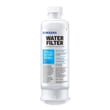
No. Samsung refrigerators do not all use the same water filter; the correct filter depends on the exact model and the filter head design. For Samsung model RF34H9960S4, match the filter by the part number listed for your model and confirm the replacement steps in the owner's manual.
What filter does RF34H9960S4 use?
For this model, the compatible replacement listed is the refrigerator water filter DA29-00019A. Using the wrong filter can cause leaks, poor water flow, or a dispenser that will not dispense.
Quick compatibility check
- Confirm your refrigerator model is RF34H9960S4 (from the rating label inside the fresh food section).
- Match the filter part number on the old filter to the replacement.
- Make sure the new filter seats fully and locks into place.
- Flush water after installation to clear air and carbon fines.
- Reset the filter indicator if your control panel has one.
How often should you replace the filter?
Most Samsung refrigerator water filters are replaced about every 6 months, or sooner if water flow slows or taste and odor change.
| Replace the filter when you notice | What it usually means | What to do |
|---|---|---|
| Slow dispenser flow | Filter media is restricted | Replace the filter and flush |
| Cloudy water right after change | Normal carbon fines | Flush several gallons |
| Bad taste or odor returns | Filter is exhausted | Replace the filter |
| Filter light is on | Time or usage threshold reached | Replace and reset |
Why it matters
A correctly matched filter protects the water inlet valve and dispenser system from sediment, keeps ice and water tasting clean, and helps maintain normal dispenser flow.
Last updated: February 2026
What is the most common problem with Samsung refrigerators?
The most common issues we see with Samsung refrigerators like model RF34H9960S4 are cooling problems and ice maker troubles. These usually trace back to airflow (evaporator fan), defrost/drain icing, temperature sensing, or water supply components; all of which can cause warm compartments, frost buildup, or no ice.
Most common symptoms (and what they usually point to)
- Fresh food section warm: evaporator fan not moving air, heavy frost on evaporator cover, or a bad temperature sensor
- Freezer cold but fridge warm: airflow restriction from frost or a weak/failed evaporator fan motor
- Ice maker stops making ice: ice room airflow issue, frozen fill path, or water supply problem
- Water dispenser slow or not dispensing: clogged filter or a failing inlet valve
- Intermittent cooling or clicking: compressor start protection or inverter/control issue
Quick checks we recommend first
- Confirm doors seal and close fully; poor sealing causes moisture, frost, and temperature swings.
- Set temps to typical targets: 0°F freezer and 37°F fridge.
- Look for heavy frost behind the rear interior panel; that points to a defrost/airflow problem.
- If water or ice is weak, replace the filter and purge air from the lines.
- Check for error codes and follow the diagnostic steps in the owner's manual.
Parts that commonly solve these problems on RF34H9960S4
| Symptom | Common part to check/replace | What it does |
|---|---|---|
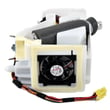
| Warm temps, poor airflow | Refrigerator evaporator fan motor DA31-00287B | Circulates cold air through compartments |
| Temps inaccurate, cycling issues | Refrigerator temperature sensor DA32-10104N | Feeds temperature data to the control system |
| No water, no ice, slow fill | Refrigerator water inlet valve DA62-04027A | Opens to supply water to dispenser and ice maker |
| Bad taste/slow flow | Refrigerator water filter DA29-00019A | Filters water and can restore flow when clogged |
Why it matters
Cooling and ice maker complaints often share the same root cause: restricted airflow or incorrect temperature feedback. Fixing the underlying fan, sensor, or water supply issue prevents food spoilage, repeat icing, and strain on the sealed system.
For ice-specific troubleshooting steps, use why your Samsung fridge stopped making ice and how to fix it.
Last updated: February 2026
Why is the bottom part of my fridge not working?
If the bottom (fresh food) section of your Samsung RF34H9960S4 isn’t cooling, the most common causes are restricted airflow, a frost-clogged evaporator area, or a failed cooling fan or temperature sensor. Start with basic airflow and temperature checks, then move to fan and defrost-related troubleshooting using the owner's manual.
Quick checks we recommend first
- Confirm the fresh food temperature is set correctly and not in a demo or cooling-off mode.
- Make sure vents inside the refrigerator are not blocked by food containers.
- Check that the doors close fully and the gaskets seal all the way around.
- Clean dust and pet hair from the front grille and the condenser area (airflow underneath matters).
- Listen for the evaporator fan running when the doors are closed (you may hear a steady fan sound).
What usually fails when the bottom section warms up
When the freezer is cold but the refrigerator section is warm, the problem is often in the airflow path from the evaporator to the fresh food compartment.
| Symptom | Most likely area | What to do next |
|---|---|---|
| Freezer OK, fridge warm | Evaporator fan or iced evaporator cover | Check for fan noise; inspect for frost buildup |
| Fridge temps swing up/down | Temperature sensor | Test/replace sensor |
| No airflow from vents | Fan not running or vents iced | Defrost and verify fan operation |
Parts that commonly solve this on RF34H9960S4
If troubleshooting points to a failed component, these are common matches for cooling and airflow issues:
- Refrigerator evaporator fan motor DA31-00287B (moves cold air through the compartments)
- Refrigerator temperature sensor DA32-10104N (reports compartment temperature to the control)
- Refrigerator temperature sensor DA32-00011D (another sensor used in some cooling circuits)
Why it matters
The refrigerator section depends on steady airflow and accurate temperature feedback. If the evaporator fan slows down, stops, or the evaporator area frosts over, cold air cannot reach the bottom compartment, so food temperatures rise quickly.
If you see heavy frost behind the rear panel
A solid frost blanket behind the evaporator cover points to a defrost or airflow problem. A full manual defrost (unplug and leave doors open) can restore cooling temporarily, but the underlying cause still needs to be corrected.
Last updated: February 2026