Installation guide
 Owner’s manual
 Error Codes

What is the life expectancy of a Frigidaire oven?
A Frigidaire electric wall oven like model FEB24S5ASB typically lasts 13 years. With regular cleaning, correct use of self-clean, and timely replacement of wear items (like the oven light bulb or temperature sensor), many units reach 15 years of service.
Typical lifespan and what affects it
Most wall ovens fall into a predictable range; how often you bake, broil, and run self-clean makes the biggest difference.
- Typical life expectancy: 13 years
- Common real-world range: 10 to 15 years
- Often extends life: keeping spills wiped up, not overheating the cavity, fixing small issues early
- Often shortens life: frequent high-heat self-clean cycles, heavy spillovers left in place, poor ventilation around the oven
Parts that commonly drive “repair vs. replace” decisions
When an older oven stops heating evenly, won’t maintain temperature, or has intermittent operation, these parts are frequent culprits.
- Range oven temperature sensor 316217002 (temperature regulation and accuracy)
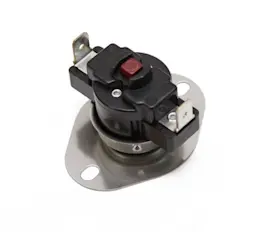
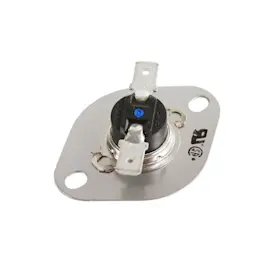
- Wall oven safety thermostat 5303302280 (overheat protection and shutdown symptoms)
- Terminal block 5304409888 (power connection issues, heat damage at wiring)
- Oven broiler element 5303016247 (broil performance problems)
Quick symptom-to-part guide
| Symptom | What it often points to | Example part on this model page |
|---|---|---|
| Oven temperature swings or bakes unevenly | Sensor out of spec | 316217002 |
| Oven shuts off when hot, then works again later | Safety thermostat opening | 5303302280 |
| No power or intermittent power | Loose/burned power connection | 5304409888 |
| Weak or no broil heat | Failed broil element | 5303016247 |
Why maintenance matters (especially with self-clean)
During self-clean, the oven runs far hotter than normal cooking; it is normal to notice odor, smoke, and metal expansion sounds. Keeping heavy spillovers wiped up before cleaning reduces excess smoke and stress on components. For cleaning and operating guidance specific to FEB24S5ASB, follow the owner's manual.
Last updated: February 2026
How do I reset my Frigidaire oven control board?
To reset the control on your Frigidaire FEB24S5ASB electric wall oven, turn off power at the breaker (or unplug if accessible) for about 5 to 10 minutes, then restore power and set the clock. If the control is beeping and showing an F-code, press CANCEL to stop the beeping and clear the display, then reprogram the oven using the steps in the owner's manual.
Reset steps (safe, basic reboot)
- Make sure the oven is not running a bake, broil, or self-clean cycle.
- Turn OFF the oven’s power at the household circuit breaker.
- Wait 5 to 10 minutes.
- Turn the breaker ON.
- If the display flashes, set the clock before trying to bake or broil.
- Test a simple function (for example, set Bake and confirm the oven begins heating).
If you see an F1 through F10 code
Your manual’s “Avoid Service Checklist” notes that when the electronic control detects a fault, it can beep and display F1 through F10. Use this sequence:
- Press CANCEL to clear the display and stop the beeping.
- Reprogram the oven (set clock, then set your cooking mode).
- If the same code returns, the issue is usually in the control circuit, wiring connections, or a related sensor.
Common next checks (after a reset)
- Confirm the oven has steady power (no tripped breaker, no loose supply connection).
- If heating is inaccurate or erratic, check the oven temperature sensor; the Frigidaire range oven temperature sensor 316217002 is a common part tied to temperature feedback.
- If the control panel is unresponsive or keys do not register, inspect the overlay; the range oven control overlay 316220805 is the touch surface on many controls.
What “reset” can and cannot fix
| Situation | Reset helps most when | Likely next step if it returns |
|---|---|---|
| Random beeping or a one-time F-code | Power glitch or temporary control fault | Diagnose the specific fault and related parts |
| Display flashing after outage | Clock not set yet | Set clock, then program cooking mode |
| Repeating F-code | Persistent fault detected | Check sensor, wiring, or control components |
Why it matters
A power reset clears temporary control faults and forces the electronic oven control to restart. Setting the clock after power is restored is important because the oven often will not accept programming until the clock is set.
Last updated: February 2026
How do I know which Frigidaire oven model I have?
Your Frigidaire wall oven’s model number is printed on the serial plate; on model FEB24S5ASB, it’s typically visible when the oven door is open along the side of the oven door area or on the front frame/side trim. Use that exact model number when looking up parts and instructions in the FEB24S5ASB owner's manual.
Where to find the model and serial plate
Check these common locations with the oven door open and the oven cool:
- Along the side of the oven door opening (serial plate area)
- On the front frame of the oven (around the door opening)
- On the side trim, visible when the door is open
- If your unit is installed in a cabinet, use a flashlight and look along the vertical frame edges
What to write down (and why)
Record the information exactly as shown so you get the right Frigidaire wall oven parts and documentation.
- Model number (example: FEB24S5ASB)
- Serial number
- Lot number or letter (often printed near the serial information)
- Date purchased (helpful for your records)
Why it matters
Many parts look similar across Frigidaire ovens, but wiring, trim, and controls can differ by model and production run. Using the exact model and serial information helps match the correct oven temperature sensor, control overlay, or light components.
Quick ID checklist
| If you see this | It usually means | What to do next |
|---|---|---|
| A label with letters and numbers | Model and serial plate | Copy it exactly (no guessing) |
| Multiple lines of codes | Model, serial, and lot info | Record all lines before ordering |
| Worn or hard-to-read print | Age, heat, or cleaning wear | Take a clear photo and zoom in |
After you find the model number
Once you confirm FEB24S5ASB, use the parts list for that model to choose the correct replacement.
Common examples for this oven include:
- Range oven light bulb 316538904 (if the oven light is out)
- Range oven temperature sensor 316217002 (if baking temperatures seem inaccurate)
- Range oven light socket 316116400 (if the bulb is good but still won’t light)
Last updated: February 2026
What does fo45 mean on an oven?
On a Frigidaire FEB24S5ASB electric wall oven, an “F0 45” (sometimes shown as “45”) code points to an electronic control fault that can stop the oven from operating; clearing the code and checking for a repeat helps confirm whether service or a control-related repair is needed. See the FEB24S5ASB owner's manual for your model’s control and troubleshooting guidance.
What to do first (safe, quick checks)
- Press CANCEL/OFF to stop beeping and clear the display.
- If the oven was set for self-clean and the door was left open, close the door and cancel the cycle.
- Turn power OFF at the breaker for 1 minute, then restore power (a hard reset).
- Try BAKE at 350°F and BROIL briefly to see if the code returns.
- If the code reappears, write down the exact display (for example, F0 45 vs F1).
Common causes and the parts most often involved
An F-series control fault is usually tied to the oven’s control system or a related input. These are common suspects:
| What can trigger the code | What you may notice | What to check next |
|---|---|---|
| Keypad or control overlay issue | Random beeping, unresponsive keys | Inspect the control area for stuck keys; consider the range oven control overlay 316220805 if your overlay is damaged or peeling |
| Temperature sensing problem | Overheating, underheating, long preheat | Check the sensor connection; consider the Frigidaire range oven temperature sensor 316217002 if temps are erratic |
| Wiring/connection problem | Code appears after moving/servicing | Verify tight, undamaged connections at the control and sensor (power off) |
Why it matters
When the control detects a fault condition, it can disable heating for safety and to prevent runaway temperature. Clearing the code and testing BAKE/BROIL helps you separate a one-time glitch from a repeatable failure.
When to stop and schedule service
- The code returns immediately after a reset.
- The oven will not heat in BAKE or BROIL.
- You smell burning insulation or see heat damage around wiring (leave power off).
Last updated: February 2026