 Owner’s manual



Does a Samsung washer have a filter that needs to be cleaned?
Yes. Your Samsung WA45H7000AW washer has filters that should be cleaned periodically, most commonly the small mesh screens in the water inlet connections. Cleaning these helps prevent slow filling, no-fill errors, and poor wash performance; follow the steps in the WA45H7000AW owner's manual.
On this model, the routine maintenance filter is the water inlet mesh filter (a small screen inside the inlet valve where the fill hoses connect). Some Samsung washers also have a drain pump filter, but the maintenance item clearly called out for this model is the inlet mesh filter.
Before you start, turn off power and water.
- Unplug the washer.
- Close both hot and cold water faucets.
- Disconnect the fill hoses from the back of the washer.
- Pull the mesh filter(s) out of the inlet valve using pliers.
- Soak and rinse the screens in water; remove sediment and scale.
- Dry completely, reinstall the screens, reconnect hoses, and open faucets.
Most households should clean the inlet mesh filter once or twice a year. Clean it sooner if you notice any of the symptoms below.
| Symptom | Likely cause | What cleaning helps |
|---|---|---|
| Washer fills slowly | Screen clogged with debris | Restores normal water flow |
| No fill or intermittent fill | Heavy blockage or low flow | Prevents cycle interruptions |
| Poor rinse results | Not enough incoming water | Improves rinse performance |
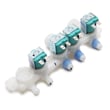
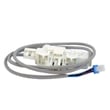
If cleaning the screens does not restore normal filling, the inlet valve can be sticking or electrically failing. In that case, replacing the valve is a common next step using the correct model-matched part such as the Samsung washer water inlet valve DC97-15459H.
A restricted inlet screen makes the washer work harder to reach the correct water level. That can lengthen cycles, reduce cleaning performance, and trigger information codes related to filling.
Last updated: February 2026
How do I tell if my washer has a filter?
Your Samsung WA45H7000AW washer does have a filter system; the easiest one to confirm is the water inlet mesh filter (a small screen inside the inlet valve where the fill hoses connect). If it clogs, filling problems can occur and the washer may show a 4E code; see the WA45H7000AW owner’s manual.
- Look at the back of the washer where the hot and cold fill hoses connect; the inlet ports contain mesh screens.
- If you’ve had slow fill, no fill, or a 4E information code, the inlet screens are a prime suspect.
- If you disconnect a fill hose, you can usually see the screen just inside the valve opening.
- Some washers also have a drain-side debris trap; on this model, the manual guidance we use most often is for the inlet mesh filter.
Follow the steps in the manual; the basic process is:
- Turn the washer off and unplug it.
- Shut off both water faucets.
- Disconnect the inlet hoses (have a towel ready).
- Pull the mesh filter out carefully (pliers are commonly used) and rinse it clean.
- Reinstall the screen, reconnect hoses, and turn water back on.
| Symptom | What it points to | What to do first |
|---|---|---|
| Washer fills slowly | Restricted water flow at inlet | Clean inlet mesh screens |
| 4E code | Water supply or inlet restriction | Check faucets, hoses, then screens |
| Detergent left in dispenser | Low water pressure or low flow | Verify pressure; clean screens |
If screens are clean and water flow is still poor, the inlet valve itself can be failing. For this model, the related replacement part is the Samsung washer water inlet valve DC97-15459H.
Keeping the inlet mesh filter clean helps maintain proper fill speed, prevents nuisance error codes, and protects components like the water inlet valve from strain and sediment buildup.
Last updated: February 2026
Is the Samsung 4.5 front load washer any good?
The Samsung WA45H7000AW is a 4.5 cu. ft. top load washer (not a front load). It is a solid choice when you want large capacity in a standard 27-inch-wide footprint, and it is designed for typical home water pressure and electrical service; use the WA45H7000AW user manual to match cycles, features, and specs to your laundry needs.
This model is a top load design with a lid. If you are shopping based on “front load” benefits (stacking, door boot cleaning, pedestal options), those comparisons will not apply to WA45H7000AW.
| Item | WA45H7000AW (this model) | Typical front load washer |
|---|---|---|
| Load style | Top load | Front load |
| Width | 27.0 in | Often 27.0 in |
| Height | 43.9 in | Often ~38 to 39 in |
| Common strengths | Large tub, easy loading | High spin extraction, stackable |
From the model documentation, WA45H7000AW is built around standard installation requirements and a moderate max spin speed.
- Water pressure range: 20 to 116 psi
- Electrical: 120 V household supply
- Max spin speed (WA45H7000A* family): 800 rpm
- Dimensions: 27.0 in W, 43.9 in H, 29.3 in D (58.1 in with lid open)
For most owners, satisfaction depends more on setup and usage than the brand badge.
- Leveling and flooring: An unlevel washer is louder and can shake more during spin.
- Load size and balance: Bulky items and mixed loads can trigger out-of-balance behavior.
- Detergent choice: Use HE detergent and avoid over-dosing to reduce residue and odors.
- Drain performance: Slow draining can leave clothes wetter; a restricted drain path is a common cause.
- Maintenance habits: Periodic cleaning helps prevent odor and buildup.
If you see wet clothes, long drain times, or standing water, start with the drain system.
- Check the drain hose for kinks or a clogged standpipe
- Verify the drain hose height and routing per the manual
- Listen for the drain pump running during drain
- If the pump hums but won’t move water, the pump may be failing
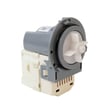
If you’re troubleshooting a drain issue, the washer drain pump DC31-00054D is one of the model-listed pump options.
Choosing the right washer type prevents mismatched expectations. WA45H7000AW is best evaluated as a large-capacity Samsung top load washer with standard install requirements, not as a 4.5 front load platform.
Last updated: February 2026
What is the capacity of the WA45H7000AW?
The Samsung WA45H7000AW is a top-load washer with an approximate capacity of 4.5 cu. ft. (often listed as 4.5 cubic feet for this model family). For the most accurate model-specific specs and feature details, we recommend confirming in the WA45H7000AW owner’s manual.
Capacity can vary slightly by revision and how manufacturers report “usable” tub volume. Use these checks:
- Look for the capacity listing in the specifications section of the WA45H7000AW owner’s manual
- Check the model tag on the washer (confirm it reads WA45H7000AW)
- Compare your tub size and cycle options to the manual’s model list (WA45H7000A* family)
- If you are shopping for replacement parts, match by model number first, then by symptom
Here is a practical way to think about capacity for a 4.5 cu. ft. top-load washer:
| Load type | Typical fit | Notes |
|---|---|---|
| Everyday mixed load | Full basket without packing | Leave space for turnover |
| Bedding | 1 comforter (varies by fill) | Use Bedding cycle when available |
| Towels/jeans | Medium to large load | Avoid overloading to reduce vibration |
Knowing the washer capacity helps us choose the right cycle, detergent amount, and load size. It also reduces out-of-balance spinning, improves cleaning performance, and can help prevent wear on suspension components like dampers.
Last updated: February 2026
What is the most common problem with Samsung washing machines?
For the Samsung WA45H7000AW top-load washer, the most common issues we see are out-of-balance vibration during spin and drain or spin problems that leave clothes too wet. Many of these start with load size, leveling, or a restriction in the drain path; your WA45H7000AW owner's manual also supports using Smart Care to read and act on error codes.
- Washer shakes or bangs in spin: load is unbalanced, washer is not level, or suspension components are worn.
- Won’t drain or drains slowly: drain hose restriction, clogged pump area, or a failing drain pump.
- Clothes come out soaking wet: incomplete drain, spin interruption, or repeated out-of-balance detection.
- Won’t fill or fills slowly: water supply valves not fully open, inlet screens clogged, or inlet valve issue.
- Stops mid-cycle with an error code: use Smart Care or the display code to narrow the failure.
- Redistribute the load (avoid one heavy item by itself; mix similar items).
- Confirm the washer is level; adjust feet as needed.
- Check the drain hose for kinks, pinches, or a standpipe that is backing up.
- Run Smart Care (press and hold Pre Soak for 3 seconds after power on or when an error occurs) to identify the error and countermeasure.
- Power reset: unplug for 2 minutes, then retry a Drain/Spin cycle.
If the basic checks do not fix draining or wet-clothes complaints, the drain system is the first place we focus.
| Symptom | Most likely area | Common next step |
|---|---|---|
| Hums but won’t drain | Drain pump | Inspect pump area; replace pump if seized |
| Drains slowly | Drain hose or pump | Clear restriction; verify hose routing |
| Won’t fill or fills slowly | Inlet valve or screens | Clean screens; test valve |
Helpful model-matched parts to consider:
- Washer drain pump DC31-00054D (common for no-drain/slow-drain symptoms)
- Samsung washer water inlet valve DC97-15459H (common for fill issues)
Excess vibration can damage internal mounts over time, and drain restrictions can cause repeated cycle interruptions and poor spin results. Catching the root cause early helps protect the drive system and keeps cycle times consistent.
Last updated: February 2026





