 Installation guide
 Owner’s manual
 Error Codes



What is the most common problem with Frigidaire dishwashers?
The most common Frigidaire dishwasher problems are poor cleaning (food soils left on dishes), draining trouble, and leaks. On the Frigidaire PLD4375RFC0, the owner's manual specifically calls out loading, water temperature (at least 120°F), water pressure (20 to 120 psi), and spray-arm blockage as frequent causes of cleaning complaints.
Most common issues we see (and what usually causes them)
- Food soils left on dishes: spray arms blocked, filter/sump area restricted, low water temperature, low water pressure, or detergent issues.
- Not draining: debris in the sump area, a restriction in the drain path, or a pump-related problem.
- Leaks: door seal wear, door not latching fully, or gasket/O-ring sealing issues.
- Not drying well: heat dry not selected, rinse aid low, or heater-related problems.
- Cycle interruptions or odd indicators: door not fully closed or power interruption.
Quick checks for PLD4375RFC0 before replacing parts
- Confirm incoming hot water is at least 120°F and run hot water at the sink before starting.
- Verify home water pressure is 20 to 120 psi.
- Load so items do not block spray arms and avoid nesting.
- Use fresh detergent and match detergent amount to water hardness.
- If you see water at the front corners, inspect the lower door seal area.
Parts that commonly relate to these symptoms
| Symptom | What to inspect first | Common related part on this model |
|---|---|---|
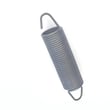
| Leaking at the door | Door seal condition, door alignment, latch closure | Gasket 809006501 |
| Door won’t stay latched or won’t start | Door closes firmly, latch engages | Latch assembly 5304525218 |
| Not drying or water not heating | Heat dry option, heater continuity, wiring | Heater 154825001 |
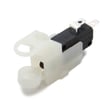
| Overfilling or odd fill behavior | Float moves freely, switch operation | Switch 154773201 |
Why it matters
Most “dishwasher problems” are really performance conditions (water temperature, pressure, loading, and spray coverage). Fixing those first often restores cleaning and drying without replacing the pump motor, control board, or tub components.
Last updated: February 2026
Is there a reset button on my Frigidaire dishwasher?
Frigidaire dishwasher model PLD4375RFC0 does not use a separate “reset” button; we reset it by canceling the current cycle. Press the START/CANCEL pad to stop the cycle and clear certain status messages, then select a cycle and start again (see the owner's manual).
How to reset (cancel) a cycle
- Press START/CANCEL once to cancel the running cycle.
- Wait for the dishwasher to stop its current action.
- If the display shows PF (power failure/interrupted power), touch START/CANCEL to clear it.
- Re-select your desired cycle and options.
- Press START/CANCEL to start, then close the door until it latches.
If it still will not start after a reset
These checks solve most “won’t run” complaints on PLD4375RFC0:
- Confirm the door is fully closed and latched (a loose latch prevents starting).
- Check for Delay Start being set; cancel Delay Start by pressing START/CANCEL.
- Verify the circuit breaker is on (or fuse is good).
- Make sure the water supply valve is turned on.
- If the controls are locked, hold DELAY START or AIR DRY for about 3 seconds to unlock (varies by control panel).
Common “reset” situations and what they mean
| What you see | What it usually means | What to do |
|---|---|---|
| PF | Power was interrupted | Touch START/CANCEL to clear, then restart |
| CL | Door is not closed | Close door firmly until it latches |
| 1H-24H | Delay Start is set | Press START/CANCEL to cancel delay |
| HO | Water heating delay | Let it continue; incoming water may be cool |
Why it matters
Canceling the cycle is the fastest safe way to stop the dishwasher without shutting off power. It also clears common status messages (like PF) so the control can accept a new cycle selection.
Last updated: February 2026
How can I force my Frigidaire dishwasher to drain?
To force your Frigidaire PLD4375RFC0 dishwasher to drain, press START/CANCEL; the dishwasher runs a 90-second drain cycle. When the drain finishes, select the cycle you want and restart it (details are in the PLD4375RFC0 owner's manual).
Quick steps to force a drain
- Press START/CANCEL once.
- Let the dishwasher run the 90-second drain.
- When it stops, choose a new wash cycle.
- Press START/CANCEL (or Start) to begin the new cycle.
- If the display shows CL, close the door fully so the drain can run.
If it still will not drain
A forced drain only works if water can flow out through the drain path. Check these common issues:
- Kinked or sharply bent drain hose under the sink or behind the unit.
- Drain hose not properly attached to the drain pump outlet.
- Drain hose connection not secured with a clamp.
- Drain hose routed too low; the high loop should be at least 32 inches from the floor.
- If connected to a disposer, the knockout plug in the disposer inlet must be removed.
Drain setup checks (what “correct” looks like)
| Item to check | What you want | Why it matters |
|---|---|---|
| Drain hose routing | No kinks, no sharp bends | Prevents restricted drain flow |
| High loop height | Loop at least 32 inches from the floor | Helps prevent backflow and siphoning |
| Sink connection point | Entry above the sink trap | Reduces drain water returning to the tub |
| Disposer connection | Knockout plug removed | Allows water to exit into disposer |
Why it matters
If the dishwasher cannot drain fully, you can get standing water, odors, poor cleaning, and cycle interruptions. A correct drain hose route and connection usually fixes repeat drain problems (see the PLD4375RFC0 installation guide for routing and connection details).
Last updated: February 2026
What causes power failure on a dishwasher?
On a Frigidaire dishwasher model PLD4375RFC0, a “power failure” is usually caused by a tripped breaker or blown fuse, a loose or incorrect wiring connection in the junction box, or the dishwasher not latching closed so it will not run. Start by safely disconnecting power and checking the supply.
Quick checks (most common causes)
- Reset the kitchen circuit breaker (dishwashers typically need a 15 to 20 amp, 120V AC grounded circuit).
- Confirm the outlet or hardwired connection has power.
- Make sure the door closes and latches firmly; a weak or broken latch can stop operation.
- Check for loose wire nuts or damaged wiring at the dishwasher junction box (power must be OFF first).
- Look for a control that appears dead or unresponsive after power is confirmed.
Parts that commonly relate to “no power” symptoms
If power is present at the supply but the dishwasher will not run, these model-related parts are common suspects:
- Door not staying latched: latch assembly 5304525218
- Control not responding: dishwasher electronic control board 5304514670 (or the alternate board dishwasher electronic control board 154543401)
Safety first: what we do before touching wiring
Dishwasher wiring and junction box checks are high risk. We always:
- Turn OFF power at the fuse box or circuit breaker box
- Verify power is actually off before handling wires
- Keep all wiring connections enclosed in the junction box
What “power failure” looks like vs. what it usually means
| Symptom | Most likely cause | What to check first |
|---|---|---|
| No lights, no response | No incoming power | Breaker/fuse, supply voltage |
| Lights on, won’t start | Door not latched or control issue | Latch engagement, control reset |
| Intermittent dead | Loose connection | Junction box wire nuts, harness |
Why it matters
A dishwasher can appear “dead” even when the house has power because the unit is designed to stop if it is not properly grounded, not correctly wired, or not fully latched. Fixing the root cause prevents repeat shutdowns and protects the control.
For model-specific electrical and grounding requirements, follow the installation guide.
Last updated: February 2026





