 Installation guide
 Owner’s manual
 Error Codes






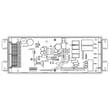

Can I look up Frigidaire parts by model number?
Yes. Looking up parts by model number is the most accurate way to get compatible replacement parts for your Frigidaire electric range model LFEF3054TFK because it filters results to the exact configuration your range was built with.
How to find the model number on your range
Our LFEF3054TFK range typically lists the model and serial information on the serial plate. The Use and Care information for this model points you to the lower oven drawer or storage drawer area.
- Pull out the lower oven drawer or storage drawer
- Look for a data tag or serial plate on the frame or inner panel
- Write the model number exactly as shown (letters and numbers)
- Keep the serial number too; it helps confirm production details
Reference: LFEF3054TFK owner’s manual
How to use the model number to choose the right part
Once you have LFEF3054TFK, match the symptom to the correct part category (surface cooking, oven heating, controls, lighting).
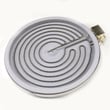
- Surface burner not heating or cycling correctly: check the surface element and its control switch
- Oven temperature seems off: check the oven temperature sensor
- Oven will not bake or heats unevenly: check the bake element
- Broil not working: check the broil element
- Oven light out: check the bulb and socket
Common LFEF3054TFK parts customers replace
| Symptom | Part to check | Example part for this model |
|---|---|---|
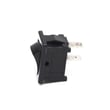
| Surface element won’t regulate heat | Surface element control switch | Range surface element control switch 316436001 |
| Oven temp inaccurate | Oven temperature sensor | Range oven temperature sensor 316490000 |
| No bake heat | Bake element | Range bake element 316413800 |
Why it matters
Model-number lookup prevents ordering a part that fits a similar Frigidaire range but has different wiring, mounting, or control style. That saves time, avoids returns, and gets your range heating safely and correctly.
Last updated: February 2026
What is the life expectancy of a Frigidaire oven?
A Frigidaire electric range like model LFEF3054TFK typically lasts 10 to 15 years. With consistent care and timely repairs (especially heating and temperature-control parts), many ranges reach the upper end of that range before major component replacement becomes likely.
What affects how long your range lasts
- Heat stress and usage: frequent high-heat baking and broiling shortens element life.
- Cleaning habits: spills left to bake on can damage finishes, seals, and sensors.
- Power quality: loose or overheated wiring connections can damage controls.
- Door sealing: a worn gasket makes the oven run longer and hotter than necessary.
- Fast fixes: replacing a failing part early prevents secondary damage.
Common wear items and what they do
If performance drops, these parts are often involved:
| Symptom | Common suspect part | Example for LFEF3054TFK |
|---|---|---|
| Oven not heating or slow preheat | Bake element | Frigidaire range bake element 316413800 |
| Oven temperature swings, over/under bakes | Oven temperature sensor | Frigidaire range oven temperature sensor 316490000 |
| Heat escaping, long cook times | Oven door seal | Frigidaire range oven door seal 316405000 |
Maintenance that extends life
We recommend following the care steps in the LFEF3054TFK owner’s manual and focusing on these basics:
- Wipe up spills after the range cools to prevent baked-on residue.
- Keep the oven door closing evenly; avoid slamming or hanging weight on the handle.
- Check that surface elements and knobs operate smoothly; address sticking controls early.
- Replace weak oven light bulbs so you do not need to open the door to check food.
- Use the troubleshooting steps in the “Before You Call” section before scheduling service.
Why it matters
A range that is heating inefficiently (bad sensor, weak element, leaking door seal) runs longer to reach temperature. That extra runtime increases wear on the control board, wiring, and insulation, which can shorten overall life.
Last updated: February 2026
How do I reset my Frigidaire electric range?
To reset your Frigidaire LFEF3054TFK electric range, we recommend turning the range off and removing power for about 30 seconds, then restoring power. This clears many control glitches; if the oven and all surface elements still do not heat, focus next on the home power supply and wiring.
Quick reset steps
- Turn all surface element knobs to OFF.
- Unplug the range, or switch OFF the range circuit breaker.
- Wait 30 seconds.
- Restore power.
- Set the clock and test Bake and one surface element.
If nothing heats after the reset
When all burners and the oven are dead after a reset, the most common cause is a power supply issue (for example, a tripped breaker, a loose connection, or only one leg of 240V present). Use the wiring and connection checks in the installation guide to confirm the range is connected correctly.
- Check the breaker: many ranges use a 2-pole breaker; one side can trip.
- If the range was recently installed, recheck the terminal block connections.
- Do not loosen factory-installed nuts that secure the range wiring at the terminal block.
- If you see heat damage or arcing at the connection point, stop and have the wiring repaired.
Common symptoms and what they point to
| Symptom | Most likely direction | What to do next |
|---|---|---|
| Display works, but no heat anywhere | Missing 240V supply | Check breaker and cord/terminal block wiring |
| Some burners work, others do not | Failed surface control or element | Test the affected burner circuit |
| Oven heats poorly or temperature is off | Sensor or heating circuit issue | Check the Frigidaire range oven temperature sensor 316490000 |
Why it matters
A reset fixes temporary electronic lockups, but it will not correct a wiring or voltage problem. Confirming proper 240V power and secure terminal block connections prevents repeat no-heat issues and protects the range’s control components.
Last updated: February 2026
Where can I find my electric range model number?
On the Frigidaire LFEF3054TFK electric range, the model and serial plate is typically on the lower right front frame of the appliance; an alternate location is under the cooktop. Use the location diagrams in the LFEF3054TFK installation guide to confirm the exact spot.
Where to look on the range
Check these common label locations on the LFEF3054TFK:
- Lower right front frame (open the oven door and look along the front frame)
- Under the cooktop (lift the cooktop if your configuration allows access)
- Along the front frame near the storage drawer opening (if equipped)
- Back of the range near the rear access area (less common for this model)
Quick steps to find it fast
- Turn the oven light on and use a flashlight to read small print
- Open the oven door and scan the front frame corners first
- If you do not see it, check under the cooktop next
- Write down the full model number and serial number exactly as shown
- Take a clear photo; it helps when ordering parts like a bake element or control board
What the label looks like
| Item on the plate | What it’s used for |
|---|---|
| Model number (example: LFEF3054TFK) | Matching diagrams and parts lists |
| Serial number | Identifying production run details |
| Electrical ratings | Verifying power requirements during installation/service |
Why it matters
We use the model number to match the correct Frigidaire parts and wiring configuration for your exact range. That prevents ordering the wrong surface element, oven temperature sensor, or control component.
Last updated: February 2026
What would cause a Frigidaire oven to stop working?
On the Frigidaire LFEF3054TFK electric range, the most common reasons the oven “stops working” are a power interruption, the clock not being set (the oven will not operate until time of day is set), incorrect control settings, or a control fault showing an F or E error code. Check the basics first using the LFEF3054TFK owner’s manual.
Quick checks we recommend first
- Confirm the range has power (breaker not tripped, cord seated, no outage).
- Set the clock; this model requires time of day to be set before the oven will run.
- Press OFF/CANCEL, then reselect Bake or Broil with a temperature.
- If the display shows an F or E code, clear it with OFF/CANCEL.
- If the code returns, shut off power for 5 minutes, restore power, then set the clock again.
If the display shows an F or E error code
The control is detecting a fault. We use this reset sequence because it often restores normal operation after a glitch.
| What you see | What it usually means | What to do next |
|---|---|---|
| No display, no oven response | Power supply issue | Check breaker, outlet, terminal connections |
| F or E code with beeping | Control detected a fault | OFF/CANCEL, then power reset for 5 minutes |
| Display works but oven will not heat | Heating circuit or sensor issue | Test bake/broil, then inspect common parts |
Parts that commonly cause “no heat” after controls are set correctly
If the control panel works but the oven will not heat, these parts are frequent culprits:
- Bake element (often fails open and the oven will not reach temperature): Frigidaire range bake element 316413800
- Broil element (can affect preheat and overall heating performance): Frigidaire range broil element 316203301
- Oven temperature sensor (can cause incorrect temps or heating shutdown): Frigidaire range oven temperature sensor 316490000
- Oven control board (may stop sending power to elements): Range Oven Control Board 5304508924
Why it matters
When an oven stops working, starting with power, clock, and error-code resets prevents unnecessary part replacement. If the oven still will not heat, focusing on the bake element, broil element, and temperature sensor targets the most common electric range failures.
Last updated: February 2026




