 Installation guide
 Owner’s manual
 Error Codes





How long do Whirlpool wall ovens last?
Whirlpool wall ovens typically last 13 to 15 years with normal use and basic maintenance; many reach 15 to 20 years when kept clean, properly installed, and repaired promptly. For your Whirlpool WOS51EC0AS04 electric built-in oven, follow the care and operating guidance in the owner's manual.
Typical lifespan and what affects it
A wall oven’s life depends less on “age” and more on heat stress, cleaning habits, and how quickly small issues are fixed.
- Usage frequency: daily baking and high-heat roasting shortens life faster than occasional use
- Self-clean cycles: frequent self-cleaning adds extreme heat stress to wiring and controls
- Ventilation and installation: correct clearances and airflow reduce overheating (see the installation guide)
- Power quality: repeated outages or surges can damage the control board
- Door seal and hinges: heat leaks make the oven work harder and can overheat nearby components
Signs your wall oven is nearing end-of-life
If you see these repeatedly, repairs may become more frequent:
- Preheats slowly or struggles to hold temperature
- Uneven baking (hot spots, underbaked centers)
- Display resets, beeps randomly, or shows intermittent control issues
- Door does not close tightly or drops when opened
- Burning smell that persists after cleaning and inspection
Common repairs that can extend life
Many “old oven” symptoms are caused by a few serviceable parts.
| Symptom | Common cause | Example part for WOS51EC0AS04 |
|---|---|---|
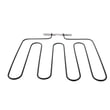
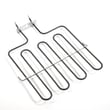
| No heat or weak bake | Failed bake element | Range bake element W11545804 |
| Self-clean will not start or door won’t lock/unlock | Faulty latch mechanism | Door latch W10883049 |
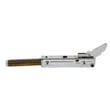
| Door won’t stay aligned | Worn hinge | Wall oven door hinge W10825778 |
Why it matters
A wall oven that seals well and heats correctly uses less energy, bakes more evenly, and puts less strain on high-cost components like the control board. Ordering the right replacement parts for WOS51EC0AS04 helps you avoid repeat repairs; you can also search by model number on Sears PartsDirect.
Last updated: February 2026
How to reset a Whirlpool wall oven?
To reset your Whirlpool WOS51EC0AS04 wall oven, we recommend doing a full power reset: turn the breaker OFF (or unplug if accessible) for 1 to 5 minutes, then restore power and set the clock. This clears many control glitches without replacing parts.
Quick reset steps (safe, no tools)
- Turn the oven OFF at the control panel.
- Switch the dedicated oven circuit breaker OFF (preferred for built-in ovens).
- Wait 1 to 5 minutes (we use 5 minutes if the display was frozen).
- Turn the breaker back ON.
- Set the clock and try Bake.
- If the oven was in a self-clean lock state, allow a few minutes for the latch to cycle.
If the display comes back but the oven still will not heat
A reset fixes software-type faults; it will not fix an open heating circuit or a failed latch.
- If Bake does not heat but Broil does, the bake element is a top suspect.
- If the door stays locked or shows lock-related behavior, the latch mechanism can be involved.
- If the control is dead or erratic after a reset, wiring connections or the control board can be involved.
| Symptom after reset | Most likely area to check | Example part for this model |
|---|---|---|
| No heat in Bake | Heating circuit | Range bake element W11545804 |
| Door will not unlock after self-clean | Door lock system | Door latch W10883049 |
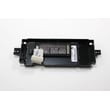
| Random beeping, blank segments, unresponsive keys | Electronic control | Control W10839510 |
Why it matters
Resetting by removing power is the fastest way to clear a stuck keypad, frozen display, or minor control error on an electric built-in oven. If symptoms return quickly, the pattern helps us pinpoint whether the issue is heat-related (element), lock-related (latch), or control-related (board).
Specs and model-specific notes
For exact reset and error-recovery steps specific to Whirlpool WOS51EC0AS04, we follow the procedures in the owner's manual.
You can order replacement parts for Whirlpool WOS51EC0AS04 from the parts list for this model, or search by model number on Sears PartsDirect.
Last updated: February 2026
Does Whirlpool make wall ovens?
Yes. Whirlpool makes wall ovens, including electric built-in wall ovens like model WOS51EC0AS04. Whirlpool wall ovens are designed to be installed in a cabinet cutout and are available in multiple finishes and configurations depending on the series and size.
How to confirm what you have (and what fits)
Use these quick checks before shopping for parts or planning a replacement:
- Match the full model number on the oven’s ID tag to WOS51EC0AS04
- Compare your oven’s cutout and electrical requirements to the installation guide
- Use the owner's manual to confirm features such as self-clean, control type, and rack positions
- If you are replacing a component, verify the part is listed for your exact model
Common Whirlpool wall oven parts you may need
For Whirlpool wall ovens like WOS51EC0AS04, these are common replacement categories (examples shown are parts available for this model):
- Heating: range bake element W11545804
- Door hardware: door latch W10883049, wall oven door hinge W10825778
- Door glass: oven door glass W10577911, wall oven door middle glass WPW10347596
- Controls and wiring: control board, wire harness, conduit
Quick comparison: wall oven vs. range
| Feature | Wall oven | Range |
|---|---|---|
| Installation | Built into cabinetry | Freestanding or slide-in |
| Cooktop included | No | Yes |
| Typical service parts | Door latch, hinges, elements, control board | Elements, burners, control board |
Why it matters
Knowing Whirlpool makes wall ovens is helpful, but matching the exact model number (WOS51EC0AS04) is what ensures the right fit, safe installation, and correct electrical compatibility when you order parts or plan a repair.
You can order replacement parts for your Whirlpool WOS51EC0AS04 from the parts list for this model, or search by model number on Sears PartsDirect.
Last updated: February 2026
What does it mean when my Whirlpool oven says E2 and F3?
On a Whirlpool WOS51EC0AS04 electric wall oven, the F3-E2 (often shown as F3 and E2) code points to a temperature sensing problem: the oven control is seeing an out-of-range signal from the oven temperature sensor circuit (sensor, wiring, or the control). Confirm the exact code wording in the WOS51EC0AS04 owner's manual before replacing parts.
What to check first (safe, quick steps)
- Power reset: turn the breaker off for 1 minute, then back on; recheck for the code.
- Cancel the cycle and let the oven cool completely; retry Bake.
- If the code appears immediately at start, suspect the sensor circuit or control input.
- If it appears after preheat, suspect a sensor drifting out of range or a heating issue.
- If the display is glitchy or buttons act odd, the control can be involved.
Likely causes and what they mean
| What’s happening | Most common cause | What you’ll notice |
|---|---|---|
| Control reads temperature signal out of range | Oven temperature sensor circuit issue | Code returns quickly, oven may not heat correctly |
| Intermittent signal | Loose connector or damaged harness | Code comes and goes, especially as oven heats |
| Control misreads a normal signal | Control board problem | Random errors, inconsistent temperature behavior |
Parts that commonly relate to F3-E2 symptoms
If troubleshooting points to a heating or temperature feedback issue, these model-listed parts are often involved:
- Range bake element W11545804 (if the oven struggles to heat or preheat normally)
- Control W10839510 (if the display and temperature regulation are erratic)
Why it matters
When the control cannot trust the temperature signal, it may stop heating or heat unpredictably. Fixing the sensor circuit issue restores accurate temperature control for baking and helps prevent repeated shutdowns.
Before you order
Use the parts list for WOS51EC0AS04 to match the exact replacement by model, or search by model number on Sears PartsDirect.
Last updated: February 2026
What are the symptoms of a bad oven control board Whirlpool?
On a Whirlpool electric wall oven like model WOS51EC0AS04, a failing oven control board commonly shows up as a dead or flickering display, keys that do not respond (or act on their own), temperature problems (no heat, overheating, or poor temperature control), and recurring fault codes. Confirm basic power first, then troubleshoot the control circuit.
Common symptoms you can expect
- Display is blank, dim, flickering, or resets during baking
- Touchpad or buttons are unresponsive, delayed, or register “phantom” presses
- Oven will not start, will not shut off, or cancels mid-cycle
- Bake or broil heat is weak, uneven, or the oven will not maintain set temperature
- Repeated error codes, beeping, or random alarms
- Cooling fan behavior is abnormal (runs constantly or not when the oven is hot)
Quick checks before replacing parts
- Power supply: Make sure the breaker is fully reset (off then on). Many wall ovens use 240V; a partially tripped breaker can cause odd control behavior.
- Hard reset: Turn power off for 1 to 5 minutes, then restore power.
- Look for heat-related damage: With power off, inspect for discoloration, melted connectors, or a burnt odor near the control area.
- Rule out a heating-element failure: If the oven powers up but will not heat, the bake circuit may be the issue; see range bake element W11545804.
- Use the wiring diagram and diagnostics: Follow the troubleshooting steps in the owner's manual for WOS51EC0AS04.
Symptoms vs. likely cause (fast guide)
| What you notice | More likely | Also check |
|---|---|---|
| Blank/flickering display | Control board or power issue | Breaker, loose harness connections |
| Buttons do nothing | Control board or user interface issue | Stuck key area, moisture/grease |
| Oven overheats or will not regulate temp | Control board relay/control issue | Temperature sensor circuit |
| No heat but display works | Heating circuit issue | Bake element, wiring, control output |
Why it matters
A bad control board can cause unsafe heating behavior (overheating or not shutting off) and can also mimic other failures like a bad bake element or wiring problem. Accurate symptom matching helps avoid replacing the wrong part.
You can order model-specific replacement parts from the parts list for WOS51EC0AS04, or search by model number on Sears PartsDirect.
Last updated: February 2026









