Owner’s manual
 Error Codes



How to change from C to F on Samsung oven?
On the Samsung NE594R0ABSR electric range, you can switch the oven temperature display between Celsius and Fahrenheit from the control panel settings. The exact button sequence can vary by control style, so we recommend following the steps in the NE594R0ABSR owner's manual for your specific keypad layout.
Quick steps to try on the control panel
Try these common Samsung range steps (they match many freestanding electric models):
- Press and hold BROIL for about 3 seconds.
- If a setting screen appears (often showing F or C), use the 0 key to toggle Fahrenheit (F) or Celsius (C).
- Press START/SET to save.
- If nothing happens, try holding BROIL and 0 together for 3 seconds, then toggle and save.
What you should see
| What the display shows | Meaning | What to do |
|---|---|---|
F |
Fahrenheit mode | Press START/SET to confirm |
C |
Celsius mode | Press START/SET to confirm |
| Settings menu opens | You are in options | Use 0 (or +/- if present) to change units |
If the oven will not switch units
These checks solve most “won’t change from C to F” issues:
- Make sure the oven is not running (cancel any bake/broil cycle first).
- Try the button hold again; timing matters (a full 3 seconds).
- Power-cycle the range: turn the breaker off for 1 minute, then back on.
- If keys do not respond, inspect for a stuck key or control issue; the range control panel assembly DG94-00611C is a common control-area replacement part for this model.
Why it matters
Using the correct temperature unit prevents undercooking or overcooking and keeps recipes consistent, especially when switching between U.S. recipes (F) and international recipes (C).
Last updated: February 2026
What are the most common issues with NE594R0ABSR?
For the Samsung NE594R0ABSR electric freestanding range, the most common problems we see involve uneven oven temperatures, the oven not heating, surface elements not heating consistently, and door or control issues. Many of these symptoms trace back to a failed heating component, sensor, or control part listed in the NE594R0ABSR owner's manual.
Common symptoms and what usually causes them
- Oven bakes unevenly or runs hot/cold: a weak temperature sensor or calibration issue; in some cases a failing control.
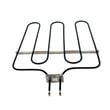
- Oven will not heat (bake): a burned-out bake element such as the range bake element DG47-00038B.
- Convection not working or noisy: a worn convection fan motor such as the range oven convection fan motor DG96-00110A or a loose fan blade nut.
- Cooktop element not heating or only heats on one setting: a failed radiant surface element (single, dual, or warming zone).
- Door won’t close right or self-clean won’t start: door hinge wear, latch problems, or a door switch issue.
- Display/control problems: control panel or oven control board faults.
Quick checks we recommend before replacing parts
- Confirm the settings: verify Bake vs. Broil vs. Convection modes and temperature selection.
- Look for visible damage: blisters, breaks, or burn spots on the bake element.
- Test safely with a meter (power off at the breaker): check continuity on heating elements and switches.
- Inspect wiring connections: loose or overheated terminals can mimic a bad part.
Symptom-to-part cheat sheet
| Symptom | Most likely area | Example part on this model |
|---|---|---|
| Oven not heating in Bake | Bake circuit | DG47-00038B bake element |
| Oven temp inaccurate | Temperature sensing | DG32-00002B oven temperature sensor |
| Convection fan dead/noisy | Fan motor/hardware | DG96-00110A convection fan motor |
| Door-related heating/self-clean issues | Door switch/latch/hinges | DG34-00006A door switch |
Why it matters
Heating and temperature-control problems affect cooking results and can cause longer preheat times and inconsistent baking. Fixing the correct component first saves time and prevents repeat failures.
Last updated: March 2026
What does C-31 mean on a Samsung oven?
On the Samsung NE594R0ABSR electric range, the C-31 code points to a problem with the oven door locking system (the latch or door lock switch feedback). It commonly shows up during or after Self Clean when the control does not sense the door locking or unlocking correctly.
What to do first (quick checks)
- Press Clear/Off to stop the cycle and let the oven cool.
- If the door is locked, wait for the lock to release after cooldown; do not force the door.
- Power reset: turn the range breaker off for 1 to 2 minutes, then restore power.
- Start a short bake cycle and confirm the oven heats normally.
- If the code returns only when using Self Clean, focus on the latch and door switch circuit.
Parts that commonly cause C-31 on this model
C-31 is usually tied to the latch mechanism or the switch that tells the control the door is locked.
| Symptom you notice | Most likely area | What it affects |
|---|---|---|
| C-31 appears during Self Clean | Door latch or lock switch feedback | Control cannot confirm locked state |
| Door stays locked after cycle | Latch mechanism not returning | Control cannot confirm unlocked state |
| Code appears with door movement | Door switch alignment/wiring | Intermittent lock signal |
Model-matched parts we see customers replace for related lock issues include the range oven door switch DG34-00006A and, when temperature feedback is also unstable during Self Clean, the Samsung range oven temperature sensor DG32-00002B.
Why it matters
During Self Clean, the oven must lock the door for safety and temperature control. If the control board cannot verify the lock position, it will stop the cycle and post C-31 to prevent unsafe operation.
When to use the manual
Use the NE594R0ABSR owner's manual for the correct Self Clean steps, cooldown timing, and any model-specific guidance on door lock behavior.
Last updated: February 2026