 Installation guide
 Owner’s manual
 Error Codes









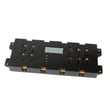

How do I clear the error code on my Frigidaire oven?
On your Frigidaire FEF366EBH electric range, you can usually clear an error code by pressing CLEAR/OFF to stop the beeping and clear the display; then reprogram the oven. If the same F-code returns, it points to a fault that needs troubleshooting rather than a one-time reset (see the FEF366EBH owner's manual).
Quick steps to clear the code
- Press CLEAR/OFF once to clear the display and stop the alarm.
- Wait a few seconds, then set BAKE or BROIL again to see if the code returns.
- If the oven is in Lockout, press and hold CLEAR/OFF for 3 seconds to cancel lockout.
- If the display shows a door lock message or the Door Locked light is flashing, wait for the lock motor to finish locking or unlocking.
- If the code comes back right away, write down the exact code (example: F11) before doing anything else.
What to do if the error code returns
When an F-code keeps coming back on the FEF366EBH, focus on the system the code relates to (control panel, door lock, temperature sensing, or wiring).
Common next checks:
- Stuck or contaminated keypad: gently clean around the control pads and confirm no button is physically stuck.
- Power interruption or loose connection: verify the range has steady power and that the cord and terminal connections are secure.
- Temperature sensing problems: if you suspect inaccurate oven temperature or repeated heating faults, the oven sensor circuit is a common cause; see range oven temperature sensor 316490000.
- Door lock system issues (self-clean/lockout): if the code appears with lock symptoms, inspect the lock mechanism; see range oven door lock motor and switch assembly 5304528973.
| Symptom you notice | Most likely area to check | Typical fix path |
|---|---|---|
| Beeping with an F-code during baking | Electronic control or sensor circuit | Clear code, retry, then test sensor/wiring |
| “Loc” or door lock light flashing | Door lock/lockout system | Cancel lockout, check lock motor/switch |
| Code returns immediately after CLEAR/OFF | Control panel or wiring fault | Inspect keypad, harness connections, service if needed |
Why it matters
Clearing the code stops the alarm, but a repeating error code helps pinpoint the failing system so you can avoid underheating, overheating, or a door that stays locked during normal cooking.
Last updated: January 2026
How to preheat a Frigidaire electric oven?
To preheat your Frigidaire electric range model FEF366EBH, press BAKE, set the temperature with the ▲/▼ pads, and let the oven heat until the preheat indicator light turns OFF and the control beeps (typically 3 beeps). At that point, the oven is ready.
Steps to preheat (standard Bake)
- Press BAKE.
- Within about 5 seconds, press ▲ or ▼ to set your target temperature.
- Wait while the oven heats; the oven cycles during preheat, so the indicator may turn on and off.
- When the preheat indicator light turns OFF, the oven is preheated.
- Put food in and continue baking; press CLEAR/OFF to stop cooking when finished.
What you should see and hear
| What happens | What it means | What to do |
|---|---|---|
| Preheat indicator light is ON | Oven is heating up | Keep waiting |
| Light turns ON and OFF during Bake | Normal cycling to hold temperature | No action needed |
| Light turns OFF and control beeps 3 times | Set temperature reached | Start baking |
If preheat seems slow or uneven
These checks solve most “won’t preheat” or “takes too long” complaints on electric ranges:
- Confirm you are using BAKE (not a timed feature); some timed modes do not use the preheat indicator.
- Avoid opening the door repeatedly during preheat.
- If the oven never reaches temperature, inspect the range bake element 316075103 for visible damage (blisters, cracks, or breaks).
- If temperatures are consistently off, the Frigidaire range oven temperature sensor 316490000 is a common cause.
- Review the exact control steps and indicator behavior in the FEF366EBH owner's manual.
Why it matters
Preheating helps the oven cavity and bake element stabilize at the set temperature, which improves baking results for foods like cookies, biscuits, and breads.
Last updated: January 2026
Why does my new Frigidaire oven take so long to preheat?
On the Frigidaire FEF366EBH electric range, a “long preheat” is often normal because the oven heats in cycles; the OVEN indicator light can turn on and off during Bake and Preheat, and the oven is ready when the preheat indicator light turns off and the control beeps.
What to check first (quick, no-tools)
- Confirm you are using Bake, not Timed Bake; during Timed Bake the preheat indicator light does not function.
- Wait for the preheat indicator light to turn OFF; the control typically beeps 3 times when the set temperature is reached.
- Make sure the door is fully closed and the oven is not packed with cookware that blocks airflow.
- Verify the set temperature is reasonable (most baking is around 350°F); this model adjusts in 5°F increments.
- If you just moved in or installed the range, confirm the power supply is correct for an electric range (a weak supply can slow heating).
Common causes when preheat is truly slow
If preheat times are consistently excessive (for example, it struggles to reach temperature or takes far longer than expected), these are the most common causes:
- Weak or failed bake heating circuit (bake element not heating properly)
- Temperature sensing problem (sensor reading incorrectly)
- Loose or overheated wiring connection at the range power connection
- Control issue that is not sending steady power to the bake circuit
Parts that commonly relate to slow preheat
| Symptom | Likely area | Example part for FEF366EBH |
|---|---|---|
| Oven heats slowly, uneven baking | Bake heating | Range bake element 316075103 |
| Oven temperature seems inaccurate | Temperature sensing | Frigidaire range oven temperature sensor 316490000 |
Why it matters
Slow preheat usually points to reduced heat output or incorrect temperature feedback. Fixing the root cause helps the oven reach set temperature faster, improves baking results, and reduces long run times.
Best next step
Use the operating details in the FEF366EBH owner's manual to confirm normal preheat indicator behavior and the correct bake settings. If preheat remains consistently slow after that, testing the bake element and sensor is the most direct path to a fix.
Last updated: January 2026





