Installation guide
 Owner’s manual
 Error Codes


How do you reset the error code CE on a Frigidaire refrigerator?
On a Frigidaire FRS26RLECSF refrigerator, the correct first reset for a CE error is a safe power reset: disconnect power for about 15 minutes, then restore power. This clears many temporary control glitches without mixing CE with other codes.
Reset steps (safe power reset)
- Unplug the refrigerator by gripping the plug (do not pull on the cord).
- Wait 15 minutes with the unit fully powered off.
- Plug the refrigerator back in firmly.
- Confirm the outlet is not controlled by a wall switch.
- Give the refrigerator time to resume normal operation after the restart.
If CE returns after the reset
A repeating CE code points to an ongoing communication or power issue that a reset will not correct. Check these common causes first:
- Loose plug, intermittent outlet, or a tripped breaker
- Power cord damage or pinched wiring after moving the refrigerator
- Voltage drop from a shared circuit (heavy loads on the same circuit)
- Moisture or corrosion at accessible wiring connections (if present)
What CE vs other codes means
CE is its own code; it is not the same as “SY CE.” Use the code exactly as shown on the display.
| Displayed code | What to do first | Next step if it comes back |
|---|---|---|
| CE | Perform the 15-minute power reset | Follow the diagnostic guidance for CE in the error code list |
| SY CE | Treat as a different code and troubleshoot by that code | Use the specific SY CE steps in the error code list |
Why it matters
Using the exact code prevents chasing the wrong repair. A power reset is fast and safe, but a recurring CE code usually means you need targeted troubleshooting rather than repeated resets.
For electrical safety and proper power handling, follow the guidance in the FRS26RLECSF owner's manual. For code definitions and next-step checks, use Frigidaire refrigerator error codes.
Last updated: February 2026
How to hard reset a Frigidaire refrigerator?
To hard reset your Frigidaire FRS26RLECSF refrigerator, we recommend disconnecting power long enough for the control to fully power down, then restoring power and allowing the unit to restart and stabilize. This clears many temporary control glitches after a power outage or error condition; use the owner's manual for model-specific control steps.
Hard reset steps (FRS26RLECSF)
- Unplug the refrigerator from the wall outlet (or switch the circuit breaker OFF).
- Wait 5 to 10 minutes.
- Restore power (plug back in or switch breaker ON).
- Leave the doors closed and let the refrigerator run.
- Allow 8 to 12 hours for temperatures to pull down after a full power-down.
- If the ice maker is ON, expect slightly longer run time while it recovers.
What to check if it still is not acting right
Many “needs a reset” symptoms are caused by power, airflow, or door sealing issues rather than the control board.
- Confirm the plug is fully seated in the outlet and the breaker is not tripped.
- Reduce door openings; warm air makes the refrigerator run longer.
- Make sure doors close tightly and nothing is blocking them.
- Clean the condenser area; a dirty condenser increases run time.
- Inspect door gaskets for dirt, cracks, or gaps; leaks force longer cooling cycles.
Timing guide after a reset
| What you are waiting for | Typical time |
|---|---|
| Compressor and fans to restart | A few minutes |
| Noticeable cooling improvement | 1 to 4 hours |
| Full temperature recovery | 8 to 12 hours |
| Ice production to begin (after proper cooling) | Within 24 hours |
Why it matters
A true hard reset removes power from the control so it can reboot cleanly. If the refrigerator still runs constantly, warms up, or the ice maker does not recover after the timing above, the root cause is usually airflow, a door seal problem, or a cooling system issue, not the reset itself.
Last updated: February 2026
How to read a Frigidaire refrigerator model number?
On your Frigidaire FRS26RLECSF side-by-side refrigerator, the model number is printed on the serial plate inside the fresh food (refrigerator) compartment. Open the refrigerator door and look on the inside wall; record the full model number exactly as shown for parts and service.
Where to find the model number on FRS26RLECSF
In most installations, you will find the serial plate:
- Inside the refrigerator compartment (fresh food section), not the freezer
- On an interior side wall (left or right)
- On a label that also lists the serial number
- In a spot that is easy to see with the door open
- Referenced in the owner's manual as the place to record model and serial numbers
How to “read” the model number so you can use it correctly
The most important part is copying it accurately. Use these tips:
- Write it exactly as printed: FRS26RLECSF (letters and numbers matter)
- Do not add spaces, dashes, or extra characters
- Use the model number to match the correct diagrams and parts list
- Use the serial number only when a procedure specifically asks for it
Quick checklist
| What you see on the label | What to do with it |
|---|---|
| Model number (FRS26RLECSF) | Use it to look up parts and documentation |
| Serial number | Keep it for your records and service history |
| Purchase date (your note) | Helpful for maintenance tracking |
Why it matters
Using the exact model number prevents ordering the wrong refrigerator water filter, door gasket, or ice maker parts. Even small model-number differences can change fit, wiring, and mounting points.
Last updated: February 2026
What is the most common problem with Frigidaire refrigerators?
The most common problems we see on Frigidaire refrigerators like model FRS26RLECSF are temperature and cooling complaints (refrigerator section too warm, freezer OK), often tied to airflow, dirty condenser coils, or defrost-related ice buildup. Ice maker and water dispenser issues are also frequent; the troubleshooting chart in the FRS26RLECSF owner's manual covers many of these symptoms.
Most common symptoms (and what they usually point to)
- Refrigerator warm, freezer cold: restricted airflow, evaporator fan issue, or frost/ice on the evaporator from a defrost problem
- Runs too long: dirty condenser, doors opened often, door not sealing, or controls set too cold
- Frost buildup or moisture between doors: door slightly open or gasket not sealing well
- Ice maker not making ice: shutoff arm OFF, water supply valve closed, freezer not cold enough, or a clogged filter
- Water collecting in drawers: normal drainage from washed produce (common and usually not a failure)
Quick checks we recommend first (FRS26RLECSF)
- Confirm temperatures: set the freezer and refrigerator controls correctly; allow 24 hours for temps to stabilize after changes.
- Check door sealing: look for gaps, tears, or grime on the gasket; a leak makes the unit run longer and can cause warm temps.
- Clean the condenser: a dirty condenser commonly causes long run times and warm temperatures.
- Look for freezer ice buildup: heavy frost on the back panel often signals a defrost system issue.
- For ice maker issues: verify the wire shutoff arm is down (ON) and the household water valve is open.
Parts that commonly solve these complaints
| Symptom | Common part to check/replace | Why it matters |
|---|---|---|
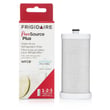
| Water tastes bad, low flow, ice maker slows | Frigidaire puresource plus refrigerator water filter WFCB | A restricted filter can reduce water flow to the dispenser and ice maker |
| No water to dispenser/ice maker (with supply on) | Refrigerator water inlet valve assembly 242252702 | A weak or failed valve can prevent proper fill |
| Warm temps, long run time, moisture/frost near doors | Refrigerator gasket 241786014 | Air leaks drive temperature swings and frost/moisture |
Why it matters
Cooling and ice maker problems often share the same root causes: airflow restrictions, heat not being rejected at the condenser, or water flow restrictions. Fixing the underlying cause protects food temperatures, reduces run time, and helps prevent repeat failures.
Last updated: February 2026