 Installation guide
 Owner’s manual
 Error Codes





What is Sabbath mode on a KitchenAid oven?
On the KitchenAid KEBS207SSS02 electric built-in oven, Sabbath mode keeps the oven running in a Bake setting until you turn it off (or for a timed portion of the Sabbath). While it’s on, tones are disabled and the display will not show temperature changes or messages.
What changes when Sabbath mode is on
Sabbath mode is designed to limit normal control and display behavior.
- Only the number keys and Start key work
- No tones will sound
- The display won’t show messages or temperature changes
- Heat source icons stay lit on the display
- Opening or closing the door does not toggle the oven light
- Heating elements do not turn on or off immediately when the door is opened or closed
How it behaves on double ovens
If your KEBS207SSS02 is configured as a double oven, Sabbath mode can be set per oven for normal use.
| Feature | Single oven | Double oven |
|---|---|---|
| Select upper/lower oven | Not applicable | Yes, you can select UPPER OVEN or LOWER OVEN before setting Bake |
| Sabbath mode cooking | One cavity | Each cavity can be set independently for regular (untimed) use |
| Disabling Sabbath mode feature | One oven | Disables both ovens when you disable the feature |
Key settings to know
These are the operating limits called out for this model’s Sabbath bake setup.
- Bake temperature range: 170°F to 500°F
- Default bake temperature shown in the steps: 350°F
- You can run it untimed (until you turn it off) or timed (for part of the Sabbath)
Why it matters
Sabbath mode prevents beeps, display updates, and immediate responses to door activity, which helps you keep cooking behavior consistent. It also means you should plan ahead because you will not get normal feedback from the control panel.
For the exact activation and deactivation steps for KEBS207SSS02, use the KEBS207SSS02 owner’s manual.
Last updated: January 2026
How do I find the model of my KitchenAid oven?
For your KitchenAid electric built-in oven, the model number is on the appliance ID tag, usually visible when you open the oven door and look around the door frame. Once you have the full model number (for example, KEBS207SSS02), we can match the correct parts and documentation.
Where to look on a wall oven
Check these common ID tag locations first:
- Left or right side of the oven door frame (most common)
- Along the front frame behind the oven door, near the hinge area
- On the lower trim area just inside the opening (sometimes near the bottom)
- If the oven is installed in a cabinet, the tag can be on the frame edge that is easiest to see with the door open
What to write down (so parts match correctly)
Record the information exactly as shown on the tag.
- Full model number (letters and numbers, no spaces)
- Serial number (helps identify production series)
- Any revision or suffix characters after the model number
Quick ID checklist
| Item on tag | Why we need it |
|---|---|
| Model number | Ensures diagrams and parts fit your exact oven |
| Serial number | Helps confirm version changes across production runs |
| Brand | Confirms the correct parts family (KitchenAid) |
Why it matters
KitchenAid wall ovens often have multiple versions that look similar, but use different components (like a bake element, temperature sensor, or door gasket). Using the exact model number prevents ordering a part that will not mount correctly or connect to your wiring harness.
Next step after you find it
Use your model number to reference the KEBS207SSS02 owner’s manual for identification and service info, and the KEBS207SSS02 installation guide if you need cabinet cutout or mounting details.
Last updated: January 2026
How do I reset my KitchenAid Superba oven?
To reset your KitchenAid Superba wall oven (model KEBS207SSS02), we recommend doing a simple power reset: turn the oven off, cut power at the breaker for about 1 minute, then restore power and press OFF/CANCEL to clear the control. Use the KEBS207SSS02 owner’s manual for control-panel key names on your exact version.
Quick reset steps (power reset)
- Touch OFF (or UPPER OVEN OFF/LOWER OVEN OFF on double-oven controls) to stop any cooking cycle.
- Turn OFF the oven’s circuit breaker (or remove power at the disconnect).
- Wait 60 seconds.
- Turn the breaker ON.
- Touch OFF/CANCEL again to clear the display and reselect Bake or Broil.
If the oven seems “stuck” in a special mode
Some Superba models can be placed into Sabbath Mode, which changes how the oven responds to keys and indicators. If your oven is not responding normally, check the Sabbath Mode section in the KEBS207SSS02 owner’s manual and return the oven to normal operation using the OFF key.
Common signs it’s a mode issue
- Keys respond differently than usual
- The oven will not start a normal timed cycle
- Indicators do not behave as expected
When a reset does not fix the problem
A reset clears many control glitches, but it will not correct a failed component. If the oven still will not heat or temperatures are erratic, these parts are common checks for KEBS207SSS02:
| Symptom | Common part to check | What it affects |
|---|---|---|
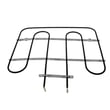
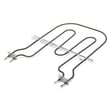
| No bake heat | Bake element WPW10207398 | Primary baking heat source |
| Temps off, overheating, or underheating | Wall oven temperature sensor WPW10131825 | Temperature feedback to the control |
| Dead display after reset | Wall oven thermal fuse WP8304452 | Cuts power if overheating occurs |
Why it matters
Resetting the control safely clears temporary electronic faults and restores normal operation without replacing parts. If symptoms return quickly, testing the heating circuit (element, sensor, thermal fuse) prevents repeat shutdowns and uneven cooking.
Last updated: January 2026
What is the f3 error on a KitchenAid oven?
On the KitchenAid KEBS207SSS02 electric wall oven, an F3 error typically points to a problem in the oven temperature sensing circuit (most often the oven temperature sensor or its wiring), so the control cannot read temperature correctly and may stop heating for safety.
What to check first (safe, quick steps)
- Reset power: turn the breaker off for 1 minute, then back on; re-test Bake.
- Confirm the oven is actually calling for heat: select Bake and press Start.
- Look for obvious wiring damage (only after power is off): loose connector, pinched harness, burned terminals.
- Check for overheating symptoms: strong hot smell, fan not running, repeated shutdowns.
- If the display shows “Err” or the oven won’t operate after basic checks, follow the troubleshooting guidance in the KEBS207SSS02 owner’s manual.
Most common repair for an F3-type error
In most KitchenAid wall ovens, the control relies on a temperature sensor (RTD) to regulate heat. When that sensor is out of range or the circuit is open/shorted, the oven can throw an F3-style code.
Likely fix path:
- Test the oven temperature sensor resistance with a multimeter.
- Inspect and reseat the sensor connector.
- Replace the sensor if readings are out of spec.
A common replacement part for this model is the wall oven temperature sensor WPW10131825.
Why it matters
Accurate temperature feedback is what keeps baking temperatures stable and prevents overheating. When the sensor circuit fails, the oven may underheat, overheat, or shut down mid-cycle.
Quick symptom-to-part guide
| Symptom | Most likely area | Example part for KEBS207SSS02 |
|---|---|---|
| F3 error appears quickly after starting | Sensor circuit open/short | Wall oven temperature sensor |
| Intermittent F3, works sometimes | Loose connector or damaged harness | Wire harness/connector check |
| Oven overheats before error | Sensor drifting out of range | Wall oven temperature sensor |
Last updated: January 2026







