Owner’s manual
 Error Codes


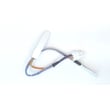
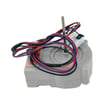
What does "bottom mount" mean?
A “bottom mount” refrigerator (like Kenmore model 79571609011) has the freezer compartment on the bottom and the fresh food section on top, so the items you use most often stay at eye level while frozen foods are stored below.
In a bottom-mount design, the refrigerator section is the upper door area and the freezer is a lower drawer or lower door.
Common features you will see:
- Fresh food shelves and door bins at standing height
- A bottom freezer drawer for frozen foods
- Separate temperature controls for refrigerator and freezer (varies by model)
- An evaporator fan that circulates cold air through both compartments
- Optional automatic ice maker depending on configuration
For model-specific use and care details, follow the 79571609011 owner's manual.
Bottom mount is mainly about convenience and daily access.
| Feature | Bottom mount benefit | Best for |
|---|---|---|
| Fresh food on top | Less bending for everyday items | Families that cook often |
| Freezer on bottom | Frozen items stored lower | People who use freezer less |
| Drawer-style freezer | Easier organization in baskets | Bulk frozen storage |
Knowing it is bottom mount helps narrow down where common issues show up:
- Warm refrigerator but freezer cold often points to airflow problems (fan, ducts, frost buildup)
- Water under the refrigerator can relate to the defrost drain path and drain tube routing
- Noisy operation can include normal sounds from the compressor, refrigerant flow, and evaporator fan
If you are diagnosing cooling or airflow symptoms, our how to fix your evaporator cooling fan guide is a solid starting point.
Last updated: February 2026
What is the advantage of a bottom mount fridge?
A bottom-mount refrigerator like Kenmore model 79571609011 keeps the fresh-food section at eye and waist level, so you reach everyday items with less bending. The freezer stays in the lower drawer, which helps many households organize frozen foods separately and efficiently.
- Less bending for fresh food: produce, drinks, and leftovers are easier to grab.
- Better visibility: you can scan shelves quickly, which helps reduce door-open time.
- Freezer organization: the lower drawer and baskets make it easier to group frozen items.
- Comfort and accessibility: a good fit if you prefer not to crouch for frequently used items.
- Energy habits: faster “grab and go” access can mean fewer long door openings.
| Feature | Bottom-mount (like 79571609011) | Top-freezer |
|---|---|---|
| Fresh-food access | Higher, easier reach | Lower, more bending |
| Freezer access | Lower drawer | Upper door |
| Typical organization | Strong for fresh-food visibility | Strong for quick freezer access |
Most households use the refrigerator compartment more often than the freezer. Keeping fresh food at a more natural reach height can make daily cooking and snacking easier, and it can also help you keep items organized so they are less likely to be forgotten.
- Adjust shelves to fit tall items and reduce clutter (see the 79571609011 owner's manual).
- Group similar foods together so you can find items quickly.
- Keep frequently used items on the middle shelves.
- Avoid overpacking; good airflow helps maintain even temperatures.
Last updated: February 2026
How do I tell what model Kenmore fridge I have?
Your Kenmore refrigerator’s model number is printed on the identification label inside the fresh food (refrigerator) compartment. For Kenmore model 79571609011, the label is located on the right-hand side wall of the refrigerator compartment; confirm the exact characters using the 79571609011 owner's manual.
- Open the refrigerator door and look along the right interior wall of the fresh food section.
- Check near the crisper drawer area (labels are often placed where they stay visible but protected).
- Look for a sticker or plate that lists Model and Serial.
- Write the model number exactly as shown (include all digits and any dots or dashes).
- Take a clear photo of the label before ordering parts.
Kenmore 795-series bottom-mount refrigerators often show the model in a format similar to:
| What you see on the label | What it means |
|---|---|
| 795.7160* | Model family/series; the asterisk typically represents a color or revision code |
| 79571609011 | Full model number used for parts lookup |
| Serial number | Unique ID for your specific refrigerator |
We use the model number to match the correct Kenmore parts and diagrams for your exact refrigerator configuration (controls, ice maker setup, shelves, and door bins can vary within the same series). Using the full model number helps you avoid ordering a part that does not fit.
- Enter the model number exactly as printed (no guessing).
- If the label shows both 795.7160 and a longer number, use the longer full model number for the best match.
- If you are troubleshooting, check the Kenmore 795 model bottom freezer refrigerator error codes for model-family guidance.
Last updated: February 2026
How can I tell how many cubic feet my Kenmore refrigerator is?
For your Kenmore refrigerator model 79571609011, the most reliable way to confirm cubic feet is to check the model’s rating label inside the fresh food compartment; it typically lists the refrigerator’s total volume (capacity) in cubic feet. If the label is hard to read, use the capacity details in the 79571609011 owner's manual.
Check these common locations inside the refrigerator section:
- On a side wall near the top front
- Behind or beside a crisper drawer (you may need to slide the drawer out)
- Near the ceiling light housing or control area
- On the left wall near the door opening
Look for wording such as “Total volume,” “Total capacity,” or “Cu. Ft.”
If the label is missing or unreadable, you can estimate capacity by measuring the usable interior space.
- Empty the compartment you’re measuring (fresh food and freezer are often listed separately)
- Measure interior height x width x depth in inches (do not include door bins)
- Multiply the three numbers to get cubic inches
- Divide by 1,728 to convert cubic inches to cubic feet
| What you have | What to do | Result |
|---|---|---|
| Interior measurements in inches | H x W x D | Cubic inches |
| Cubic inches | Divide by 1,728 | Cubic feet |
Knowing cubic feet helps us match the right parts and maintenance items for your 79571609011, and it also helps when comparing storage capacity, organizing airflow, and setting expectations for cooling recovery after door openings.
Last updated: February 2026
How do I tell how old my Kenmore stove is?
Your Kenmore 79571609011 is a bottom-mount refrigerator (not a stove), and its age is determined from the serial number, not the model number alone. We use the model and serial tag on the cabinet to identify the manufacturer and decode the production date.
Check these common locations first:
- Inside the fresh food compartment on a side wall
- On the ceiling of the fresh food compartment near the light cover
- Behind the base cover or lower front grille area
- On a label near the door hinge area
For this Kenmore 795.7160* platform, the manual notes the model and serial number label and also references a tech sheet location under the front of the refrigerator behind the base cover; use the 79571609011 owner's manual to confirm label locations and access steps.
Use this process to get an accurate manufacture date:
- Write down the full serial number exactly as shown (letters and numbers).
- Use the first 3 digits of the model number to identify the manufacturer prefix.
- Decode the serial number using the matching manufacturer’s date code format.
- If the label is worn, take a clear photo and zoom in to capture every character.
| What you have | What it tells you | What it does not tell you |
|---|---|---|
| Model number (example: 79571609011) | Product family and manufacturer prefix | Exact build month/year |
| Serial number | Production date code | Parts compatibility by itself |
Knowing the manufacture date helps us match the correct refrigerator parts (like a door switch, temperature sensor, or ice maker assembly) and choose the right troubleshooting steps for your Kenmore platform.
Last updated: February 2026
What is the average lifespan of a Kenmore Elite refrigerator?
A Kenmore Elite refrigerator typically lasts 10 to 15 years with normal household use. For a Kenmore bottom-mount like model 79571609011, regular cleaning and airflow maintenance (especially the condenser area) helps you reach the high end of that range; see the 79571609011 owner's manual.
- Condenser coil cleanliness: dust buildup makes the sealed system work harder.
- Door gasket seal and door habits: frequent openings and poor sealing increase run time.
- Room temperature and ventilation: hot rooms and tight clearances raise compressor workload.
- Maintenance and care: cleaning, correct settings, and avoiding overloading shelves.
- Major component health: compressor and fans are the biggest life drivers.
Use this as a simple routine for Kenmore bottom-mount refrigerators:
- Vacuum and clean the condenser area on a regular schedule.
- Keep door gaskets clean and check for gaps or tears.
- Confirm temperatures stay near 37°F (fresh food) and 0°F (freezer).
- Avoid blocking vents inside the refrigerator and freezer.
- After a move or power interruption, allow up to 24 hours for full cooling before judging performance.
| Component | Typical service life | What you notice when it’s failing |
|---|---|---|
| Compressor | 10 to 15 years | Warm temps, long run times, clicking, poor cooling |
| Evaporator fan motor | 7 to 12 years | Warm fridge, noisy fan, weak airflow |
| Door switch | 5 to 10 years | Lights not working correctly, fan behavior changes |
| Ice maker assembly | 5 to 10 years | No ice, small cubes, leaking or jammed harvest |
If you’re troubleshooting cooling performance, the refrigerator compressor TCA38091801 and airflow-related parts are common repair points on this style of refrigerator.
A refrigerator that runs longer than normal uses more energy and puts extra wear on the compressor. The manual notes that high-efficiency compressors can run 40% to 80% of the time under normal conditions, and even more in warm conditions or with frequent door openings; keeping coils clean and doors sealing well reduces that workload.
Last updated: February 2026
What are the common problems with Kenmore Elite refrigerators?
Common Kenmore Elite refrigerator problems include warm temperatures (cooling failure), ice maker not making ice, water leaks/puddles, lights not working, and unusual noises. On Kenmore model 79571609011, many of these symptoms trace back to airflow restrictions, dirty condenser coils, a clogged defrost drain, or a fan or sensor issue; our 79571609011 owner's manual walks through model-specific troubleshooting.
- Not cooling or weak cooling: confirm the unit is not in Demo (Demonstration) Mode; then check for blocked air vents and dirty condenser coils.
- Runs constantly: warm room temps, frequent door openings, or dirty coils can keep the compressor running longer than expected.
- Ice maker problems: verify the water line is connected and the ice maker is on; avoid touching moving parts while plugged in.
- Water leaking or puddles: a blocked drain path or drain tube can cause water to collect and overflow.
- Lights not working: a loose or burned-out bulb, or doors left open too long, are common causes.
- Power reset: unplug for 5 minutes, then plug back in and recheck temps.
- Check Demo Mode: if the display works but cooling does not, disable Demo Mode using the button sequence in the manual.
- Clean condenser coils: remove dust buildup so the refrigerator can shed heat efficiently.
- Inspect door sealing: make sure gaskets are clean and doors close fully.
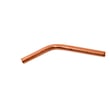
- Address leaks: if you see water under the unit, inspect the drain area and consider replacing the refrigerator drain tube 5251JA3003D if it is cracked or restricted.
| Symptom | Likely cause | Typical fix |
|---|---|---|
| Warm fridge/freezer | Dirty coils, fan issue, Demo Mode | Clean coils; check fans; disable Demo Mode |
| No ice | Water supply issue, ice maker fault | Check water line; test/replace ice maker |
| Puddles/leaks | Clogged drain, drain tube issue | Clear drain; replace drain tube if needed |
| Rattling/vibration | Not level on floor | Level the cabinet per manual |
Cooling, ice production, and leak prevention all depend on good airflow and proper defrost drainage. Keeping coils clean and addressing drain issues early helps protect the compressor and prevents repeat temperature swings.
Last updated: February 2026
How to tell if a Kenmore refrigerator compressor is bad?
A bad compressor in a Kenmore 79571609011 refrigerator usually shows up as poor cooling with long run times, repeated clicking as it tries to start, or unusual heat at the compressor area. Because some “new” sounds and longer run cycles are normal, we confirm by checking airflow, coils, and start components first.
- Verify the fridge and freezer are not warming up from frequent door openings or a recent large food load.
- Listen: a brief click when the cooling system cycles is normal; repeated clicking every few minutes points to a start problem.
- Make sure the condenser area is clean; dirty coils can mimic compressor failure.
- Confirm the evaporator fan is running; no airflow can cause warm temps even if the compressor runs.
- Check for strong vibration or rattling caused by an uneven floor or leveling legs (noise is not always a compressor issue).
For normal operating sounds and basic troubleshooting steps, use the 79571609011 owner's manual.
| Symptom | Most likely cause | What it means |
|---|---|---|
| Repeated clicking, then silence | Overload protector or start device opening | Compressor is failing to start or drawing too much current |
| Runs constantly but temps stay warm | Sealed system or compressor inefficiency | Cooling capacity is lost |
| Compressor is very hot and keeps shutting off | Overheating under load | Often tied to start components, airflow, or compressor wear |
| No compressor sound at all (but lights work) | Control, relay/overload, or compressor | Needs electrical diagnosis |
These parts are model-matched options we use when diagnosing a “won’t start” or “clicking” complaint:
- Refrigerator compressor overload protector 6750CL0001D (protects the compressor from overheating/overcurrent)
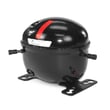
- Refrigerator compressor TCA38091801 (the pump that circulates refrigerant)
- Refrigerator condenser coil ACG73784701 (heat exchanger; dirty or restricted coils raise compressor load)
Replacing a compressor is a major repair, and many “bad compressor” symptoms are actually caused by airflow problems (dirty condenser coil, failed fan motor) or a failing overload protector. Ruling out those common causes first saves time and prevents unnecessary parts replacement.
Last updated: February 2026