 Owner’s manual






How do you know if a thermal fuse is blown on a Whirlpool dryer?
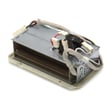
On a Whirlpool WED7500VW2 electric dryer, a blown thermal fuse usually shows up as a dryer that will not run at all (no motor operation) even though the control panel seems normal. The sure way to know is to test the fuse for continuity with a multimeter after unplugging the dryer.
What to check first (quick symptoms)
- Dryer will not start; drum does not turn and you do not hear the motor hum
- Timer or display may still light up, but the cycle will not run
- Dryer stopped mid-cycle and will not restart
- You recently had long dry times or very hot cabinet temperatures (often tied to restricted venting)
How we test a dryer thermal fuse (safe, reliable method)
- Unplug the dryer (electric shock hazard).
- Access the thermal fuse (commonly on the blower housing or exhaust duct area).
- Pull at least one wire off the fuse terminal.
- Set a multimeter to continuity or lowest ohms.
- Touch probes to the fuse terminals.
Expected result:
| Test result | What it means | What to do next |
|---|---|---|
| Continuity (near 0 ohms or beeps) | Fuse is good | Keep troubleshooting door switch, motor, belt switch, or control |
| No continuity (open/infinite) | Fuse is blown | Replace the thermal fuse and correct the airflow problem |
Why the fuse blows (and why it matters)
A thermal fuse is a one-time safety device; it opens when the dryer overheats. Overheating is most often caused by restricted airflow, such as lint buildup in the lint screen housing, crushed vent duct, or a clogged exterior vent hood. Fixing airflow prevents repeat failures and helps drying performance.
Related start issue to rule out on this model
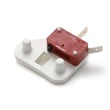
If the dryer has power but will not run, also check the door switch. A failed door switch can mimic a “dead” dryer.
- Inspect the door strike alignment
- Listen for a solid click when closing the door
- Test the switch for continuity
- Replace if it tests open when the door is closed (use dryer door switch WP8182530)
Model-specific guidance
For WED7500VW2 access panels, wiring routing, and the correct test points, follow the steps in the WED7500VW2 owner's manual.
Last updated: February 2026
How much does it cost to replace a heating element in a Whirlpool dryer?
Replacing the heating element in a Whirlpool electric dryer like model WED7500VW2 typically costs $100 to $350 total, with about $230 being a common average when you include parts and labor. DIY replacement usually costs less, but only makes sense if you can safely access and test the heater circuit.
What makes the price go up or down
- DIY vs. service call: labor is usually the biggest cost driver.
- What failed besides the element: a blown thermal cut-off, thermostat, or wiring issue can take out a new element quickly.
- Vent restriction: poor airflow often causes repeat overheating failures.
- Time to access the heater housing: some installs require more disassembly.
- Electrical supply issues: a missing leg of 240V can mimic a “bad heater.”
Typical cost breakdown
| Scenario | What you pay for | Typical total |
|---|---|---|
| DIY repair | Part(s) only | $40 to $150 |
| Pro repair (most common) | Part(s) + labor | $150 to $350 |
| Complex diagnosis/extra parts | Multiple heat-safety parts + labor | $250 to $450 |
Before you buy a heating element
We recommend these quick checks first because they often explain “no heat” on an electric dryer:
- Confirm the dryer is getting 240V at the outlet (a tripped breaker can leave you with 120V and no heat).
- Clean the lint screen and check airflow at the outside vent hood.
- Inspect for a crushed or excessively long vent run.
- If the drum turns but there is no heat, test heat components with a meter (element, thermal cut-off, thermostats).
For model-specific access steps and wiring diagrams, use the WED7500VW2 owner’s manual.
Why it matters
A heating element replacement that does not address airflow or a failed safety thermostat can lead to repeat failures, longer dry times, and overheating. If you suspect an overheating condition, the dryer safety thermostat W10843940 is one of the key protection parts in the heater circuit.
Last updated: February 2026
How to find part number on Whirlpool dryer?
On the Whirlpool WED7500VW2 electric dryer, the fastest way to get the correct part number is to read the model and serial tag inside the door opening, then use that exact model number to look up the part diagram and match the part name to the listed part number. See the WED7500VW2 owner's manual for the tag location and identification details.
Where to look for the model and serial tag
Most Whirlpool dryers like the WED7500VW2 place the identification tag in one of these spots:
- Inside the dryer door opening on the cabinet frame (often upper right)
- On the back panel of the dryer cabinet
- Behind the control panel area (less common)
How to get the right part number (without guessing)
Use this process so you do not order the wrong version of a part:
- Write down the full model number (WED7500VW2) and the serial number
- Find the part in the exploded-view diagram by location and shape, not just by name
- Match the diagram callout to the part name and part number in the list
- If multiple similar parts appear (for example, screws or thermostats), match by where it mounts
- When replacing a safety or heat-related part, confirm the dryer is an electric dryer (this model is)
Common examples on this model
These examples show how part IDs and part numbers can look different, which is why matching by diagram matters.
| What you see on the dryer | Example part name | Example part ID |
|---|---|---|
| Door won’t “click” closed | Dryer door switch | WP8182530 |
| Dryer overheats or shuts off | Dryer safety thermostat | W10843940 |
| Drum won’t turn | Drive motor | WP8182472 |
Why it matters
Whirlpool often uses similar-looking parts across multiple dryer series; using the exact WED7500VW2 model tag details helps us match the correct revision, wiring style, and mounting points so the repair goes smoothly.
Last updated: February 2026
What are common dryer part failures?
On the Whirlpool WED7500VW2 electric dryer, the most common part failures we see involve the heating and safety circuit (thermostats, thermal cutoffs), start and door-interlock components, and drum-drive wear parts. These issues typically show up as no heat, no start, long dry times, or unusual noise.
Most common failures and what you’ll notice
- No heat or weak heat: failed operating thermostat, safety thermostat, or a heat-control component
- Won’t start: door switch not closing, failed start circuit component, or wiring connection issue
- Stops mid-cycle or overheats: safety devices opening due to restricted airflow or a failing thermostat
- Long dry times: vent restriction, lint buildup, or temperature control problems
- Thumping, scraping, or squealing: drum support wear (glides/bearings) or drum issues
Model-relevant parts to check first
These are common “first checks” on WED7500VW2 symptoms, using parts available for this model:
| Symptom | Likely area | Example part for this model |
|---|---|---|
| Won’t start | Door interlock | Dryer door switch WP8182530 |
| Overheats or shuts off | Safety temperature limit | Dryer safety thermostat W10843940 |
| Runs hot/cold inconsistently | Cycling temperature control | Dryer operating thermostat, 90-degree W10870283 |
| Scraping at front of drum | Drum support at front | Dryer drum glide bearing W10119103 |
Why it matters
When a thermostat or safety device fails, the dryer can lose heat, overheat, or shut down to protect the appliance. When drum support parts wear, the dryer often still runs, but noise and friction can quickly lead to bigger repairs (drum damage, motor strain, or belt wear).
Quick checks before replacing parts
- Clean the lint screen and confirm strong airflow at the outside vent hood
- Inspect the vent path for kinks, crushed ducting, or heavy lint buildup
- If the dryer won’t start, test the door closure and listen for a “click” at the switch
- If drying is slow, try a timed dry cycle to compare performance
- Use the wiring diagram and diagnostic guidance in the WED7500VW2 owner’s manual
For display or fault messages on Whirlpool electronic dryers, use our Whirlpool duet dryer error codes reference to narrow the failure to a circuit or component.
Last updated: February 2026
What are the common problems with Whirlpool dryers?
Common problems we see with Whirlpool electric dryers like model WED7500VW2 include a dryer that will not start, a drum that will not tumble, no heat or weak heat, long dry times, and unusual noises. Many of these issues trace back to power supply, airflow restrictions, or a small set of wear parts.
Quick checks first (fastest wins)
- Confirm the dryer has full 240V power (a tripped breaker can leave the dryer running but not heating).
- Clean the lint screen before every load.
- Check the vent path for crushing, kinks, or heavy lint buildup.
- Avoid overloading; heavy loads can prevent proper tumbling and airflow.
- Verify the cycle and temperature settings match the load type.
Symptom-to-cause guide
| Symptom | Most common causes | What to do next |
|---|---|---|
| Will not start | Door not fully closed, failed door switch, control setting | Check door latch action; test/replace dryer door switch WP8182530 if the door does not “click” reliably |
| Runs but no heat | Power issue (one leg), failed thermostat, restricted venting | Reset breakers; inspect venting; consider testing dryer safety thermostat W10843940 |
| Takes too long to dry | Clogged vent, long vent run, lint buildup inside cabinet | Clean venting; review venting requirements in the WED7500VW2 owner's manual |
| Loud squeal/grind | Drum support wear (glides/bearings), idler or belt wear | Inspect drum support surfaces; check for rubbing and flat spots |
| Drum not turning | Broken belt, failed motor, seized drum support | Try turning drum by hand (unplugged); if stiff, inspect supports; if free, suspect belt or motor |
Why it matters
Dryer problems often start as airflow or minor wear issues; fixing them early helps prevent overheating, repeated thermal cutoffs, and longer dry times that waste energy.
Parts that commonly come up in troubleshooting
- Door-start issues: dryer door switch WP8182530
- Overheating or no-heat protection: dryer safety thermostat W10843940
- Temperature regulation concerns: operating thermostat (model-specific testing procedures are in the manual)
Last updated: February 2026






