 Owner’s manual







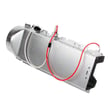



How do I know if my Kenmore dryer thermal fuse is blown?
If your Kenmore dryer model 79680448900 suddenly will not start (no drum movement, no heat, no motor sound) but the outlet and breaker are good, the thermal fuse is a top suspect. We confirm it by unplugging the dryer and testing the fuse for continuity with a multimeter.
A blown thermal fuse usually acts like a safety “open circuit” that stops the dryer from running.
- Dryer will not turn on at all
- Controls may light up, but the motor will not run (varies by design)
- Dryer stopped mid-cycle and will not restart
- You recently had long dry times or a vent warning, then the dryer quit
- Breaker is not tripped and the outlet has power
- Unplug the dryer (or switch off the breaker).
- Access the thermal fuse area as shown in the 79680448900 owner's manual.
- Pull one wire off the fuse terminal.
- Set your multimeter to continuity (or lowest ohms).
- Touch a probe to each terminal.
Result guide
| Meter result | What it means | Next step |
|---|---|---|
| Beep or near 0 ohms | Fuse is good | Keep troubleshooting (door switch, control, motor circuit) |
| No beep or OL/infinite | Fuse is blown | Replace the thermal fuse and fix the airflow problem |
Thermal fuses usually blow because the dryer overheats, most often from restricted airflow. The manual’s “before calling for service” section points to venting and lint buildup as common causes of poor drying and overheating conditions.
- Clean the lint screen every load (inspect the housing too)
- Check the vent duct for crushing, kinks, or excessive length
- Clear lint from the wall cap damper so it opens freely
- Clean the blower area if lint is packed inside
- If your vent indicator is blinking, address the duct restriction right away
If airflow is good but heating control is unstable, these model-compatible parts are commonly involved in heat regulation:
Last updated: February 2026
How much does it cost to replace a heating element in a Kenmore dryer?
For a Kenmore dryer like model 79680448900, replacing the heating element typically costs $250 to $600 total (part plus labor). If you do it yourself, the part cost is often the main expense; for this model, the dryer heating element 5301EL1001J is a common replacement.
Costs vary by location, dryer access, and whether additional parts (like thermostats) are replaced at the same time.
| Cost item | Typical range | Notes |
|---|---|---|
| Heating element part | $100 to $300 | Electric dryers use a 240 VAC heating circuit; match the correct element for the model. |
| Service call and labor | $150 to $350 | Often 1 to 2 hours depending on disassembly. |
| Optional related parts | $15 to $60 each | Thermostats and fuses are commonly checked when heat is lost. |
A dryer that will not heat is often caused by airflow or safety devices opening, not only a failed element.
- Confirm the dryer is on a dedicated 240 VAC circuit and the breaker is not partially tripped.
- Check and clean the lint screen and exhaust duct; restricted venting reduces heat and can trip safety thermostats.
- Run a timed heat cycle and verify the exhaust air feels warm after about 3 minutes.
- Inspect the element for a visible break in the coil (with power disconnected).
- If the dryer overheats or shuts heat off, test the high-limit thermostat.
For model-specific access steps and safety guidance, follow the 79680448900 owner's manual.
If the element is open, replacement is straightforward; if the element failed due to overheating, address airflow and consider the safety thermostat.
Replacing the heating element without fixing poor venting can lead to repeat failures, longer dry times, and overheating. Keeping the vent system clear helps the heater cycle normally and protects components.
Last updated: February 2026
How to find model number on Kenmore dryer?
On the Kenmore dryer model 79680448900, the model number is printed on an identification plate located inside the dryer door. Open the door and look along the cabinet frame area for the label that lists both the model and serial number; confirm the exact characters before ordering parts.
Check these common label locations first:
- Inside the dryer door opening on the cabinet frame (most common)
- Along the inner front panel just behind the door
- Near the door opening edge where the latch engages
- On the identification plate that also shows the serial number
For diagrams and the exact wording used on the label, use the 79680448900 owner's manual.
The identification plate typically includes the items below. Copy them exactly (including zeros):
- Model number (example format: 796.8#######)
- Serial number
- Electrical rating information (useful for service)
- Gas or electric designation (varies by version)
| Item on label | Why we need it | Example of what to record |
|---|---|---|
| Model number | Ensures correct part fit | 79680448900 |
| Serial number | Helps match production changes | Full serial as printed |
| Rating info | Confirms electrical requirements | As printed on label |
Kenmore model numbers can look similar across different dryer series. Using the exact model number from the door identification plate prevents ordering the wrong Kenmore dryer drum belt, heating element, thermostat, or control board for your specific build.
Last updated: February 2026
How to hard reset a Kenmore dryer?
To hard reset your Kenmore dryer model 79680448900, we power-cycle it: turn it off, unplug it for about 1 minute, then plug it back in and try a normal start. This clears many control glitches without changing any cycle settings.
- Press Power to turn the dryer off.
- Unplug the dryer (grip the plug, not the cord).
- Wait 60 seconds.
- Plug the dryer back into its dedicated outlet.
- Press Power, select Normal, then press Start/Pause.
- If the dryer was paused or stopped, close the door fully before pressing Start/Pause.
These checks come straight from common “won’t turn on” causes for this style of Kenmore dryer:
- Confirm the plug is fully seated in a properly grounded outlet.
- Check the house breaker or fuse (reset breaker, replace fuse with the correct rating).
- Make sure the door is fully closed; a failed door switch can prevent starting.
- If the dryer turns on but shuts off after sitting, restart it (many models power off after several minutes idle).
- If the drum will not tumble and you hear motor strain or squealing, inspect the belt and idler system.
| What you see | Most likely area to check | Good next step |
|---|---|---|
| No lights, no response | Power supply | Check breaker/fuse and outlet power |
| Lights on, won’t start | Door/controls | Verify door closure; test door switch |
| Runs but no heat | Heating circuit or airflow | Check venting, then heating components |
| Runs but drum not turning | Drive system | Inspect belt, idler pulley, rollers |
- 79680448900 manual: Use it to confirm the correct start sequence and basic troubleshooting checks.
- Dryer door switch EBF61496102: If the switch fails, the dryer can act like the door is open.
- Dryer drum belt 4400EL2001F: A broken belt can stop tumbling even if the motor runs.
- Dryer idler pulley 4560EL3001A: A seized pulley can prevent the belt from moving smoothly.
A true “hard reset” on the 79680448900 is mainly a safe power reset. If the dryer still will not start afterward, the issue is usually power at the outlet, a door-switch interlock, or a drive component, not a setting you can clear.
Last updated: February 2026
What is an AF code?
On the Kenmore dryer model 79680448900, an AF code means restricted airflow. The dryer is not moving enough air through the lint screen and exhaust vent, so drying times can increase and the dryer can run hotter than normal. See the 79680448900 owner's manual for venting requirements and safety guidance.
- Lint screen clogged or coated with fabric softener residue
- Exhaust duct crushed, kinked, or too long
- Too many elbows/turns in the vent run
- Exterior vent hood flap stuck closed or blocked (lint, snow, bird nest)
- Lint buildup inside the duct or blower housing
- Clean the lint screen and wash it with warm water and a soft brush if it looks “waxy.”
- Run a timed dry cycle for 5 to 10 minutes and check airflow at the outside vent hood.
- Inspect the vent path behind the dryer; straighten kinks and replace plastic or foil venting with rigid or approved metal duct.
- Clean the entire vent system from the dryer outlet to the outside termination.
- If airflow is still weak, check for lint buildup at the blower area and confirm the blower wheel is intact.
In most cases, you can clear the display by pressing a key on the control panel; the dryer typically continues running while the AF condition is present.
If the venting is clear but airflow remains weak, a damaged blower wheel can reduce air movement.
| Symptom | Most common fix | Related part for this model |
|---|---|---|
| Weak airflow at outside hood | Clean/shorten vent, reduce elbows | Venting (not a dryer part) |
| Rattling plus weak airflow | Inspect blower wheel for cracks/loose fit | Dryer blower wheel 5835EL1002A |
| Lint screen damaged or not sealing | Replace lint screen | Dryer lint filter 5231EL1003B |
Restricted airflow is a leading cause of long dry times and overheating. Keeping the lint screen and vent system clear helps the dryer dry faster, run more efficiently, and reduces heat stress on components like thermostats and the heating system.
Last updated: February 2026








