Owner’s manual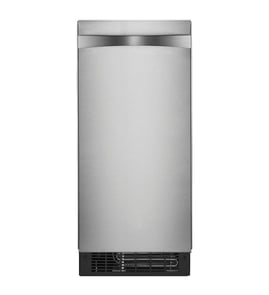




How to find ice maker model number?
For a Kenmore freestanding ice maker, the model number is typically printed on the appliance’s rating label. On model 10689592102, check inside the cabinet area first, then around the door opening and lower front area if you do not see it right away.
Where to look on a freestanding ice maker
Check these common label locations (start with the easiest to access):
- Inside the ice storage bin compartment on a side wall
- Along the door opening (hinge side or latch side)
- On the back panel near the power cord entry
- Behind the lower front kick plate or toe grille
- On a side exterior panel near the bottom rear
What the label looks like
Most Kenmore rating labels include the model number and other identifiers.
| Label item | What it helps with |
|---|---|
| Model number | Matching the correct parts list and diagrams |
| Serial number | Identifying production run details for service |
| Electrical ratings | Verifying power requirements (voltage/amps) |
Tips to read it correctly
- Write the model number exactly as shown (letters and numbers matter)
- Take a clear photo before ordering parts
- If the label is worn, use a flashlight and view from an angle to make the print stand out
Why it matters
Using the exact model number prevents ordering the wrong Kenmore ice maker parts, especially for items like the control board, pumps, and water system components.
For model-specific label location notes and general identification info, use the 10689592102 manual.
Last updated: January 2026
Can I leave my portable ice maker on all the time?
Yes, you can leave the Kenmore 10689592102 freestanding ice maker powered on, but we recommend running it only when you need ice. Continuous operation increases wear, can lead to more frequent cleaning needs, and may cause ice to clump or melt if it sits in the bin too long.
Best practice for everyday use
If you want reliable ice and fewer issues, use a simple routine:
- Keep the unit level and allow airflow around the cabinet
- Use cold, clean water (filtered water helps reduce scale)
- Empty older ice regularly so it does not melt and refreeze into clumps
- Wipe the bin and interior dry if you will not use it for a day or more
- Follow the cleaning and descaling schedule in the 10689592102 owner's manual
What to expect if you run it 24/7
Most portable and freestanding ice makers cycle on and off based on bin level and temperature. When left on all the time, common side effects include:
- Faster mineral buildup (hard water scale)
- More frequent “stale” tasting ice from sitting too long
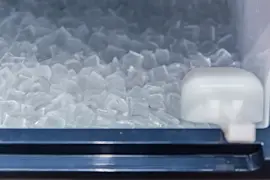
- Ice clumping from partial melting and refreezing
- Higher chance of drain or pump issues if maintenance is skipped
Quick comparison
| How you run it | Best for | Tradeoffs |
|---|---|---|
| As needed (recommended) | Occasional use, small households | You may need a few hours lead time |
| Daily, timed (morning to evening) | Regular use, entertaining | Requires routine emptying and wipe-down |
| 24/7 | Constant demand | More cleaning, more wear, more clumping risk |
Water quality and filtration
If your ice tastes off or you see white flakes, water quality is usually the cause. Using a compatible filter can reduce sediment and scale.
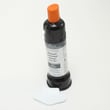
- Consider replacing the water filter F2WC9I1 on schedule
- Descale more often if you have hard water
- Clean the reservoir and circulation path during maintenance
Why it matters
Running the ice maker only when needed helps protect key components like the recirculation pump, drain system, and electronic control board; it also keeps ice fresher and reduces mineral buildup.
Last updated: January 2026
Why is my free standing ice maker not making ice?
If your Kenmore freestanding ice maker model 10689592102 runs but won’t make ice, the most common causes are no water supply, a restricted water filter, or a failed water-circulation component (especially if the reservoir is full but the evaporator plate stays dry). Use the 10689592102 owner's manual to confirm the correct start-up and water-supply setup.
Quick checks (start here)
- Make sure the unit is powered on and the ice-making mode is enabled.
- Confirm the water supply valve is fully open and the supply line is not kinked.
- Check that the water reservoir is filling.
- Look for a clogged or overdue water filter; replace if needed.
- Verify the condenser area has airflow and is not packed with dust.
What the symptoms usually mean
| What you see | What it points to | What to do next |
|---|---|---|
| Reservoir is empty | Water supply problem | Check shutoff valve, line kinks, inlet restrictions, and household water pressure |
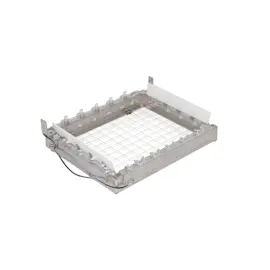
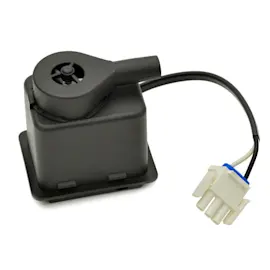
| Reservoir is full but evaporator plate is dry | Water not being circulated | Inspect/replace the ice maker recirculation pump W11542867 |
| Thin, hollow, or slow ice production | Restricted water flow or poor heat transfer | Replace the water filter F2WC9I1 and clean condenser area |
| Water in bin or unit won’t drain | Drain system issue | Check the ice maker drain pump W11542868 and drain line routing |
Step-by-step troubleshooting flow
- Step 1: Confirm water is getting to the machine. If the reservoir never fills, focus on the supply line and shutoff valve.
- Step 2: Check circulation. If the reservoir is full but water is not moving over the evaporator plate, the recirculation pump is the primary suspect.
- Step 3: Rule out restriction. A clogged filter can reduce flow enough to stop or slow ice production.
- Step 4: Check drainage. Standing water can interrupt normal cycling and cause poor ice results.
Why it matters
Ice makers depend on steady water flow across the evaporator plate and proper draining between cycles. A simple water-supply restriction can look like a major failure, so checking fill and circulation first saves time and prevents unnecessary parts replacement.
Last updated: January 2026
What are common problems with pebble ice makers?
Common pebble ice maker problems on a Kenmore freestanding ice maker like model 10689592102 include no ice, slow ice production, hollow or slushy ice, unusual noises, leaks, and ice clumps or jams. Most issues trace back to water supply problems, mineral scale buildup, airflow restrictions, or a failing pump or control.
Quick checks we recommend first
- Confirm the unit is powered on and the bin is seated correctly.
- Verify the water supply valve is fully open and the inlet line is not kinked.
- Clean and descale the water system on the schedule in the 10689592102 owner's manual.
- Replace the water filter if flow is weak or taste/odor is off (use the correct water filter F2WC9I1).
- Make sure the condenser area has good airflow and is free of dust.
Symptoms, likely causes, and what to do
| Symptom | Most common cause | What usually fixes it |
|---|---|---|
| No ice production | No water, clogged filter, control not cycling | Restore water flow, replace filter, reset per manual |
| Low ice output | Scale buildup, warm room, restricted airflow | Descale, improve ventilation, clean condenser |
| Loud buzzing or grinding | Pump strain, ice jam, worn moving parts | Clear jam, descale, inspect pump operation |
| Water in bin or leaks | Drain restriction, drain pump issue | Check drain path, inspect drain pump |
Parts that commonly relate to these problems
If basic cleaning and water checks do not restore normal operation, these model-matched parts are often involved:
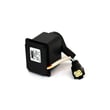
- Ice maker recirculation pump W11542867: circulates water over the freezing surface; weak flow can reduce output.
- Ice maker drain pump W11542868: helps remove meltwater; drain issues can cause leaks or wet ice.
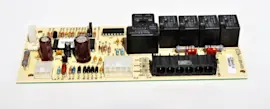
- Ice maker electronic control board W11034363: controls harvest and pump timing; failures can stop cycling.
Why it matters
Pebble ice makers depend on steady water flow and clean internal water paths. When scale or a restriction develops, the machine can still run but produce less ice, make noise, or create clumps, which is why routine descaling and filter changes prevent most repeat problems.
Last updated: January 2026