 Installation guide
 Error Codes





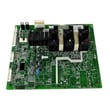
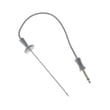
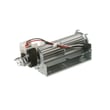
How do you reset a GE oven?
To reset your GE PT9550SF1SS electric wall oven, reset power at the home electrical panel: switch the oven’s circuit breaker OFF for about 1 minute, then switch it back ON. This power-cycle resets the electronic control and clears many temporary control glitches.
Reset steps (safe, standard method)
- Turn the oven OFF at the control panel.
- Locate the dedicated oven breaker (or fuse) in your home electrical panel.
- Switch the breaker to OFF (or remove the fuse).
- Wait 60 seconds.
- Switch the breaker back to ON (or reinstall the fuse).
- Set the clock, then test Bake and Broil.
If the reset does not fix the problem
A reset helps with temporary software or control lockups. If the oven still will not heat, keeps beeping, or shows an error again, focus on the most common causes below.
Common next checks
- Confirm the breaker is fully seated ON (some breakers trip “halfway”).
- If the display is on but temperatures are wrong, the temperature sensor is a common failure point.
- If the oven overheats or shuts down, cooling airflow and overheat protection components matter.
- If the door is stuck locked after self-clean, the door lock system may be involved.
| Symptom after reset | Likely area to check | Example part for PT9550SF1SS |
|---|---|---|
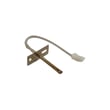
| Oven heats poorly or temp is inaccurate | Temperature sensing circuit | Wall oven temperature sensor WB21X10165 |
| Fan runs constantly or oven overheats | Cooling fan and limit controls | Range high-limit thermostat WB24X46906 |
| Door won’t unlock after self-clean | Door lock mechanism | Latch self c WB10X28391 |
Why it matters
A proper breaker reset restores clean power to the control board and can clear a “stuck” relay or logic state. If symptoms return quickly, the issue is usually a sensor, thermostat, fan, latch, or control board problem rather than a one-time glitch.
Reference for electrical and power checks
The installation instructions emphasize that the oven must be on the proper voltage and a dedicated, protected circuit; use the rating plate on the oven frame to confirm electrical requirements and verify the breaker/fuse is correct. See the PT9550SF1SS installation guide.
Last updated: January 2026
How long do GE wall ovens last?
GE wall ovens typically last about 12 to 15 years with normal household use. For the GE PT9550SF1SS electric wall oven, lifespan depends most on heat exposure to electronics, door seal condition, and keeping airflow and wiring connections in good shape per the PT9550SF1SS installation guide.
Typical lifespan and what affects it
Most wall ovens reach the end of their service life due to wear on heating, sensing, and control components rather than the cabinet itself.
Common factors that shorten or extend life:
- High-heat cooking frequency (daily roasting, long bakes, self-clean use)
- Ventilation and cooling performance (cooling fan running correctly)
- Door seal condition (heat leaks make components work harder)
- Electrical supply quality (loose connections, heat at junction box)
- Prompt repair of small issues (sensor errors, fan noise, uneven temps)
What usually fails first (and what it looks like)
These are common wall-oven wear items that can show up in the 8 to 15 year range:
| Component | What you may notice | Example part for PT9550SF1SS |
|---|---|---|
| Temperature sensor | Oven temp swings, under/overcooking, error codes | Wall oven temperature sensor WB21X10165 |
| Cooling fan | Loud fan, overheating shutdowns, hot control area | Wall oven cooling fan assembly WB26T10066 |
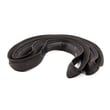
| Door seal | Longer preheat, heat escaping around door | Wall oven door seal WB35X32825 |
Maintenance that helps you reach 15 years
We recommend these practical habits for GE electric wall ovens:
- Keep the door seal clean and replace it if it’s torn, flattened, or loose
- Avoid slamming the door; it stresses hinges and can compromise sealing
- Use self-clean sparingly; high heat accelerates wear on sensors and controls
- Make sure the oven has proper cabinet clearances and electrical connection practices outlined in the PT9550SF1SS installation guide
- If temperatures seem off, test and replace the sensor before it strains other parts
Why it matters
A wall oven is built to last, but excess heat and poor airflow can shorten the life of control boards, sensors, and wiring. Small fixes (like a sensor, fan, or door seal) often restore normal baking performance and help you get the full expected lifespan.
Last updated: January 2026
How to find wall oven model number?
For a GE electric wall oven like model PT9550SF1SS, the model number is typically printed on a rating label around the oven frame or just inside the oven door opening. If you are installing or servicing the oven, the installation paperwork also points you to labels on the top of the unit.
Where to look first (fastest checks)
- Open the oven door and check the front frame around the opening (often along the side trim).
- Check the rim/edge of the oven door area (near the hinge side).
- Look along the inside side walls of the oven cavity (near the front).
- For built-in wall ovens, check the label on top of the oven (commonly referenced for approved models during installation).
What the label usually looks like
Most GE wall oven rating labels include:
- Model number (example: PT9550SF1SS)
- Serial number
- Electrical ratings (volts/amps)
- Manufacturing information
If you cannot see the label without removing the oven
If the oven is tightly installed in the cabinet, the top label may be hidden. Use the safe, low-effort options first:
- Use a flashlight and look along the frame with the door open
- Check both upper and lower oven door openings (double ovens can have labels in more than one spot)
- Review the PT9550SF1SS installation guide for handling and access notes before attempting any removal
Quick ID tips (to avoid ordering the wrong part)
| What you found | What to do next |
|---|---|
| Model number is clear (PT9550SF1SS) | Use it to match parts like a temperature sensor or control board exactly |
| Only partial characters are readable | Take a photo, zoom in, and compare letter-by-letter |
| Multiple labels | Use the label that lists the full electrical ratings and serial number |
Why it matters
Wall oven parts (control boards, temperature sensors, door seals, and cooling fan components) are model-specific. Using the exact model number helps us match the correct diagrams and compatible parts the first time.
Last updated: January 2026





