Owner’s manual
 Error Codes


Where is the model number on a Kenmore side by side refrigerator?
On Kenmore model 79551016010, the model number is printed on the identification label inside the fresh food (refrigerator) compartment, on the right-hand side. The same label also lists the serial number, so you can record both for parts lookup and service.
How to find the label quickly
- Open the refrigerator (fresh food) door, not the freezer door
- Look along the right interior wall of the refrigerator compartment
- Check near the front edge where the door gasket seals
- Use a flashlight; the label can be small and easy to miss
- Write down the full model number and serial number exactly as shown
What you should see on the label
Most Kenmore side-by-side ID labels include these fields:
| Label item | What it’s used for | Tip |
|---|---|---|
| Model number | Matching the correct parts list | Copy every digit exactly |
| Serial number | Identifying production details | Keep it with your receipt |
| Date of purchase (you add this) | Warranty and records | Record it in your notes |
Why it matters
We use the model number to match your refrigerator to the correct Kenmore parts diagrams and compatible replacement parts. Even small model-number differences can change items like the water system, door hardware, or ice maker components.
Related tip for water and ice parts
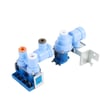
If you are tracking down a water or ice issue after confirming the model number, the owner's manual includes sections on features, water filter information, and troubleshooting.
Last updated: February 2026
How many cubic feet is the Kenmore 79551016010?
The Kenmore 795.51016010 is a side-by-side refrigerator, and units in this Kenmore 795 series are typically about 25 to 27 cubic feet of total capacity. For the exact cubic-foot rating for your specific 795.51016010, we recommend checking the specifications section in the owner's manual.
How to confirm the exact capacity on your model
Use these quick checks to find the official number for your refrigerator:
- Look in the specifications or product data section of the owner's manual
- Check the model and serial label inside the fresh food compartment (often on a side wall)
- Compare the listed overall capacity (total) versus refrigerator and freezer compartment capacities
- If you are measuring for storage planning, focus on usable space after shelves and bins are installed
Typical capacity ranges (what most owners see)
These ranges help set expectations for a Kenmore side-by-side like model 795.51016010.
| Refrigerator style | Typical total capacity | Notes |
|---|---|---|
| Side-by-side (standard depth) | 25 to 27 cu. ft. | Most common range for this platform |
| Side-by-side (counter depth) | 20 to 23 cu. ft. | Shallower cabinet reduces volume |
Why it matters
Knowing cubic feet helps you compare replacement models, plan shelf and bin organization, and estimate cooling recovery after door openings. It also helps when choosing accessories like bins and when troubleshooting temperature complaints tied to overloading.
Last updated: February 2026
How to remove drip tray from Kenmore fridge?
On Kenmore model 79551016010, we remove the dispenser drip tray by pressing down on the area labeled “PUSH”, then lifting the tray up using the center finger hole. This tray is designed to pop out without tools; keep hands out of the dispenser opening.
Steps to remove the dispenser drip tray
- Hold a cup under the dispenser area to catch any drips.
- Press down firmly on the tray where it says PUSH.
- Put a finger in the center hole of the tray.
- Lift up and pull the tray out.
- Wash and dry the tray, then reinstall it by aligning it and pushing until it seats.
If the tray feels stuck
- Remove any ice or sticky residue around the tray edges.
- Use warm, soapy water on a cloth to loosen dried spills; then try the PUSH and lift motion again.
- Do not pry with a screwdriver; that can crack the tray or the dispenser trim.
Quick reference: remove vs. reinstall
| Task | What to do | What to avoid |
|---|---|---|
| Remove tray | Press PUSH, lift using center hole | Pulling straight out without pressing |
| Reinstall tray | Line up, push back until it sits flush | Forcing it at an angle |
Why it matters
A properly seated drip tray helps prevent water from pooling under the dispenser, reduces sticky buildup, and keeps the dispenser area easier to clean. For the exact dispenser details and safety notes, use the owner's manual.
Last updated: February 2026
How to clean the drip pan on a Kenmore refrigerator?
On Kenmore model 79551016010, the drip pan (defrost drain pan) collects water during automatic defrost; it is normal to see water there. To clean it, unplug the refrigerator, carefully remove and empty the pan, wash with mild detergent and warm water (use non-flammable cleaner), dry completely, then reinstall it.
Before you start (safety and prep)
- Unplug the refrigerator or disconnect power at the breaker.
- Use non-flammable cleaner only.
- Avoid abrasive cleaners on plastic parts.
- Keep towels handy; the pan can spill when you slide it out.
- If access requires removing a rear cover, have a qualified technician handle that step.
Steps to clean the drip pan
- Unplug the refrigerator.
- Locate the drip pan near the bottom rear of the cabinet (access varies by installation).
- Slide the pan out slowly; empty it into a sink.
- Wash with a soft cloth or sponge and mild detergent in warm water.
- Rinse and dry thoroughly.
- Reinstall the pan fully, then restore power.
What’s normal vs. a problem
It’s normal for water to drip into the defrost pan and evaporate, especially during defrost cycles.
| Symptom | Most likely cause | What to do |
|---|---|---|
| Water in pan | Normal defrosting | No repair needed |
| Pan stays full longer | Hot or humid conditions | Allow more time to evaporate |
| Overflow or puddles | Drain issue or pan not seated | Check pan position; inspect for blockage |
Why it matters
A clean drip pan helps prevent odors and keeps moisture from turning into mold during normal defrost operation.
For model-specific access details and cleaning cautions, follow the owner's manual.
Last updated: February 2026
How to replace an ice maker in a side by side refrigerator?
To replace the ice maker in your Kenmore 79551016010 side-by-side refrigerator, we unplug the refrigerator, remove the ice bin and ice shelf to access the ice maker cover, swap the ice maker assembly, then turn the ice maker power switch ON. Expect 12 to 24 hours for ice production to start.
Steps to replace the ice maker
- Unplug the refrigerator (prevents injury from moving ejector parts).
- Remove the ice storage bin using both hands; lift up while slightly pulling out.
- Remove the ice shelf to reach the ice maker cover; lift the shelf and pull it out.
- Remove the ice maker cover and mounting screws (keep screws for reassembly).
- Disconnect the ice maker wiring harness plug.
- Install the replacement ice maker, reconnect the harness, and reinstall the cover.
- Reinstall the ice shelf and ice bin; make sure the bin fully engages the auger drive.
After installation: what to expect
A new ice maker and a newly installed refrigerator can take time to begin producing ice.
| Item | Normal behavior | What you should do |
|---|---|---|
| First ice | First few batches can contain air or debris from the line | Discard the first few batches |
| Start-up time | Ice may not start right away | Allow 12 to 24 hours |
| Ice maker start temp | Ice maker waits until freezer is cold enough | Keep freezer at normal settings; avoid frequent door openings |
Quick checks if it still will not make ice
- Confirm the ice maker power switch is set to ON.
- Verify the freezer is at or below 15 °F (-9 °C) so the ice maker can cycle.
- Make sure nothing blocks the feeler arm (it stops ice production when the bin is full).
- Check that the ice bin is seated and engaged into the auger drive.
- If the refrigerator was used before the water line was connected, make sure the ice maker was not left OFF.
Why it matters
Correct bin engagement, a clear feeler arm, and proper freezer temperature prevent false “no ice” symptoms and protect you from injury around the ejector mechanism and heater.
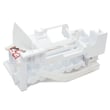
For diagrams and model-specific access details, use the owner's manual. If you are replacing the full assembly, match your replacement to the lg refrigerator ice maker assembly 5989JA1005G.
Last updated: February 2026