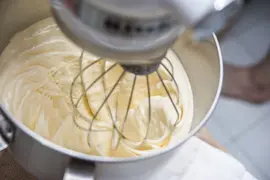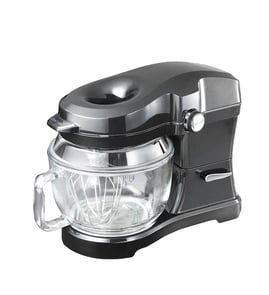

What is the difference between a mixer and a stand mixer?
A hand mixer is a handheld tool you move through the bowl, while a stand mixer (like the Black & DECKER M175) is a countertop machine that holds the bowl and drives beaters from a motorized head. Stand mixers handle longer mixing and heavier doughs more comfortably.
Quick comparison
| Feature | Hand mixer | Stand mixer |
|---|---|---|
| How it’s used | You hold and guide it | It stays put; you add ingredients |
| Best for | Small batches, quick mixing | Larger batches, longer mixing |
| Heavy mixtures (cookie dough, bread dough) | Limited; can strain the motor | Better; more stable and powerful |
| Hands-free mixing | No | Yes (you can multitask) |
| Storage | Compact | Takes more counter/cabinet space |
Which one should you choose?
- Choose a hand mixer for whipped cream, frosting, eggs, and small cake batters.
- Choose a stand mixer for frequent baking, thicker batters, and repeated batches.
- If you mix for 10+ minutes at a time, a stand mixer is typically more comfortable.
- If you have limited space, a hand mixer is easier to store.
- If you want to add ingredients while mixing, a stand mixer makes that simpler.
Why it matters
Using the right mixer helps prevent overheating, splattering, and uneven mixing. A stand mixer’s stability and hands-free operation are especially helpful when you are creaming butter and sugar, kneading dough, or mixing dense cookie dough.
Helpful related reading
If you need to confirm you are shopping parts for the correct unit, use how to find your appliance model number (and what it means for parts).
Last updated: February 2026
What is the best hand held mixer on the market?
The best hand held mixer is the one that matches what you mix most often: choose higher power and better low-speed control for cookie dough, or a lighter, quieter mixer for batters and whipped cream. If you own a Black & DECKER M175, avoid overloading to prevent motor strain.
How we recommend choosing a hand mixer
- Power and torque: Pick a mixer that keeps speed steady in thicker mixtures.
- Speed control: 5 to 9 speeds gives better control for folding, creaming, and whipping.
- Comfort: A balanced handle reduces fatigue during longer mixing.
- Attachments: Standard beaters cover most jobs; dough hooks help with heavier mixes.
- Cleanup and storage: Dishwasher-safe beaters and a storage case save time.
Quick comparison (what to buy for your baking style)
| If you mostly make... | Prioritize | Typical sweet spot |
|---|---|---|
| Cookies and thicker dough | Higher wattage, sturdy beaters, slow-start | 250 to 350 watts, 7 to 9 speeds |
| Cakes, brownies, muffins | Smooth speed steps, comfort | 200 to 300 watts, 5 to 9 speeds |
| Whipped cream, frosting | Low-speed control, whisk option | 200+ watts, stable low speeds |
| Occasional light mixing | Lightweight body, simple controls | 150 to 250 watts, 5 speeds |
If you already own a Black & DECKER M175
Even though the Black & DECKER M175 is listed under stand mixer parts, the same selection logic applies when comparing handheld mixers: match the tool to your most common tasks and avoid forcing thick doughs that overheat the motor.
Basic care tips that extend mixer life
- Start on low speed to reduce splatter and strain
- Stop and scrape the bowl instead of forcing the mixer through stiff dough
- Let the motor cool between heavy batches
- Keep vents clear of flour and sugar dust
- Inspect the cord for damage before each use
Why it matters
Right-sizing power and speed control prevents stalling, overheating, and premature wear, especially with dense doughs and frequent baking.
For general repair safety and DIY expectations, use our guide: are diy appliance repairs safe.
Last updated: February 2026
What are the different attachments for a stand mixer?
The Black & DECKER M175 is a hand mixer, so its attachments are simpler than a stand mixer’s. It uses standard beaters for most mixing, and some versions include wire whisks for lighter mixtures; it does not use a dough hook or paddle-style stand mixer beaters.
Attachments you’ll see on the Black & DECKER M175
- Beaters: the everyday pair for cookie dough, cake batter, frosting, and mashed potatoes
- Wire whisks (on some versions): best for whipping cream, beating egg whites, and aerating lighter batters
- Eject mechanism: not an attachment, but the built-in eject lever releases beaters or whisks for cleaning
Quick guide: which one should I use?
| What you’re making | Use this | Best practice |
|---|---|---|
| Cake batter, brownies, cookies | Beaters | Start on low to prevent flour splash, then increase speed |
| Frosting, mashed potatoes | Beaters | Stop and scrape the bowl to keep mixing even |
| Whipped cream, egg whites | Wire whisks (if included) | Use a deep bowl and keep speeds moderate to reduce splatter |
How to install and remove M175 attachments
- Unplug the mixer before changing attachments
- Insert each beater or whisk into the correct socket and push until it locks
- Tug gently to confirm it’s seated
- Use the eject lever to remove attachments (keep the mixer over the sink or counter)
Why it matters
Using the correct M175 attachment improves texture (more air with whisks, more power with beaters) and helps prevent overloading the motor when mixing thicker ingredients.
For help confirming the exact version of your M175 and matching the correct replacement accessories, use how to find your appliance model number (and what it means for parts).
Last updated: February 2026
What are the things on a mixer called?
On the Black & Decker M175, the “things” you use with the mixer are typically called beaters and attachments (or accessories). For this model, that usually means the pair of wire beaters and, on some versions, a spatula-style accessory; it is not a stand-mixer set with a dough hook or paddle.
Common names you will hear (and what they mean)
- Wire beaters: the two metal mixing tools used for batters, frosting, and whipped mixtures
- Beater set: both beaters together as a pair
- Spatula attachment/accessory: a scraper-style accessory used to help move batter off the bowl sides (included on some M175 versions)
- Eject button: the control that releases the beaters
- Speed control: the slider or switch that changes mixing speed
- Cord and plug: the power supply components
Quick guide: which “thing” to use
| What you are mixing | What it is commonly called | Best use |
|---|---|---|
| Cake batter, cookie dough (soft) | Wire beaters | General mixing and creaming |
| Whipped cream, egg whites | Wire beaters | Whipping and aerating |
| Thick bread dough | Not recommended for this model | Use a heavier-duty mixer designed for kneading |
Why it matters
Using the correct accessory name helps you order the right replacement and avoid forcing the mixer through heavy doughs that strain the motor, gears, and beater sockets.
How to match the right accessory to your exact version
Because “M175” can appear on multiple label variations, confirm the full model information from the tag on the mixer before ordering.
- Check the label near the cord entry or underside of the handle
- Match the full model text and type number exactly
- Compare the beater shape (wire loop style and stem length)
- If your mixer uses a scraper accessory, confirm it is listed for your version
For help locating and decoding the tag, use how to find your appliance model number (and what it means for parts).
Last updated: February 2026