


What is the bar on the back of a tiller for?
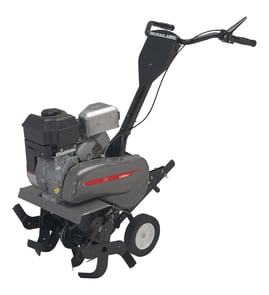
On your Craftsman 917298232 front-tine tiller, the bar on the back is the drag bar (also called a depth stake). We use it to control tilling depth and to steady the tiller by adding resistance so the tines do not pull the machine forward too fast.
What the drag bar does (and why you want it)
The drag bar is a simple adjustment that makes a big difference in how the tiller behaves.
- Sets how deep the tines can dig on each pass
- Helps keep the tiller from “running away” or hopping
- Improves control in hard soil by slowing forward travel
- Helps you make consistent, even rows
- Reduces strain on the operator by stabilizing the machine
How to adjust it safely
Most front-tine tillers adjust the drag bar by moving it up or down and locking it in place with a pin.
- Shut the engine off and let all moving parts stop.
- Remove the retaining/lock pin, then pull the clevis-style pin.
- Move the drag bar to the position you want:
- Higher bar position: shallower tilling
- Lower bar position: deeper tilling
- Reinstall the pin(s) fully and confirm the bar cannot slip.
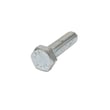
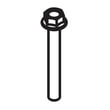
If your pin hardware is bent, missing, or not holding securely, replace it so the drag bar stays locked. A common fastener used on linkages is a shoulder bolt such as the tiller shoulder bolt 532121117.
Quick depth guide (typical)
Use this as a starting point, then fine-tune based on soil conditions.
| Job | Typical depth | Tip |
|---|---|---|
| First pass in hard ground | 1 to 2 in. | Make multiple passes rather than forcing depth |
| General garden bed prep | 3 to 6 in. | Let the drag bar slow the tiller |
| Mixing compost/topsoil | 2 to 4 in. | Avoid over-tilling wet soil |
Why it matters
Correct drag bar adjustment protects your tiller and improves results. When the bar is set too shallow, the tiller can surge forward and leave uneven soil. When it is set too deep, the engine and drive components work harder and the tiller can bog down.
Last updated: February 2026
What are the common problems with lawn tillers?
Common problems we see on the Craftsman 917298232 front-tine tiller include hard starting or stalling (fuel or ignition issues), tines that will not drive (belt/idler or linkage issues), and excessive vibration (loose or damaged hardware). Most fixes start with fuel quality, spark, and a quick fastener inspection.
Most common symptoms and likely causes
- Won’t start or starts then dies: stale fuel, clogged fuel filter/line, dirty carburetor, fouled spark plug
- Runs rough or lacks power: restricted fuel flow, dirty air filter, spark plug gap/wear, throttle/choke not set correctly
- Tines won’t turn or slip under load: worn belt, misadjusted clutch cable/linkage, worn idler components (check the idler pad 532109227)
- Excessive vibration or rattling: loose bolts/nuts, damaged tine, missing retainers (inspect the outer tine, left 583017601)
- Controls feel loose or don’t engage smoothly: stretched/misrouted cable, bent brackets (inspect the lawn & garden equipment cable bracket 532009484)
Quick checks we recommend (in order)
- Fuel: drain old gas; refill with fresh fuel (old fuel is the top cause of no-start and surging).
- Spark: remove and inspect the spark plug; replace if fouled or worn.
- Airflow: clean or replace the air filter.
- Drive engagement: verify the tine/clutch control moves freely and returns fully.
- Hardware and tines: tighten fasteners and inspect tines for bends, cracks, or missing hardware.
Parts that commonly solve these issues
| Problem area | What to inspect | Example part on this model |
|---|---|---|
| Tine drive slipping | Idler wear, belt tension, linkage | Idler pad 532109227 |
| Vibration/poor tilling | Bent or worn tine | Outer tine, left 583017601 |
| Loose controls/cable routing | Bracket alignment and mounting | Lawn & garden equipment cable bracket 532009484 |
Why it matters
A tiller that is running lean from restricted fuel flow or slipping in the tine drive can overheat components and wear the drive system faster. Catching loose hardware early also helps prevent tine and transmission damage.
Last updated: February 2026
How to lubricate a tiller?
For a Craftsman 917298232 front-tine tiller, lubrication means keeping the tine drive and moving linkages coated with the correct grease or oil so the tines engage smoothly and parts do not wear prematurely. We focus on cleaning first, then lubricating only the points that actually move.
What to lubricate (common points)
- Tine shaft and tine hubs (light coat to prevent rust and seizing)
- Tine fasteners and pivot points (where parts rotate or slide)
- Clutch/drive linkage pivots (control lever linkage points)
- Wheel/axle points (if your unit has wheels and bushings)
- Any chaincase or gearbox fill point (if equipped)
Basic lubrication steps
- Shut the engine off, let it cool, and disconnect the spark plug wire.
- Brush or wipe off packed dirt first; grease over grit accelerates wear.
- Apply lubricant sparingly to pivots and rotating points; wipe off excess.
- If your tiller has a chaincase or gearbox, check the fill plug and top off with the specified lubricant for that housing (many use grease, some use gear oil).
- Recheck hardware tightness after lubrication and a short test run.
Helpful parts to inspect while you lubricate
Loose or worn hardware often looks like a lubrication problem (squeaks, binding, uneven tine action). These parts are commonly involved:
| Symptom while operating | What to check | Example part on this model page |
|---|---|---|
| Tines wobble or feel loose | Tine mounting hardware | Tiller shoulder bolt 532121117 |
| Tines bind or are hard to remove | Tine hub area and fasteners | Outer tine, left 583017601 |
| Linkage feels sloppy after greasing | Pins, retainers, and brackets | Tiller clevis pin 532443676 |
Why it matters
Proper lubrication reduces friction and heat at the tine shaft, linkage pivots, and drive components. That prevents premature wear, helps the clutch engage consistently, and makes seasonal storage easier (less rust and seized hardware).
Last updated: February 2026