 Installation guide
 Owner’s manual
 Error Codes




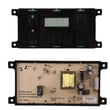

How do I reset my Frigidaire gas oven control board?
To reset the oven control on your Frigidaire FGF328GSG gas range, disconnect power to the range for about 1 minute, then restore power and reset the clock. If an error code returns immediately after the reset, the problem is usually in the control circuit, wiring, or a failed control component.
Safe reset steps (power reset)
- Turn the range off.
- Unplug the power cord, or switch the range circuit breaker off.
- Wait 60 seconds.
- Restore power.
- Set the clock again (the clock typically clears when power is removed).
If the oven still will not work after a reset
A reset only clears the control temporarily. If the oven will not heat, heats erratically, or shows recurring faults, check these common causes:
- Loose or damaged wire connections at the control board or sensor harness
- Failed oven temperature sensor (probe)
- Weak or failed oven igniter (no bake heat even though the control calls for heat)
- Failed electronic control board
Quick symptom-to-part guide
| Symptom after reset | Most common check | Related part for FGF328GSG |
|---|---|---|
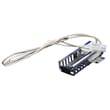
| Oven will not ignite (no heat) | Igniter glow and burner ignition | Range oven burner igniter 5304509706 |
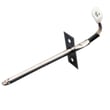
| Temperature is inaccurate | Sensor resistance and harness | Oven probe 316233903 |
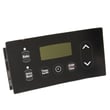
| Display issues or recurring faults | Control board and connectors | Range oven control board 5304518661 |
Why it matters
Resetting power is the fastest way to clear a temporary control glitch, but repeated failures point to a component that is not reliably sensing temperature or safely lighting the burner. Fixing the root cause prevents no-heat complaints, uneven baking, and nuisance shutdowns.
Where to confirm the exact procedure for your model
For model-specific keypad functions, clock setting, and control behavior on the FGF328GSG, follow the steps in the FGF328GSG owner’s manual.
Last updated: January 2026
How long do Frigidaire gas ranges last?
Most Frigidaire gas ranges, including model FGF328GSG, typically last 13 to 19 years with normal household use. Lifespan depends most on how clean the burners stay, how often the oven is used, and whether wear items like igniters and sensors are replaced when performance starts to drop.
Typical lifespan and what affects it
A gas range is a mix of long-life mechanical parts (burners, valves, frame) and shorter-life wear parts (igniters, bulbs, sensors). Regular cleaning and correct installation make the biggest difference.
Common factors that extend life:
- Keeping surface burners and ports clear of spills and grease
- Avoiding harsh cleaners or overspray that can damage finishes and components
- Preventing moisture from getting into control areas during cleaning
- Using the correct gas type and regulator setup (natural gas vs. LP)
- Replacing failing ignition parts early to prevent secondary damage
Parts that commonly need replacement first
On the FGF328GSG, these parts are frequent “wear item” replacements when symptoms show up:
- Range oven burner igniter 5304509706 (slow or no oven ignition)
- Oven probe 316233903 (temperature swings, underbaking, overbaking)
- Appliance light bulb, 40-watt 316538904 (oven light out)
Quick symptom-to-part guide
| Symptom | Most likely area | Example part for FGF328GSG |
|---|---|---|
| Oven won’t light or takes a long time to light | Oven ignition | Range Oven Burner Igniter 5304509706 |
| Oven temperature seems inaccurate | Temperature sensing | Oven Probe 316233903 |
| Oven light doesn’t work (bulb is good) | Socket or wiring | Range Light Socket 316116400 |
Why it matters
Replacing a small wear part at the right time often restores safe, consistent heating and helps the range reach the upper end of its expected lifespan. It also reduces stress on the oven gas valve, control components, and wiring.
Best practices for getting the full lifespan
- Follow the cleaning and use guidance in the FGF328GSG owner’s manual
- Use gentle cleaning methods around knobs and controls; avoid soaking the panel
- Keep the range free of grease buildup, especially around burners and under the cooktop
- If converting to LP gas, follow the FGF328GSG installation guide exactly
Last updated: January 2026
How to fix F1 error on oven frigidaire?
On the Frigidaire FGF328GSG gas range, an F1 (or other “F” code) means the electronic oven control detected a fault. We recommend clearing the code, then doing a 5-minute power reset; if the code returns, the most common fixes are the oven control board or a failing keypad/overlay. See the FGF328GSG owner’s manual for the exact clear-and-reset steps.
Quick reset steps (safe first checks)
- Press CLEAR/OFF to stop the beeping and clear the display.
- Try Bake or Broil again.
- If the F1 returns, turn power off at the breaker for 5 minutes, then restore power.
- Set the clock, then test Bake again.
- If the fault repeats, write down the exact code (F1, F11, etc.) before turning the oven off.
What usually causes an F1 on a Frigidaire range
An F1 is typically tied to the control system reading an invalid signal. Common causes include:
- Stuck or shorted keypad (often after heavy cleaning, heat, or moisture)
- Loose or damaged ribbon connector between keypad and control
- Failed electronic oven control (EOC) board
- Wiring damage or a poor connection at the control
Parts that commonly solve persistent F1 errors
If the reset does not hold, these model-matched parts are the usual next step:
| Symptom you see | Most likely part to check/replace | Model-matched example |
|---|---|---|
| F1 returns quickly, random beeping | Control board or keypad circuit issue | Range oven control board 5304518661 |
| Buttons act “stuck”, won’t respond, or trigger by themselves | Overlay/keypad issue | Range control overlay 316220728 |
Why it matters
When the control thinks a key is pressed or a circuit is shorted, it can disable baking or cause constant beeping. Clearing the code and confirming whether it returns helps you avoid replacing parts that are still working.
Last updated: January 2026




