Installation guide
 Owner’s manual
 Error Codes



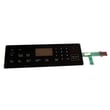

How do I clear the error code on my Samsung stove?
On your Samsung NX58F5500SS gas freestanding range, you can clear most error codes by pressing CLEAR/OFF to stop the beeping and reset the current cooking function; if the code returns, reset power to the range for 30 seconds, then restart. See the owner's manual for the model’s troubleshooting and information code steps.
Steps to clear an error code
- Press CLEAR/OFF once to cancel the active oven function and clear the display.
- Wait a few seconds; then try the function again (Bake, Broil, etc.).
- If the code comes back, disconnect power for at least 30 seconds (unplug the cord or switch the breaker off), then restore power.
- Re-enter the cooking mode and set temperature again.
- If the keypad is unresponsive or the code returns immediately, inspect for stuck keys and consider control-related parts.
What the reset does (and does not do)
A CLEAR/OFF reset stops the current cycle and clears many “function” errors. A power reset clears temporary control glitches, but it will not fix a failed sensor, stuck key, or a wiring problem.
| Action | What it affects | When to use it |
|---|---|---|
| CLEAR/OFF | Cancels the current oven operation | First step for any beeping error code |
| Power reset (30 seconds) | Reboots the control board | If the code returns after CLEAR/OFF |
| Part inspection/replacement | Fixes the underlying fault | If the same code repeats consistently |
Parts that commonly relate to repeating error codes
If the error code keeps returning after the two resets above, these parts are often involved in code-related failures on ranges:
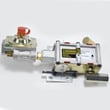
- Samsung range oven control board and clock DE92-02588G (control logic and display)
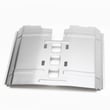
- Range membrane switch support bracket DG61-00495B (supports the touch area and can relate to key issues)
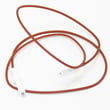
- Range oven door switch DG34-00006A (door status feedback for certain modes)
Why it matters
Repeated error codes usually mean the control is detecting a condition that can affect temperature control, safe operation, or door locking behavior. Clearing the code is useful for recovery, but fixing the root cause prevents repeat shutdowns.
You can order replacement parts for NX58F5500SS from the parts list for this model, or search by model number on Sears PartsDirect.
Last updated: February 2026
How do you reset a Samsung gas stove?
To reset your Samsung NX58F5500SS gas freestanding range, first try a control reset by clearing the current cooking mode; if the control is still acting up, do a power reset by turning the range’s power off for 30 seconds and then restoring power (this often clears temporary control glitches). See the owner's manual for the exact key sequence your control panel uses.
Quick reset options (start with the simplest)
- Press CLEAR/OFF to stop the current oven function, then restart the setting.
- If an error code returns, disconnect power for at least 30 seconds, then reconnect.
- If the display shows a Lock icon, unlock the controls (a locked control panel can look like a “failed” reset).
- If burners will not light after a reset, confirm the range has power (spark ignition needs electricity).
- If the problem repeats, focus on the system involved (ignition, gas supply, or electronic control).
Power reset steps (safe, effective for many control issues)
- Turn the range OFF.
- Switch OFF the circuit breaker (or unplug the power cord if accessible).
- Wait 30 seconds.
- Restore power and set the clock.
If you are resetting because something is not working
| Symptom after reset | Most common cause | What we do next |
|---|---|---|
| Oven will not heat | Ignition or gas delivery issue | Check for glow/ignition; inspect igniter circuit and burner |
| Control beeps, shows an error code | Control detected a fault | Clear the code, then power reset; recheck |
| Surface burners click but do not light | Dirty/misaligned burner parts | Clean and reseat burner cap and head |
Parts that commonly relate to “reset” complaints
A reset helps when the issue is temporary. If the problem is hardware-related, these model-matched parts are often involved:
- Samsung range oven control board and clock DE92-02588G (display, keypad logic, and oven control)
- Samsung range oven burner igniter DG94-00520A (oven ignition)
- Range spark module DG96-00297A (surface burner spark ignition)
Why it matters
On the NX58F5500SS, the oven and surface ignition systems rely on the electronic control and household power. A proper reset clears “stuck” logic, but repeated faults usually point to an ignition, wiring, or control component that needs attention.
You can order replacement parts for your NX58F5500SS from the parts list for this model, or search by model number on Sears PartsDirect.
Last updated: February 2026
What is the average lifespan of NX58F5500SS?
A Samsung gas freestanding range like the NX58F5500SS typically lasts 15 years with normal household use and basic maintenance. Keeping burners clean, ensuring steady ignition, and addressing heat or gas-odor issues quickly helps you reach that expected service life.
Typical lifespan and what affects it
Most ranges reach their full lifespan when the gas and ignition systems stay clean and properly adjusted.
- Heavy daily cooking shortens lifespan; light to moderate use extends it
- Spills and boil-overs that clog burner ports cause ignition strain
- Power surges can damage electronic controls
- Poor leveling can affect oven performance and door sealing
- Delayed repairs (weak ignition, uneven baking) accelerate wear
Parts that most often drive “end of life” symptoms
These are common wear or failure points on gas ranges; replacing them often restores reliable operation.
| Symptom | Common cause | Example part on this model page |
|---|---|---|
| Oven will not ignite or takes too long to light | Weak igniter | Samsung range oven burner igniter DG94-00520A |
| Clicking but burner will not light consistently | Spark/ignition issue | Range spark module DG96-00297A |
| Burner flame is uneven or lifting | Dirty/misaligned cap or head | Range surface burner cap DG62-00070A |
Maintenance that helps you hit 15 years
We recommend these habits for the NX58F5500SS gas cooktop and oven burners:
- Clean burner caps and heads regularly; keep ports clear
- Re-seat caps and heads after cleaning so they sit flat
- Wipe up acidic spills quickly to protect stainless and enamel
- Use cookware that matches burner size to reduce overheating
- Verify stable flames and proper ignition after any deep cleaning
Why it matters
A range can “feel old” because of ignition delays, weak flames, or temperature swings, not because the cabinet is worn out. Targeted maintenance and a few key replacement parts often restore performance for years.
For model-specific operating and care guidance, use the NX58F5500SS owner's manual.
Last updated: March 2026