 Installation guide
 Owner’s manual
 Error Codes
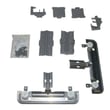






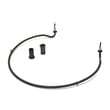

What are the common problems with Kenmore dishwashers?
Kenmore dishwashers like model 66513262K113 most often have problems with draining, filling, cleaning performance, leaks, and drying. In many cases, the root cause is a clog (filter, drain path, spray arm) or a worn part such as a pump, inlet valve, or heating component.
Most common symptoms and what usually causes them
- Won’t drain or drains slowly: food debris in the sump area, kinked drain hose, or a failing drain pump
- Won’t fill or fills slowly: closed water supply valve, clogged inlet screen, or a bad inlet valve
- Dishes come out dirty: blocked spray arm holes, overloaded racks, low water temperature, or poor detergent choice
- Leaks: loose hose connections, damaged door seal area, or a sump seal issue
- Not drying well: heater circuit problem, rinse aid empty, or cycle selection (no heat dry)
Quick checks we recommend before replacing parts
- Reset the cycle: cancel/drain, then restart a normal cycle.
- Confirm basics: water supply valve fully open; dishwasher is level; door closes firmly.
- Inspect and clean: remove debris from the sump area and clear spray arm holes.
- Check the drain path: look for kinks or high-loop issues in the drain hose.
- Verify heat and detergent: run hot water at the sink first; use fresh detergent and rinse aid.
Parts that commonly fix these issues on 66513262K113
| Symptom | Likely part to check | Example part for this model |
|---|---|---|
| Standing water, no drain | Drain pump | Dishwasher drain pump WPW10348269 |
| No/low fill | Water inlet valve | Dishwasher water inlet valve W11175771 |
| Poor drying, cool water | Heater | Dishwasher heater W10703867 |
| Weak wash or poor coverage | Spray arm | Dishwasher spray arm WPW10491331 |
Why it matters
Drain, fill, and heat problems can cascade: low fill reduces spray pressure, clogs prevent proper draining, and lack of heat hurts both cleaning and drying. Catching the symptom early helps prevent odors, leaks, and repeat wash cycles.
For model-specific cycle options, cleaning guidance, and diagnostic steps, use the 66513262K113 owner’s manual.
Last updated: January 2026
How to hard reset a Kenmore dishwasher?
To hard reset your Kenmore dishwasher model 66513262K113, we recommend using the control-panel reset sequence (often called a “cancel/drain” reset) to clear a stuck cycle and reboot the control. Follow the exact button sequence and timing in the 66513262K113 user manual.
Quick hard reset steps (most common)
- Press Cancel/Drain once to stop the cycle.
- If the dishwasher begins draining, let it finish (typically 1 to 2 minutes).
- Turn power off at the breaker for 3 minutes.
- Restore power, then select a normal cycle and press Start/Resume.
- If the controls are unresponsive, try a heated dry + high temp style key sequence if your console has those options (some Kenmore models use a 2-key pattern).
If the dishwasher still will not reset
These checks address the most common reasons a reset does not “take.”
- Door not fully latched: open and firmly re-close the door, then press Start/Resume.
- Water left in the tub: a drain issue can make the unit seem “frozen”; inspect the drain path and consider the dishwasher drain pump WPW10348269 if the pump hums but will not move water.
- Control lock enabled: look for a “Lock” indicator and hold the lock key (varies by console).
- Power supply issue: confirm the breaker is on and the dishwasher has steady power.
- Stuck keypad or moisture in console: dry the console area and try again after a few minutes.
What a “hard reset” actually does
A hard reset clears the current cycle state and forces the electronic control to reboot. It does not fix underlying problems like a clogged drain hose, failed drain pump, or a door latch that is not engaging.
| Symptom after reset | Most likely cause | What to check next |
|---|---|---|
| Won’t start, lights on | Door not latched or control lock | Door latch, lock setting |
| Won’t drain | Drain restriction or pump problem | Filter area, drain path, drain pump |
| Stops mid-cycle | Heating, fill, or wash issue | Water fill, heater, spray arm movement |
Why it matters
Resetting is the fastest way to recover from a stalled cycle, power glitch, or control confusion. If the dishwasher repeatedly needs resets, that pattern usually points to a drain, fill, heating, or control problem that needs troubleshooting.
Last updated: January 2026
Where is the filter on a Kenmore quiet guard dishwasher?
On the Kenmore 66513262K113 (Quiet Guard style) undercounter dishwasher, the filter is in the bottom of the tub, directly under the lower dishrack, around the sump area. You access it by pulling out the lower rack and lifting or twisting the filter assembly out.
How to access and remove the filter
- Turn off power at the breaker and let the heater cool.
- Pull the lower rack straight out to expose the tub floor.
- Look for a round or oval filter screen and filter basket near the center bottom.
- Rotate the filter (typically counterclockwise) to unlock, then lift it out.
- Rinse the filter under warm water; use a soft brush for grease and debris.
- Reinstall by seating it flat, then rotate to lock (it should sit flush and stable).
For the exact filter style and removal steps used on your 66513262K113, follow the diagrams and instructions in the 66513262K113 owner’s manual.
What you should see (quick guide)
| What you notice in the tub bottom | What it usually means | What to do |
|---|---|---|
| Round screen/basket near center | Main filter area over the sump | Remove, rinse, reinstall flush |
| Standing water with debris | Filter clogged or drain issue | Clean filter; check drain path |
| Grity residue on dishes | Filter dirty or spray arm issue | Clean filter; inspect spray arm |
If cleaning the filter does not fix poor cleaning
- Confirm the spray arm holes are not clogged; remove and rinse if needed.
- Make sure the lower rack is not blocking spray arm rotation.
- Use fresh detergent and run hot water at the sink before starting the cycle.
- Check for slow draining; a restricted drain can redeposit soil.
- If you suspect a wash circulation problem, inspect the dishwasher spray arm WPW10491331 for damage or blockage.
Why it matters
A clean filter keeps food soil from recirculating through the wash system. That improves cleaning performance, helps prevent odors, and reduces strain on the pump and drain system.
Last updated: January 2026
Why is the start button not working on my Kenmore Ultra Wash quiet guard?
On Kenmore model 66513262K113, a Start button that won’t respond is usually caused by the door not latching (door switch not closing), a stuck keypad/console, or a control that is not accepting input. We start with a reset, then confirm the door latch and control panel are working.
Quick checks that fix many “won’t start” complaints
- Make sure the door is fully closed and latched; press firmly until it clicks.
- Cancel the cycle, then try a normal cycle again.
- Reset power: turn the dishwasher off at the breaker (or unplug) for 5 minutes, then restore power.
- Confirm the control lock is off (if your console has a lock feature).
- If lights work but nothing starts, try a different cycle and press Start, then close the door immediately.
Most common causes (in order)
- Door latch or door switch issue: If the control does not sense a closed door, it will not start.
- Console/keypad problem: A worn or shorted keypad can make Start unresponsive.
- Electronic control problem: The control may power up but not process button presses.
What to inspect safely
Turn off power at the breaker before opening panels.
- Door latch alignment: Check for loose screws, a sagging door, or a latch that does not catch consistently.
- Moisture or detergent residue: Clean around the console buttons and inner door edge; residue can interfere with button travel.
- Wiring connections: Look for loose connectors at the console/control area.
Parts that are often involved
If the dishwasher fills and drains but won’t start a wash cycle, these model-matched parts are commonly checked during diagnosis:
| Symptom | What it points to | Example part for this model |
|---|---|---|
| Start button dead or intermittent | Console/keypad or control | Console (white) WPW10380081 |
| Powers on but won’t run any cycle | Main control not responding | Dishwasher electronic control W10595569 |
Why it matters
The Start button is part of a safety and control sequence. If the door switch does not prove the door is closed, or the control cannot read the keypad input, the dishwasher prevents operation to avoid leaks and unsafe running conditions.
For model-specific button sequences and control lock details, use the 66513262K113 owner’s manual.
Last updated: January 2026









