 Owner’s manual
 Error Codes




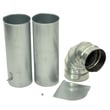
How do you reset the flow sensor on a LG dryer?
On the LG DLEX5680V dryer, the Flow Sense (duct blockage sensing) alert clears when you restore proper airflow; clean the lint filter and exhaust venting, then power the dryer off and back on. Flow Sense is an airflow warning, so fixing the restriction is the real “reset.”
What to do to clear a Flow Sense alert
- Turn the dryer off and let it sit for a minute, then restart the cycle.
- Clean the lint screen before every load; replace it if it is torn or won’t seat correctly (see dryer lint screen by LG 5231EL1001C).
- Check the lint screen grille area for buildup and clean it.
- Inspect the vent hose behind the dryer for kinks, crushing, or a long sag that traps lint.
- Clean the entire vent run to the outside hood; remove lint and confirm the damper opens freely.
- Avoid running the dryer with the vent disconnected; it can blow lint into the cabinet.
Quick airflow checklist (most common causes)
| Check | What “good” looks like | What to fix |
|---|---|---|
| Lint filter | Clean, no film, fits flat | Wash residue off, replace if damaged |
| Vent hose | Short, smooth, not crushed | Reroute, shorten, replace crushed hose |
| Outside hood | Strong airflow, flap opens | Clear lint, remove blockage, replace hood |
| Duct run | Minimal elbows, not clogged | Clean duct, reduce bends if possible |
Why it matters
Flow Sense helps detect restrictions in household ductwork that reduce exhaust airflow. Keeping the duct clean improves drying efficiency and helps prevent long dry times and overheating-related shutdowns.
Helpful references
- Use the DLEX5680V owner's manual for Flow Sense indicator details, cleaning reminders, and operating tips.
- For model-specific troubleshooting steps and display messages, use LG dryer error codes.
Last updated: February 2026
What is the most common problem with LG dryers?
The most common problem we see with LG dryers like model DLEX5680V is restricted airflow, which causes long dry times and can trigger airflow or overheating-related shutoffs. A clogged lint filter, blocked exhaust duct, or an overly long vent run are the usual culprits; heating and drum-drive parts are next most common.
Most common symptoms and what they usually mean
- Clothes take too long to dry: lint filter needs cleaning, exhaust duct is blocked/dirty, or vent run is too long
- Dryer stops early or seems to “shut off”: airflow restriction can cause heat buildup and safety shutdown behavior
- No heat or weak heat: heating circuit issue (electric models), or heat control components
- Noise (thumping, squealing, grinding): worn belt, idler pulley, or drum support rollers
- Error codes such as tE1/tE2: thermistor-related temperature sensing problem
Quick checks we recommend first (fastest wins)
- Clean the lint filter and make sure it seats fully; never run the dryer without it.
- Check the outside vent hood for strong airflow while the dryer runs.
- Inspect the vent path for kinks, crushed flex duct, lint buildup, or excessive length.
- If your dryer shows a duct blockage alert, clean or repair the ducting to restore airflow.
- If drying is still slow, compare cycle and heat settings to the recommendations in the DLEX5680V owner's manual.
Common parts involved (when it is not just venting)
If airflow is good but performance or noise issues continue, these are frequent wear items for this model:
| Symptom | Likely area | Example part on this page |
|---|---|---|
| Squealing or drum not turning well | Drum drive | Dryer drum belt 4400EL2001F |
| Rumbling or thumping | Drum support | Dryer drum support roller 4581EL2002H |
| tE1/tE2 error code | Temperature sensing | Dryer thermistor AGM30045804 |
Why it matters
Airflow problems do more than slow drying; they trap heat in the dryer and ductwork, which can lead to repeated shutoffs, higher energy use, and extra wear on thermostats and heating components. Keeping the lint filter and venting clean is the best prevention.
Helpful reference
- For code meanings and what to check next, use our LG dryer error codes guide.
- To order replacement parts for LG DLEX5680V, use the parts list for this model or search by model number on Sears PartsDirect.
Last updated: February 2026
Why does my LG dryer keep saying 80% duct blockage?
On LG model DLEX5680V, the Flow Sense duct blockage sensing system is detecting restricted exhaust airflow; the “80% duct blockage” message (often shown as D80) points to a significant restriction in your household venting that needs cleaning or repair to restore proper airflow. See the venting and duct-check details in the DLEX5680V owner's manual.
What usually causes the 80% duct blockage alert
Most D80 alerts come from airflow restrictions between the dryer and the outside vent hood.
- Lint buildup in the vent pipe or wall duct
- A crushed, kinked, or damaged transition duct behind the dryer
- A vent run that is too long or has too many elbows/bends
- A blocked exterior vent hood (lint, stuck flap, pest screen clogged)
- A nearly clogged lint filter or lint screen housing area (reduces airflow at the source)
What to do next (quick, practical steps)
- Clean the lint filter and make sure it seats fully.
- Inspect the transition duct behind the dryer; replace it if it is crushed or flimsy.
- Check the outside vent hood while the dryer runs; you should feel strong, steady airflow.
- Clean the full vent run from the dryer outlet to the exterior termination.
- If the message returns, shorten and straighten the vent path where possible.
Helpful parts that can improve airflow at the dryer
If your lint screen is damaged, warped, or not fitting tightly, replacing it can help maintain proper airflow.
| Symptom at the dryer | What to check | Part that may help (if needed) |
|---|---|---|
| “Check Filter” light stays on | Lint screen condition and fit | Dryer lint screen by LG 5231EL1001C |
| Lint bypassing the screen | Lint screen grille condition | Dryer lint screen grille 3550EL1005C |
| Lint screen area not sealing | Cover and spring alignment | Dryer lint screen cover spring 4970EL4002C |
Why it matters
Restricted venting makes the dryer run hotter and longer, increases energy use, and can leave clothes damp. Keeping the ductwork clean and free of restrictions helps your DLEX5680V dry faster and more efficiently.
Related help for LG dryer messages
If you are also seeing other codes or alerts, use our LG dryer error codes guide to match the display to the right troubleshooting steps.
You can order replacement parts for your LG DLEX5680V from the parts list for this model, or search by model number on Sears PartsDirect.
Last updated: February 2026
What is the life expectancy of an LG dryer?
LG dryers typically last 10 to 15 years in normal household use. For your LG DLEX5680V, consistent airflow maintenance (lint filter and venting) and fixing wear items early (belt, rollers, idler) are the biggest factors in reaching that lifespan; see the DLEX5680V owner's manual for model-specific care steps.
What affects dryer lifespan the most
- Airflow and venting: restricted exhaust makes the dryer run hotter and longer.
- Lint control: clean the lint filter every load; keep the lint path clear.
- Drum support wear: worn rollers or an idler pulley can strain the motor and belt.
- Heat control parts: thermostats and thermistors help prevent overheating.
- Load habits: chronic overloading accelerates belt, roller, and motor wear.
Quick maintenance checklist (best ROI)
- Clean the lint filter and confirm it seats correctly each cycle.
- Inspect and clean the vent duct periodically; use heavy metal venting where possible.
- Listen for squealing, thumping, or scraping; address noises early.
- Keep the area around the dryer free of lint buildup.
Common wear parts that can shorten life (and what they do)
| Symptom | Likely wear area | Example part for DLEX5680V |
|---|---|---|
| Drum not turning, burning rubber smell | Belt or idler system | Dryer drum belt 4400EL2001F |
| Thumping or rumbling | Drum support rollers | Dryer drum support roller 4581EL2002H |
| Squealing, belt slipping | Idler pulley | Dryer idler pulley 4560EL3001A |
| Long dry times, overheating symptoms | Airflow or temperature sensing | Dryer thermistor AGM30045804 |
Why it matters
A dryer that is forced to run hot or run long (usually from lint restriction or vent issues) wears out the heating system, motor, and drum support parts faster. Keeping airflow strong is the simplest way to extend the service life of an LG dryer.
You can order replacement parts for your LG DLEX5680V from the parts list for this model, or search by model number on Sears PartsDirect.
Last updated: February 2026









