 Owner’s manual




How do I clear the error code on my LG dishwasher?
To clear an error code on your LG LDT7797BD dishwasher, we first cancel the current cycle so the control can drain and reset. Press and hold Start for 3 seconds to cancel; once draining finishes, the dishwasher powers off and the code typically clears (if the problem is corrected). For model-specific control details, use the LDT7797BD owner’s manual.
Quick steps to clear the code
- Press Power to wake the control (if needed).
- Press and hold Start for 3 seconds to Cancel (the drain pump will run).
- Wait for draining to finish; the dishwasher should turn off automatically.
- Turn Power back on.
- Run a short cycle (Turbo or Rinse) to confirm the code stays cleared.
If the code comes back right away
An error code usually returns when the dishwasher still detects the underlying issue. These are common, model-relevant checks:
- OE (drain error): Check for a kinked drain hose, a clogged disposal or waste tee knockout, or a blocked drain path.
- IE (inlet error): Confirm the water supply valve is fully open and the supply line is not kinked.
- Door not starting: Make sure the door is fully latched and Control Lock is off.
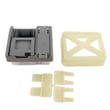
If you are troubleshooting a drain-related code and the unit will not drain, the drain pump may need inspection or replacement; see LG dishwasher drain pump ABT72989206.
What “Cancel” does on this model
| Action | What it does | When to use it |
|---|---|---|
| Press and hold Start (3 sec) | Cancels the cycle and drains, then powers off | Best first step for most error codes |
| Power off/on | Reboots the control | After Cancel completes |
Why it matters
Clearing the code without fixing the cause can lead to repeat shutdowns, poor cleaning, or water left in the tub. Canceling correctly also forces a drain, which helps protect the dishwasher if the cycle is stuck.
Last updated: January 2026
What is the most common problem with LG dishwashers?
For the LG LDT7797BD, the most common “problem” we see is poor cleaning or draining caused by routine issues: a dirty filter area, blocked spray arm holes, or loading that prevents water from reaching dishes. These are usually fixable with cleaning and a few quick checks in the LDT7797BD owner's manual.
Most common issues (and what to check first)
- Not cleaning well: Filter area needs cleaning; spray arms are blocked; dishes are loaded too tightly.
- Not draining: Food debris in the sump area; drain path restriction; drain pump issue.
- Spots or film: Low rinse aid, hard water, or too much detergent.
- Wet dishes: Rinse aid low; Extra Dry not selected; plastics retain water.
- Error codes: Often point to fill or drain conditions that start with hose kinks or water supply being off.
Quick checks for LDT7797BD that solve most complaints
- Clean the filters and check the sump area (maintenance section in the manual).
- Spin the upper and lower spray arms by hand; make sure they rotate freely and holes are not clogged.
- Confirm hot water supply is in the recommended range (the manual lists 120°F minimum and 149°F maximum).
- Use rinse aid and choose options like High Temp or Extra Dry when needed.
- If it will not drain, listen for the drain pump running; if it hums but water stays, inspect the drain path.
When it’s likely a part (common symptom-to-part mapping)
| Symptom | Most likely area | Example compatible part for this model |
|---|---|---|
| Won’t drain or drains slowly | Drain system | LG dishwasher drain pump ABT72989206 |
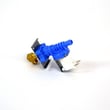
| Won’t fill or fills slowly | Water supply inlet | Dishwasher water inlet valve 5221DD1001E |
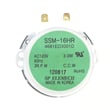
| Leaves soil, wash pressure seems weak | Wash routing/diverter | Dishwasher diverter motor 4681ED3001D |
Why it matters
A clogged filtration system or blocked spray arm can make the dishwasher run longer, clean worse, and sometimes trigger drain or fill related errors. Keeping the filter area clean is the fastest way to protect wash performance and reduce repeat problems.
Last updated: January 2026
Does LG have Aquastop?
LG does include leak and overflow protection on many dishwashers, but for LG model LDT7797BD we can’t confirm that LG markets it specifically as “AquaStop” based on the model-specific information we have. For the exact safety and troubleshooting language LG uses, check the LDT7797BD owner’s manual.
What leak protection usually means on LG dishwashers
Even when the term “AquaStop” isn’t used, leak protection commonly involves these behaviors:
- Stops water filling if an overfill condition is detected
- Runs the drain pump to remove water from the tub
- Shows an error indicator or error code
- Prevents starting a new cycle until the condition clears
- Helps reduce the chance of cabinet or floor water damage
What you may see if leak protection is active
If your dishwasher is reacting to a leak or overfill, symptoms often include:
- Drain pump runs continuously
- Dishwasher won’t fill with water
- Cycle stops mid-cycle
- Error light or code appears on the front display
For code meanings and next steps, use LG dishwasher error codes.
Parts that can be involved (model LDT7797BD)
We avoid guessing at “AquaStop” parts because names vary by brand and model. On LDT7797BD, these model-listed parts are commonly involved in fill and drain issues that can look like leak protection:
- Dishwasher water inlet valve 5221DD1001E (controls water entering the dishwasher)
- LG dishwasher drain pump ABT72989206 (pumps water out during drain)
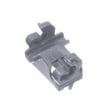
- Dishwasher drain check valve MJX63511301 (helps prevent drain water from flowing back)
“AquaStop” vs. LG leak protection
| Term you may hear | What it usually refers to | Typical location |
|---|---|---|
| AquaStop (brand term) | A specific branded leak-stop system, sometimes including a special inlet hose | Water supply line and/or base |
| Leak/overflow protection | Sensors and controls that stop filling and may drain when water is detected where it shouldn’t be | Tub/base area and controls |
Why it matters
If you’re troubleshooting “won’t fill,” “won’t start,” or constant draining on LDT7797BD, knowing whether the dishwasher is in a leak/overflow response mode helps you focus on the right checks first.
Last updated: January 2026





