 Installation guide
 Owner’s manual
 Error Codes





How do I reset my Frigidaire gas oven control board?
To reset the oven control board on your Frigidaire FFGF3047LSE gas range, turn the range’s power off at the breaker (or unplug it) for about 1 minute, then restore power and reset the clock and any oven settings. This clears many temporary control glitches and power-interruption errors.
- Turn all surface burner knobs to OFF.
- Shut off power at the circuit breaker (preferred) or unplug the range.
- Wait 60 seconds.
- Restore power.
- Reset the clock and oven function as needed (this is required after power is restored).
- Test Bake and Broil to confirm normal operation.
A reset helps with temporary faults, but repeated error codes or no-heat symptoms usually point to a failed component.
Common next checks:
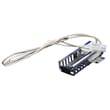
- If the oven will not ignite or takes a long time to light, inspect the hot surface igniter; a weak igniter is a top cause on gas ovens.
- If temperatures are consistently off but the oven heats, use the control’s temperature adjustment feature (calibration) rather than replacing parts.
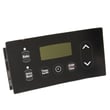
- If the display is erratic or buttons do not respond, the control board or keypad overlay may be the issue.
| Symptom | What it often indicates | Example part for FFGF3047LSE |
|---|---|---|
| Oven will not ignite, no heat | Weak or failed igniter | Range oven burner igniter 5304509706 |
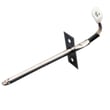
| Oven heats but runs too hot/cold | Calibration needed or sensor issue | Range oven temperature sensor 316233903 |
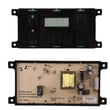
| Display issues, random beeps, nonresponsive controls | Control board or overlay problem | Range oven control board 5304518661 |
Resetting power is the fastest way to clear a “stuck” control state after a power interruption. If the problem returns quickly, focusing on the igniter, temperature sensor, or control board prevents repeated no-heat situations and helps avoid unsafe ignition attempts.
For control features like setting the clock and adjusting oven temperature, follow the steps in the FFGF3047LSE owner’s manual.
Last updated: January 2026
How long do Frigidaire gas ranges last?
Most Frigidaire gas ranges, including model FFGF3047LSE, typically last 13 to 19 years with normal household use and basic maintenance. Keeping burners clean, addressing ignition issues early, and following the care steps in the FFGF3047LSE owner's manual helps you get the longest service life.
A range’s life depends more on heat, grease, and wear parts than on the cabinet itself.
- Cleaning habits: spillovers and grease buildup shorten the life of burner parts and controls
- Ignition wear: igniters and switches are common wear items
- Heat exposure: frequent high-heat baking/broiling stresses wiring and electronic controls
- Gas quality and airflow: clogged ports or poor combustion can cause uneven heating
- Timely repairs: replacing a small part early can prevent bigger failures
These parts often need attention long before the range itself is “worn out.”
| Part area | What you may notice | Example part for FFGF3047LSE |
|---|---|---|
| Oven ignition | Oven won’t light, slow ignition, gas smell before lighting | Range oven burner igniter 5304509706 |
| Oven temperature sensing | Temperature swings, underbaking/overbaking | Range oven temperature sensor (model-specific) |
| Oven light | Light out, flickering | Appliance light bulb, 40-watt |
If several of these show up together, repairs can add up.
- Repeated ignition failures even after cleaning and basic part replacement
- Oven temperature becomes unreliable across multiple cooks
- Multiple burners won’t light or won’t adjust properly
- Control issues (buttons/knobs not responding consistently)
- Frequent service calls within a short period
Knowing the typical 13 to 19 year lifespan helps you decide whether to repair or replace. If your FFGF3047LSE is mid-life, replacing a wear part like an igniter is often a practical way to restore reliable baking and safe ignition.
Last updated: January 2026
What is the code F22 on a Frigidaire gas range?
On the Frigidaire FFGF3047LSE gas range, error code F22 points to a communication problem between the oven user interface (control panel) and the oven control (relay) board. Start by resetting power, then check wiring connections and related control parts if the code returns.
- Turn the range off at the circuit breaker (or unplug if accessible).
- Wait 30 seconds, then restore power.
- If F22 returns, avoid repeated resets; focus on connections and components.
- If you smell gas at any time, stop and follow the safety guidance in the FFGF3047LSE owner’s manual.
- Loose or oxidized wire connection between the control panel and control board
- Pinched or damaged harness (often after moving the range or a recent repair)
- Failed oven control board
- Failed user interface (touchpad/control panel) or a failing overlay
If the reset does not clear F22, these model-matched parts are commonly checked or replaced during diagnosis:
- Range oven control board 5304518661 (main electronic control)
- Range oven control overlay 316220729 (overlay that interfaces with the control panel)
| What you see | Most likely direction | What we recommend |
|---|---|---|
| F22 appears after a power outage or flicker | Control glitch | Power reset, then monitor |
| F22 appears randomly during baking | Intermittent connection | Inspect harness plugs and seating |
| F22 appears immediately at power-up | Control or UI failure | Test connections, then suspect control parts |
When the UI and control board cannot “talk” reliably, the range may stop heating, beep, or shut down mid-cycle. Fixing the communication issue restores dependable oven operation and helps prevent repeat interruptions.
Last updated: January 2026




