Owner’s manual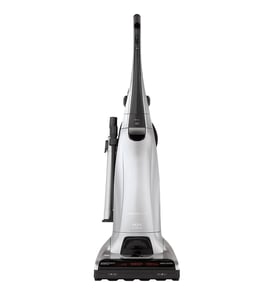

Why is my Kenmore vacuum brush not spinning?
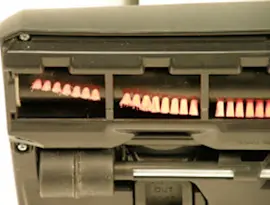
On Kenmore upright vacuum model 11636933502, the brush (agitator) usually stops spinning because the floor setting is set to FLOOR (agitator off), the agitator is jammed with debris, or the agitator motor overload protector has tripped on thick carpet or a rug. Check the settings and clean the agitator first using the owner's manual.
Quick checks (most common fixes)
- Set the touch control to CARPET (high speed) or GENTLE (low speed); FLOOR turns the agitator off.
- Turn the vacuum off and unplug it; remove hair, string, and threads from the agitator.
- If the brush stopped on a thick rug, move to a thinner area and restart; the overload protector can stop the agitator.
- Check for a clog in the nozzle or airflow path; restricted airflow can reduce cleaning performance and contribute to shutdowns.
- Empty the dust bin and clean the primary filter; replace the exhaust filter on schedule.
Use the right setting for your floor
Your vacuum uses a two-speed, direct-drive agitator controlled by the touch settings.
| Touch control setting | Agitator behavior | Best for |
|---|---|---|
| CARPET | High speed | Most carpets (avoid on berber) |
| GENTLE | Low speed | Berber or delicate pile; may slow/stop on thick rugs |
| FLOOR | Off | Bare floors (wood, tile, vinyl) |
If the brush still will not spin
- Unplug the vacuum.
- Clean the agitator thoroughly (ends and brush area).
- Clear clogs in the nozzle and air path.
- Confirm you are not using FLOOR mode.
- If the agitator repeatedly stops in GENTLE on rugs, switch to a more appropriate surface or setting; if it stops in CARPET on normal carpet, the agitator drive or motor system needs troubleshooting.
Why it matters
A non-spinning brush roll reduces carpet agitation, so dirt stays embedded and the vacuum can seem like it has weak pickup even when suction is normal.
Last updated: February 2026
How to open Kenmore 11636933502 Vacuum?
To open your Kenmore 11636933502 upright vacuum for routine access, we focus on the user-service areas: the dust bin/bag area, filters, and the brushroll (agitator) access points. Use the steps in the 11636933502 owner's manual to open the correct covers and avoid damaging latches.
What “open” usually means on this model
Most owners mean one of these:
- Opening the dust bin or bag compartment to empty or change the bag
- Opening the filter cover to clean the primary filter or replace the exhaust filter
- Opening the bottom plate area to clear the agitator (brushroll) or remove clogs
Safe steps before you start
- Unplug the vacuum before opening any cover
- Set the vacuum upright and lock the handle
- Work on a flat surface with good lighting
- Keep screws and small parts in a cup so nothing gets lost
Common access points and what you do there
| Area you open | What it’s for | What to watch for |
|---|---|---|
| Dust bin/bag compartment | Emptying or changing the bag/bin | Don’t force the door; check for a stuck latch |
| Primary filter area | Removing and cleaning the primary filter | Make sure the filter is fully dry before reinstalling |
| Exhaust filter cover | Replacing the exhaust filter | Seat the cover evenly so it seals |
| Bottom/agitator area | Cleaning the agitator and clearing clogs | Remove hair and string; check belt path while you’re there |
Why it matters
Opening the correct compartment the right way prevents broken tabs, air leaks, and loss of suction. It also keeps the motor protected by ensuring filters and covers are installed correctly after cleaning.
Last updated: February 2026
What are the parts of the vacuum?
Your Kenmore upright vacuum model 11636933502 is made up of a suction motor system, a nozzle and brush (agitator) system for carpet pickup, filtration (primary and exhaust filters), a dust bin, and attachment tools (hose, wand, combination brush) that let you clean floors, edges, and above-floor areas. For the exact layout, use the owner's manual.
Main parts and what they do
- Motor and motor protector: creates suction; the motor protector helps prevent damage if airflow is blocked.
- Dust bin: collects dirt and debris; it removes so you can empty it and access some areas for cleaning.
- Nozzle and agitator (brush roll): the nozzle directs airflow at the floor; the agitator loosens debris from carpet.
- Filters: a primary filter (DCF-2) captures fine dust; an exhaust filter (EF-1) helps reduce dust in the air.
- Hose, wand, and combination brush: extend reach for stairs, upholstery, and tight spaces.
- Cord hooks and quick release: store the power cord and help you unwind it quickly.
- Headlight and bulb: lights the cleaning path (uses a headlight bulb style listed in the manual).
Parts and features you will see called out in the manual
| Area | What you may see labeled | Why it matters |
|---|---|---|
| Handle area | Touch control handle, quick release | Controls and handling during cleaning |
| Dirt collection | Dust bin, dirt sensor (optic cells) | Helps indicate dirt pickup; needs gentle cleaning |
| Floor head | Nozzle, furniture guard, release pedal | Floor contact and transitions |
| Attachments | Upper hose hook, extension hose, wand holder | Keeps tools secured and ready |
Why it matters
Knowing the names of the parts helps you match symptoms to the right maintenance step, like cleaning the dust bin, washing the primary filter, replacing the exhaust filter, or clearing the agitator and hose to restore suction.
Quick safety note before you inspect parts
- Unplug the vacuum before checking the nozzle, hose, filters, or agitator
- Do not drip water on the vacuum
- Wrap the cord loosely to avoid cord damage
Last updated: February 2026
Where can I find the Kenmore vacuum model number?
On your Kenmore upright vacuum model 11636933502, the model and serial numbers are printed on the model and serial number plate on the vacuum body. We use that complete model number to match the correct diagrams, filters, belts, and other replacement parts.
Where to look on the vacuum
Check these common spots first (the plate is usually a small label or stamped plate):
- Back of the main vacuum body, near the lower housing
- Bottom of the vacuum, close to the brush roll (agitator) area
- Behind the dust bin or near the dust bin mounting area
- Near the wheels or rear base
- Along the cord wrap area on the back of the handle
For model-specific label locations and how the vacuum is laid out, use the 11636933502 owner's manual.
How to read the number correctly
Kenmore vacuum model numbers are easiest to use when you copy them exactly.
- Write the full model number exactly as shown (all digits, no spaces)
- Record the serial number too; it is often needed for service questions
- If you see punctuation on older labels (example: 116.XXXXXXX), use the digits as printed on your plate
- Take a clear photo of the plate before ordering parts
Quick check table
| What you need | What it’s used for | Tip |
|---|---|---|
| Model number (example: 11636933502) | Matching the correct parts list | Copy every digit |
| Serial number | Service history and production info | Record it with the model |
| Purchase date | Warranty and maintenance tracking | Keep with your receipt |
Why it matters
Using the exact model number prevents ordering the wrong items (especially look-alike parts such as filters, brush rolls, and switches) and helps us pull the right exploded-view diagrams for your Kenmore upright vacuum.
Last updated: February 2026
How to change the belt on a Kenmore vacuum?
To change the belt on your Kenmore upright vacuum model 11636933502, we unplug the vacuum, remove the bottom nozzle cover, lift out the brush roll (agitator), move the belt from the motor shaft to the brush roll, then reinstall the brush roll and cover so the brush spins freely. Use the 11636933502 owner's manual for the exact screw locations and cover style.
Before you start
- Unplug the vacuum (no exceptions).
- Empty the dust bin so the unit is lighter.
- Lay the handle flat and turn the vacuum over.
- Keep screws together so they go back in the same holes.
- Clear hair and string from the brush roll while it is out.
Belt replacement steps (typical Kenmore upright)
- Remove the bottom plate or nozzle cover screws.
- Lift off the cover to expose the brush roll.
- Lift the brush roll out of its slots.
- Slip the old belt off the motor drive shaft and brush roll.
- Loop the new belt around the motor shaft first.
- Stretch the belt onto the brush roll and reinstall the brush roll fully into its end slots.
- Spin the brush roll by hand; it should turn smoothly with light belt resistance.
- Reinstall the nozzle cover and tighten screws evenly.
Quick checks after replacement
- Brush roll turns by hand without scraping.
- Belt sits centered on the brush roll.
- No burning rubber smell during the first minute.
| What you notice | What it usually means | Fix |
|---|---|---|
| Brush roll not spinning | Belt off track or brush roll not seated | Reseat belt and brush roll |
| Belt breaks quickly | Brush roll jammed by debris | Clean brush roll and end caps |
| Loud rattle | Cover not seated or missing screw | Refit cover, reinstall screws |
Why it matters
A stretched or worn belt reduces brush roll speed, which lowers carpet pickup and can make the vacuum harder to use on carpet. A fresh belt restores agitation and cleaning performance.
Last updated: February 2026