



How long do Kenmore canister vacuums last?
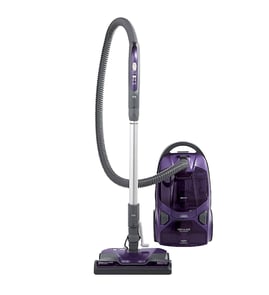
Most Kenmore canister vacuums (including model 11621614015) last 8 to 12 years with normal home use and routine maintenance; heavy use and clogged airflow shorten life, while timely belt, filter, and hose care extends it. For repair help and maintenance how-tos, use our vacuum repair-guides landing page and shop by model on Sears PartsDirect.
Typical lifespan and what changes it
A canister vacuum’s service life is mainly driven by airflow health (bags, filters, clogs) and power head wear (belt, brush roll, bearings).
- Light use (1 to 2 times/week): often 10 to 12 years
- Average use (2 to 4 times/week): often 8 to 10 years
- Heavy use (daily, pets, large homes): often 5 to 8 years
- Poor maintenance (frequent clogs, dirty filters): can drop below 5 to 7 years
Signs it’s near end-of-life vs. needs a repair
Many “old vacuum” symptoms are fixable with cleaning or common wear-part replacement.
| Symptom | Most common cause | What to do first |
|---|---|---|
| Weak suction | Full bag, clogged hose, dirty filter | Clear clogs; replace bag/filter |
| Brush roll not spinning | Worn/broken belt, jammed brush roll | Clean brush roll; inspect belt |
| Shuts off during use | Overheating from restricted airflow | Check for clogs; clean/replace filters |
| Won’t turn on | Cord/plug issue, switch, thermal protector | Check outlet/cord; let it cool; inspect connections |
Maintenance that adds years (best ROI)
These habits protect the suction motor and keep cleaning performance consistent.
- Replace bags before they are packed full (airflow drops fast when overfilled).
- Clean hair and string off the brush roll regularly.
- Check the hose, wand, and power head for clogs when suction drops.
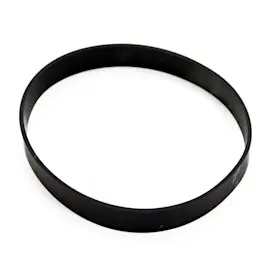
- Replace worn belts promptly (a slipping belt overheats and reduces agitation).
- Keep filters clean or replaced on schedule for your setup.
Why it matters
A Kenmore canister vacuum typically “dies early” from overheating and motor strain caused by restricted airflow. Keeping the bag, filters, and air path clear is the single most effective way to reach the 8 to 12 year lifespan range.
Last updated: February 2026
Does a Kenmore canister vacuum have a fuse?
Yes, many Kenmore canister vacuums (including models in the 116-series like 11621614015) use a fuse or thermal cutout to protect the vacuum if it overheats or draws too much current. If your vacuum is completely dead, checking that protection device is a smart first step before replacing major parts.
What “fuse” usually means on a canister vacuum
On a Kenmore canister vacuum, the protection device is commonly one of these:
- Thermal fuse / thermal cutout: Opens when the motor overheats (often from a clog or restricted airflow).
- Inline fuse: A traditional fuse in the power path (less common than a thermal device, but used on some designs).
- Resettable protector: Trips when hot and resets after cooling (some models).
Quick checks before you assume the fuse is bad
Unplug the vacuum first. Then:
- Try a different outlet (and confirm the outlet works).
- Inspect the cord and plug for cuts, kinks, or burn marks.
- Check for clogs in the hose, wand, and power nozzle; restricted airflow is the #1 cause of overheating trips.
- Let it cool 30 to 60 minutes if it shut off during use.
- Check the bag and filters; a full bag or blocked filter can overheat the motor.
Where the fuse/protector is typically located
Exact placement varies by revision, but these are the most common locations:
| Protection device | Typical location | Common symptom |
|---|---|---|
| Thermal cutout | On or near the suction motor housing | Vacuum won’t run after overheating |
| Inline fuse | In the canister wiring harness, sometimes near cord reel or switch | Vacuum completely dead |
| Resettable protector | Integrated with motor or control area | Shuts off, then works again later |
Why it matters
A blown fuse or tripped thermal cutout is often a result of another problem (clog, dirty filters, jammed brush, failing motor). Fixing the root cause helps prevent repeat failures and protects the suction motor.
Parts and repair help
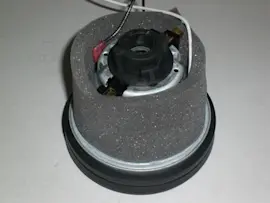
We recommend using the model parts list for Kenmore 11621614015 to match the correct electrical and motor components, then use Sears PartsDirect to search by model number if you are cross-checking diagrams or looking up related assemblies.
For step-by-step troubleshooting by symptom, use our vacuum repair-guides landing page.
Last updated: February 2026
Why does my vacuum have power but no suction?
If your Kenmore canister vacuum model 11621614015 turns on but has little or no suction, the cause is almost always restricted airflow (a full bag or bin, clogged filters, or a blockage in the hose, wand, or power nozzle). Restore suction by clearing the entire air path and sealing any air leaks.
Quick checks that fix most “no suction” problems
- Empty the dust container or replace the vacuum bag (overfilled bags cut airflow fast).
- Clean or replace filters (a clogged pre-motor or exhaust/HEPA filter can stop suction).
- Check the hose and wand for a clog (coins, socks, hair clumps, and paper are common).
- Inspect the floor nozzle and intake for packed debris.
- Reseat all connections (hose to canister, wand to hose, nozzle to wand) so they lock in tightly.
- Look for cracks or loose gaskets that let air leak in.
Step-by-step airflow test (fast and reliable)
Work from the vacuum inward so you find the restriction quickly:
| Test point | What to do | What it tells you |
|---|---|---|
| Hose off the canister | Turn on briefly and feel suction at the canister inlet | Strong suction here means the clog or leak is downstream |
| Hose only | Check suction at the hose end | Weak suction suggests a hose clog, split, or loose cuff |
| Wand attached | Test at the wand end | Weak suction points to a wand blockage |
| Power nozzle attached | Check pickup at the nozzle | Poor pickup can be a nozzle clog or brush roll issue |
If suction is OK but pickup is still poor
Sometimes suction exists, but the carpet nozzle is not agitating:
- Remove hair and string from the brush roll area.
- Check for a stretched or broken belt in the power head.
- Make sure the height setting is correct for your floor type.
For power-nozzle issues, we use these guides: vacuum brush roll on spinning and how to replace a vacuum power head ribbed drive belt.
Why it matters
Running with restricted airflow makes the suction motor run hotter, reduces cleaning performance, and can shorten the life of filters, seals, and the motor.
If you need replacement filters, hoses, belts, or a motor for model 11621614015, start with the parts list for your model, or search by model number on Sears PartsDirect.
Last updated: February 2026
Is the Kenmore Intuition a good vacuum?
The Kenmore Intuition line can be a good choice if you want a bagged upright vacuum with strong carpet cleaning and cleaner dirt disposal. Our page model, Kenmore 11621614015, is a canister vacuum, so “good” for you depends on whether you prefer upright handling (Intuition) or canister maneuverability.
Intuition vs your Kenmore 11621614015 (canister): what changes
These are different vacuum styles, so the best pick comes down to how you clean.
- Upright (Intuition): faster for large carpeted areas, push-forward cleaning
- Canister (11621614015): easier around furniture, better reach for stairs and above-floor
- Bagged design (both styles): cleaner disposal and good dust containment
- Maintenance needs: bags, filters, and brush/belt condition drive performance
Quick comparison
| Feature | Kenmore Intuition (upright) | Kenmore 11621614015 (canister) |
|---|---|---|
| Best for | Wall-to-wall carpet, quick passes | Mixed floors, tight spaces, above-floor cleaning |
| Feel in use | One-piece push vacuum | Hose and wand with canister trailing |
| Common “not cleaning” causes | Full bag, clogged airflow, worn belt/brush | Clogged hose/wand, dirty filters, worn belt/brush in power nozzle |
| Storage | Smaller footprint | More pieces (hose, wand, nozzle) |
How we judge whether a vacuum is “good”
Use these checks to match the vacuum to your home and avoid disappointment.
- Flooring mix: mostly carpet vs mostly hard floors
- Pet hair: needs strong agitation and consistent airflow
- Allergies: bagged systems reduce dust exposure during disposal
- Above-floor needs: hose reach, wand control, tool set
- Upkeep tolerance: replacing bags and cleaning filters on schedule
If performance is disappointing, check these first
Many “bad vacuum” complaints are maintenance-related.
- Replace the bag before it is packed full
- Clear hose and wand clogs (hair plugs, socks, debris)
- Clean hair from the brush roll and confirm it spins freely
- Inspect the drive belt for stretching or breakage
- Clean or replace filters to restore airflow
For step-by-step troubleshooting by symptom and repair type, use our vacuum repair-guides landing page. For replacement parts and accessories by model number, search on Sears PartsDirect.
Why it matters
Choosing the right style (upright vs canister) and keeping bags, filters, and brush drive parts maintained protects suction, improves pickup, and reduces motor strain.
Last updated: February 2026