Installation guide
 Owner’s manual
 Error Codes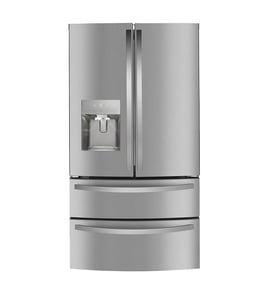




How to find Kenmore refrigerator model number?
On Kenmore refrigerator model 25370413419, the model number is printed on the rating/serial plate inside the fresh food (refrigerator) compartment. Open the refrigerator door and look along the inside walls; it is designed to be easy to read for parts lookup and service.
Where to look first (fastest checks)
- Inside the refrigerator compartment on an interior side wall (rating/serial plate)
- Near the crisper drawer area (check the wall behind or just above the lower drawers)
- Along the door opening frame (the cabinet face you see when the door is open)
- Behind the toe grille or kick plate area (some units place labels low on the cabinet)
What you should write down
For ordering parts and matching diagrams, we recommend recording these exactly as shown:
- Model number (example format: 25370413419)
- Serial number
- Purchase date (helpful for service history)
| Item | What it’s used for | Where it appears |
|---|---|---|
| Model number | Matching parts and diagrams | Rating/serial plate inside refrigerator compartment |
| Serial number | Identifying production run | Same rating/serial plate |
Why it matters
Kenmore model numbers can look similar across a series, but small differences change which door gasket, ice maker, or control parts fit. Using the exact model number helps ensure you get the correct replacement part the first time.
Helpful reference
The Use & Care Guide explains that you should record the model and serial numbers from the serial plate inside the refrigerator compartment; see the 25370413419 owner's manual.
Last updated: January 2026
Is there a reset button on a Kenmore refrigerator?
Kenmore refrigerator model 25370413419 does not use one universal, dedicated “reset button” for the whole refrigerator. Most resets are done by power-cycling the unit or using a specific control-panel reset (for example, resetting the water filter status) as described in the 25370413419 owner's manual.
The most common “reset” methods
- Hard reset (power cycle): Unplug the refrigerator (or switch off the breaker) for about 5 minutes, then restore power.
- Control feature reset: Some features have their own reset sequence (example: water filter status).
- Mode reset: If a special mode is active, you must exit that mode using the control panel.
Model-specific resets we see in the manual
The manual for this Kenmore model includes these control-panel resets:
| What you want to reset | What to do on the controls | What you should see |
|---|---|---|
| Water filter status light | Press and hold Water Filter for 3 seconds | Status changes (example: red to green) |
| Sabbath Mode | Press and hold the freezer “∨” and refrigerator “∧” indicators for 5 seconds | Display shows “Sb” when ON; normal display when OFF |
Why it matters
A power cycle clears many temporary control glitches, but it will not fix a failed component (like a temperature sensor, fan motor, or control board). If the refrigerator still will not cool or alarms keep returning, troubleshooting the specific symptom is the fastest path to the right repair.
If you are resetting because of a problem
- If the display is unresponsive, check whether Sabbath Mode is ON.
- If you just replaced a filter, reset the Water Filter status so reminders stay accurate.
- If cooling is weak after a reset, listen for fan operation and check for airflow blockage.
- If you see an error code, use the Kenmore 253 series french door refrigerator error codes reference to match the code to a likely cause.
Last updated: January 2026
What is the er if code on a Kenmore refrigerator?
On Kenmore refrigerator model 25370413419, the ER IF code points to an ice fan (ice room fan) airflow problem, which can lead to warm temperatures in the ice compartment and poor ice production. We focus on checking for ice buildup, blocked vents, and fan operation.
What to check first (fast, no parts)
- Power reset: unplug the refrigerator (or turn off the breaker) for 5 minutes, then restore power.
- Make sure the ice bin and any packaging are not blocking air passages.
- Look for frost or ice buildup around the ice room or rear panel that could stop airflow.
- Confirm doors close fully and seals are making contact.
- Listen for a small fan running when the unit is cooling (fan noise may be faint).
Common causes and what they mean
| Likely cause | What you’ll notice | Typical fix |
|---|---|---|
| Ice room fan not running | ER IF returns, weak ice production | Inspect fan area; replace failed fan components if needed |
| Ice buildup restricting airflow | Fan may run but airflow is poor | Defrost/clear blockage; address defrost issue if it returns |
| Door not sealing well | Frost near door, moisture, temp swings | Adjust/clean seal; replace gasket if torn |
| Wiring/control issue | Fan tests good but code persists | Check harness connections; service diagnosis |
Parts that are often involved (when a repair is needed)
If you confirm the fan is obstructed or damaged, these model-matched parts are commonly related to airflow and icing symptoms:
- Refrigerator evaporator fan blade 5308000010 (damaged blade can reduce airflow)
- Refrigerator defrost sensor 808137001 (defrost sensing issues can contribute to icing)
- Refrigerator defrost bi-metal thermostat 5304521781 (defrost protection and cycling)
Why it matters
The ice fan moves cold air to the ice compartment. When airflow is restricted or the fan cannot run, temperatures rise and the refrigerator can overwork, which can affect ice production and overall cooling performance.
Where to find model-specific guidance
Use the troubleshooting and error code information in the 25370413419 owner's manual. For code interpretation and next steps specific to Kenmore 253-series units, use Kenmore 253 series french door refrigerator error codes.
Last updated: January 2026