Installation guide
 Owner’s manual
 Error Codes



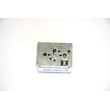

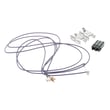

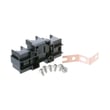
How do I reset the error code on my GE oven?
On the GE JBP35DM1WW electric range, you can usually clear a flashing “F-” error by disconnecting power to the range for at least 30 seconds, then restoring power. If the code returns, press Clear/Off and address the underlying issue (often a latch or control problem).
Steps to reset a GE “F-” function error code
- Turn the range off at the household breaker (or unplug if accessible).
- Leave power off for at least 30 seconds.
- Restore power and watch the display.
- If the code reappears, touch Clear/Off.
- If the error happened during self-clean, verify the door latch is fully in the locked position, then let the oven cool for about 1 hour before trying again.
What the display is telling you
When the display shows “F-” plus a number or letter, the control is reporting a function error. These are the most common “next checks”:
| When it happens | Most likely area to check | What to do first |
|---|---|---|
| During self-clean | Door latch not fully locked | Move latch fully to the right, press Clear/Off, cool 1 hour |
| After a power outage/surge | Control glitch or settings lost | Reset power, then reset the clock |
| Any time, repeats after reset | Control or wiring issue | Inspect power connection and consider control diagnostics |
Parts that are commonly involved (when the code keeps coming back)
If the reset works only temporarily, the problem is usually not the “code”; it is the component triggering it.
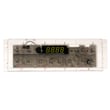
- Electronic control: range oven control board WB27X45466
- Power connection issues at the back of the range (burnt/loose terminals): terminal block WB17T10011
- Miswire indication (some models show “bAd” then “linE”): verify the house-to-range wiring matches the installation instructions
Why it matters
Repeated error codes can stop baking, broiling, or self-cleaning mid-cycle. Resetting power clears a temporary glitch, but a repeating code helps pinpoint a failing control, latch condition, or power connection so you can restore safe, reliable heating.
For model-specific keypads, display messages, and troubleshooting notes, use the JBP35DM1WW owner’s manual.
Last updated: January 2026
What does F350 mean on my GE stove?
On a GE electric range such as model JBP35DM1WW, the F350 code points to a problem in the upper cooling fan circuit or a cooling fan obstruction. Restoring airflow and verifying the fan circuit connections typically clears the condition.
What to check first (safe, quick steps)
- Press Clear/Off to reset the control and see if the code returns.
- Make sure the oven vent area is not blocked by foil, pans, or spills.
- Let the range cool completely; then restore power and re-test.
- If the code appears during or after high-heat use, confirm the range has proper clearance for airflow.
- If the code returns quickly, plan to inspect the cooling fan circuit per the JBP35DM1WW owner's manual.
Troubleshooting path for F350
Because F350 is tied to cooling fan operation, we focus on airflow first, then electrical.
| What you observe | Most likely cause | What we recommend |
|---|---|---|
| Code appears after baking/broiling | Fan not moving enough air | Check for vent blockage; verify fan runs when hot |
| Code returns immediately after reset | Fan circuit fault | Inspect wiring connections and fan circuit components |
| Oven shuts down or behaves erratically with the code | Control reacting to overheating risk | Stop using the oven until the fan issue is corrected |
Parts that may be involved
F350 is not usually caused by a bake or broil element; it is more commonly tied to cooling/controls. If diagnosis points to the electronic control, a common related part for this model is the range oven control board WB27X45466.
- Cooling fan motor (if equipped on your configuration)
- Fan wiring harness and connectors
- Electronic oven control (EOC)
- Sensor inputs the control uses to manage heat and cooling
Why it matters
The cooling fan helps protect the control area from excessive heat. When the fan circuit is blocked or failing, the range may display F350 to prevent overheating and reduce the chance of repeated shutdowns during cooking.
Last updated: January 2026
What type of electric stove is best?
For most homes, the best electric stove type comes down to priorities: induction is the fastest and most efficient, a smooth-top radiant range is the easiest to wipe clean, and a coil-top range is the most budget-friendly and durable. For your GE JBP35DM1WW electric range, cookware fit and safe installation clearances matter as much as the cooktop style; see the JBP35DM1WW installation guide for spacing and electrical requirements.
Quick comparison: induction vs radiant vs coil
| Type | Best for | Pros | Trade-offs |
|---|---|---|---|
| Induction | Speed, precision, efficiency | Very fast boil, responsive control, cooler cooktop surface | Needs magnetic cookware, higher upfront cost |
| Radiant smooth top (glass) | Easy cleaning, modern look | Flat surface, even heat, widely available | Slower response than induction, glass can scratch |
| Coil elements | Value and durability | Lowest cost, simple parts, tolerant of heavy cookware | Less precise, harder to clean around bowls and drip pans |
How to choose the “best” type for your kitchen
- Choose induction if you want the quickest heat changes and best energy efficiency.
- Choose radiant smooth top if you want a sleek look and easy wipe-down cleaning.
- Choose coil if you want a proven design with straightforward maintenance.
- Match the stove type to your cookware; flat-bottom pans perform best on any electric surface.
- Plan for your electrical setup; most electric ranges use a 120/240V (or 120/208V) supply and a properly rated range cord.
Installation and safety details that matter
Your range choice should also fit your space and wiring. The GE installation guidance calls out key clearances and electrical considerations.
- Avoid cabinet storage above the cooktop when possible to reduce burn risk.
- If cabinets are above the cooktop, a hood that extends outward helps reduce risk.
- Typical guidance includes 30 inches minimum from surface units to the bottom of an unprotected cabinet.
- New construction commonly uses a 4-conductor connection; many installs use a UL-listed 3- or 4-conductor range cord.
Why it matters
The “best” electric stove is the one that matches how you cook (speed vs simplicity), your cookware, and your kitchen setup. Even a top-performing range will disappoint if pans do not sit flat or if the installation clearances and electrical connection are not correct.
Last updated: January 2026