Installation guide
 Owner’s manual


How to factory reset Amana washer?
For the Amana NTW4701BQ1 washer, the closest thing to a factory reset is a control power reset: unplug the washer (or switch off the breaker) for about 5 minutes, then restore power and restart a cycle. This clears many control glitches and stuck states.
Quick reset steps (recommended first)
- Press START/Pause to stop the cycle.
- Unplug the washer (or turn the breaker off).
- Wait 5 minutes.
- Plug back in (or turn breaker on).
- Close the lid and start a new cycle.
If the washer still will not start, confirm the lid is fully closed; this model will not run with the lid open. See the NTW4701BQ1 owner's manual for operating and troubleshooting details.
When a “reset” is really a calibration
After certain repairs (especially drive, suspension, or control work), the washer can act “off” until it’s calibrated. On many Amana top-load models, calibration is run from diagnostic mode using a specific knob or button sequence, then letting the washer complete the calibration routine.
Use this approach when you notice:
- Off-balance or excessive vibration during spin
- Unusual stopping or pausing behavior
- Poor agitation or weak spin performance after a repair
For the correct diagnostic and calibration procedure for NTW4701BQ1, follow the steps in the NTW4701BQ1 installation guide.
What to check if the washer still will not run
These items commonly look like a “needs reset” problem but are actually a condition the control is detecting:
- Power supply: confirm the outlet has power; reset a tripped breaker.
- Water supply: both hot and cold faucets must be on; hoses cannot be kinked.
- Inlet screens: clogged screens can prevent proper filling.
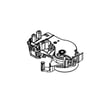
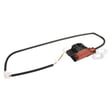
- Lid lock: if the lid will not lock, the cycle may not start; inspect the washer lid lock assembly W10404050.
Reset vs. repair: quick guide
| Symptom | Best first step | Likely next step |
|---|---|---|
| Control seems frozen, lights odd | Power reset | Calibration routine |
| Won’t fill | Check faucets, hoses, screens | Replace inlet valve if faulty |
| Won’t start, lid issue | Check lid closes and locks | Test/replace lid lock |
Why it matters
A power reset clears temporary electronic faults, while calibration re-teaches the control how the drive system and basket respond. Using the right method helps prevent repeat stoppages, off-balance spins, and unnecessary part replacement.
Last updated: February 2026
Does my top load Amana washer have a filter?
Yes. Your Amana top-load washer model NTW4701BQ1 does not use a front-access lint filter like many front-load washers; instead, it relies on self-cleaning drain pumping and good loading habits. For model-specific cleaning and maintenance steps, use the NTW4701BQ1 owner's manual.
What “filter” means on this washer
Most top-load washers like the NTW4701BQ1 do not have a routine-clean lint screen. “Filtering” is typically handled in these ways:
- The drain pump moves wash water out; lint is carried out with the water
- Small items can occasionally get trapped between the basket and tub or in the pump area
- Suds from too much detergent can slow draining and act like a clog
- Proper loading helps prevent debris from recirculating onto clothes
Quick checks if you suspect a clog or poor draining
If clothes come out wetter than normal or the washer seems slow to drain, we recommend:
- Use the correct amount of HE detergent (too much can cause excess suds)
- Avoid tightly packing the basket; load items in loose heaps around the basket wall
- Check the standpipe and household drain for partial clogs
- Confirm the drain hose is installed correctly and not shoved too far down the standpipe
- Inspect the drain hose for kinks or restrictions; replace if damaged (see washer drain hose W11244231)
Symptoms and the most likely cause
| What you notice | Most likely issue | What to do first |
|---|---|---|
| Slow drain, long pauses before spin | Excess suds or restricted drain path | Reduce detergent; check drain hose and home drain |
| Loads still wet after cycle | Unbalanced or tightly packed load | Redistribute load; run Drain/Spin |
| Washer stops and won’t continue | Lid not closed or cycle paused | Close lid; restart cycle |
Why it matters
Because there is no simple lint screen to clean, drain performance depends on correct detergent use, proper loading, and a clear drain path. Keeping those basics right prevents wet loads, odors, and repeat drain issues.
Last updated: February 2026
What would cause an Amana washer not to spin?
On the Amana NTW4701BQ1, a no-spin problem is usually caused by the lid not closing and locking, a drain issue that leaves water in the tub, an unbalanced or tightly packed load, or a worn drive system part such as the belt. Use the NTW4701BQ1 owner's manual troubleshooting steps to narrow it down.
Quick checks (fastest fixes first)
- Make sure the lid is fully closed; the washer must sense a closed lid to run and spin.
- Redistribute the load; tightly packed or unbalanced loads can stop or limit spinning.
- Run Drain/Spin to remove extra water; this is the recommended way to recover a wet load.
- Reduce detergent if you see heavy suds; excess suds can slow or stop draining and spinning.
- Confirm the drain hose is installed correctly; it should not be shoved too far into the standpipe.
Most common causes and what they look like
| What you notice | Likely cause | What we recommend |
|---|---|---|
| Washer will not start spinning at all | Lid not locking or lid lock failure | Check lid closure; if the lock does not engage, replace the washer lid lock assembly W10404050. |
| Tub stays full or drains very slowly | Drain hose install issue, clog, or suds | Correct hose setup, clear restrictions, then run Rinse/Spin with no detergent. |
| Spins sometimes, but stops with a heavy load | Unbalanced or overloaded basket | Load in loose heaps around the basket wall; choose the right load size. |
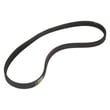
| Motor runs but basket does not reach speed | Worn or loose belt | Inspect and replace the washer drive belt WPW10006384 if glazed, stretched, or damaged. |
Why it matters
Spinning depends on two things working together: the washer must be able to drain water quickly and it must be able to safely ramp up to spin speed (lid closed and load balanced). If either condition fails, the NTW4701BQ1 can pause, stop, or leave clothes wet.
When a repair is more likely
If the washer drains correctly and the load is balanced but it still will not spin, focus on spin-related parts:
- Lid lock assembly
- Drive belt
- Gear case and drive components
- Brake actuator
For deeper diagnostics and cycle behavior notes, follow the troubleshooting section in the NTW4701BQ1 owner's manual.
Last updated: February 2026
How to stop Amana washing machine?
To stop an Amana NTW4701BQ1 washer, press CANCEL to end the cycle, or press START/Pause/Unlock Lid to pause. If the lid is locked, it unlocks only after the basket stops moving, which can take several minutes after a high-speed spin (see the NTW4701BQ1 owner's manual).
Quick ways to stop or pause the washer
- Pause the cycle: Press START/Pause/Unlock Lid once.
- Open the lid: Wait for the Lid Locked light to turn off; the washer must stop moving first.
- Resume washing: Press START/Pause/Unlock Lid again.
- Cancel the cycle: Press CANCEL to stop the cycle.
- If it is draining or spinning: Expect a short wait; the control will not unlock the lid until motion stops.
What the lid lock light means
When the washer is running, the lid lock status tells you what you can do.
| Lid Locked light status | What it means | What to do |
|---|---|---|
| On (solid) | Lid is locked; you cannot open it | Press START/Pause/Unlock Lid and wait |
| Blinking | Washer is paused | Wait for unlock, then open lid if needed |
| Off | Lid can be opened | Open lid and add or remove items |
Why it matters
Stopping a top-load washer mid-cycle is mainly about safety. The NTW4701BQ1 can spin at higher speeds for water removal, so the lid stays locked until the basket fully stops to prevent injury and water splash.
If the washer will not stop or unlock
- Make sure the lid is fully closed and not binding.
- Wait 2 to 5 minutes after a spin for the basket to stop.
- Unplug the washer for 1 minute, then restore power and try CANCEL.
- If the lid will not unlock consistently, inspect the washer lid lock assembly W10404050.
Last updated: February 2026