 Installation guide
 Owner’s manual



Where can I find my Frigidaire dryer model number?
On your Frigidaire dryer model FASE7073LA0, the model number is printed on the serial plate at the top of the door opening. Open the dryer door and look along the upper edge of the opening for the label that lists both the model and serial numbers.
What to look for on the label
The serial plate typically includes several identifiers. Use these details to make sure you capture the right information:
- Model number (example format: FASE7073LA0)
- Serial number (unique to your specific dryer)
- Electrical rating information (volts/amps)
- Sometimes the manufacturing date code
Quick steps to find it fast
- Turn the dryer off.
- Open the door fully.
- Look at the top inside edge of the door opening.
- Write the model number exactly as shown (letters and numbers).
- Keep it with your paperwork or save it in your phone.
Why it matters
We use the exact model number to match the correct Frigidaire dryer parts, diagrams, and troubleshooting info. Even small model-number differences can change which heating element, belt, or control parts fit.
Common label locations (comparison)
| Appliance type | Most common model tag location |
|---|---|
| Dryer (like FASE7073LA0) | Top of the door opening |
| Washer | Under the lid or along the door opening |
| Refrigerator | Inside fresh food section wall or ceiling |
For additional model-specific details and record-keeping tips, check the FASE7073LA0 owner's manual.
Last updated: February 2026
What does code E68 mean on a Frigidaire dryer?
On a Frigidaire FASE7073LA0 dryer, error code E68 points to a keypad or user-interface button problem, most often a stuck key. We recommend running the built-in function test mode to identify the specific button and then correcting the cause (debris, moisture, or a failing control).
What to do first (quick checks)
- Press each console button one at a time; confirm none feel physically stuck.
- Unplug the dryer for 2 minutes, then restore power and recheck.
- Wipe the console with a barely damp cloth, then dry it fully (avoid spraying cleaner directly on the panel).
- If the code returns immediately, the issue is usually in the console key circuit, not the load or vent.
- If the dryer will not start, confirm the door is closing and latching normally.
Use function test mode to find the stuck key
Your dryer’s tech sheet procedure is referenced in the FASE7073LA0 owner’s manual. In general, function test mode lets the control “see” which key input is being detected continuously so you can pinpoint the problem button.
What typically fixes E68
| Finding | Most likely cause | Typical fix |
|---|---|---|
| One button always “active” | Stuck key or contamination | Clean and dry the keypad area; free the key |
| Multiple keys act erratically | Moisture or failing user interface | Let panel dry; replace the interface/control if needed |
| Code appears after moving dryer | Pinched/loose console wiring | Inspect and reseat console connections |
Why it matters
A stuck key can keep the control from accepting normal cycle selections, and it can prevent starting or cause beeping and repeated error displays. Addressing it early helps avoid unnecessary part replacements.
When a part is likely needed
If cleaning and power-cycling do not stop E68, the failure is commonly in the electronic control or user interface. For this model, the control is listed as control assembly 809160802.
Last updated: February 2026
How much does it cost to replace a heating element in a Frigidaire dryer?
For a Frigidaire FASE7073LA0 dryer, the total cost to replace the heating element is usually the price of the part plus labor. The heating element itself is commonly the biggest cost; if you hire service, labor often adds a separate charge.
Typical cost breakdown
Here’s what we usually see customers pay, depending on whether they DIY or hire a technician:
- Part cost: typically $100 to $250 for an electric dryer heating element
- Labor (if serviced): typically $150 to $300 (varies by region and access)
- Service call/diagnostic fee: often $75 to $125 (may be applied to repair)
- Total installed cost: commonly $250 to $550
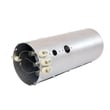
If you’re replacing the heater in this model, the correct part to price out is the dryer heating element 134792700.
What to check before buying a heating element
A dryer can run but not heat for reasons other than a failed element. In the FASE7073LA0 owner information, common no-heat checks include power supply issues (on electric models, one house fuse can blow and the drum still turns) and safety devices that trip during overheating.
- Confirm the dryer is on a dedicated circuit and has full power
- Check for a blown fuse or tripped breaker (electric dryers can have 2 fuses)
- Inspect and clean the lint screen and venting to prevent overheating
- If an overheat safety device has opened, address airflow restrictions first
- Use the wiring diagram and procedures in the FASE7073LA0 installation guide when accessing electrical connections
Parts that are often replaced with the heating element
If overheating or airflow restriction caused the failure, these related parts are commonly inspected or replaced at the same time:
| Symptom | Common related part to check | Why it matters |
|---|---|---|
| No heat after overheating event | Thermal limiter | Can open to protect the dryer |
| Heater cycles off too soon | High-limit thermostat | Controls heater temperature |
| Long dry times | Venting and lint buildup | Restricts airflow and raises temps |
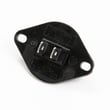
Model-matched options on this page include the dryer inlet thermal limiter 137032600 and the kelvinator dryer high-limit thermostat 3204267.
Why it matters
A weak airflow setup can overheat the heater housing and trip safety devices, which increases repair cost and can shorten the life of the new heating element. Cleaning the vent path and confirming correct electrical supply helps the repair last.
Last updated: February 2026
How to take off the front of a Frigidaire dryer?
To remove the front on your Frigidaire FASE7073LA0 dryer, we disconnect power, open the cabinet, then remove the front panel fasteners and lift the panel up and off the lower tabs. Use the FASE7073LA0 installation guide for safe access points and screw locations.
Before you start (safety and setup)
- Turn off power at the breaker or remove the fuse; confirm the dryer is dead.
- If needed, pull the dryer forward carefully so you can work without straining the exhaust duct.
- Protect the floor and the front edge of the dryer with cardboard or a towel.
- Keep a small container for screws so nothing gets lost.
- Take a quick photo of any wire routing before you unplug connectors.
Front panel removal steps (typical Frigidaire layout)
- Unplug the dryer (or keep breaker off) and open the door.
- Remove screws that secure the top (often at the back); slide the top back slightly and lift it.
- If the door switch harness is attached to the front panel, disconnect the plug; cut any zip tie only if it prevents unplugging.
- Remove the front panel mounting screws (usually inside the cabinet near the top corners).
- Lift the front panel straight up to unhook it from the lower retaining tabs, then pull it forward and off.
What you may need to remove first
| Item | When it comes off | Why |
|---|---|---|
| Dryer door | If it blocks access to hinge-side screws | Makes the panel lighter and easier to handle |
| Lint screen housing screws | If the housing is fastened to the front panel | Prevents bending the duct/housing |
| Control console access | Only if the wiring diagram/tech sheet is needed | Helps with wire routing and diagnostics |
Why it matters
Removing the front panel correctly prevents pinched wires, cabinet damage, and misalignment that can cause rubbing noises or poor door closing. It also gives you safe access to common wear parts like the white-westinghouse dryer drum belt 134719300 and drum support components.
Last updated: February 2026





