Owner’s manual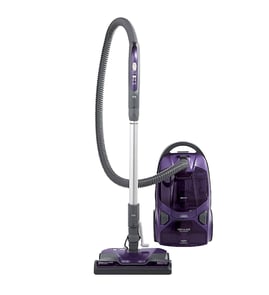


Does a Kenmore canister vacuum have a fuse?
Yes. Many Kenmore canister vacuums, including model 11621612001, use an internal fuse or thermal cutout as part of the power circuit to help protect the vacuum if it overheats or has an electrical fault. Use the 11621612001 owner's manual to locate the electrical and troubleshooting information for your exact configuration.
What “fuse” usually means on a canister vacuum
On canister vacuums, the protection device is typically one of these:
- Thermal protector (thermal fuse/cutout): opens when the motor overheats; may reset after cooling or may be one-time.
- Inline fuse: a replaceable fuse in the power path (less common than thermal protection).
- Circuit breaker/reset: a button or resettable device (more common on some power nozzles).
Quick checks before assuming the fuse is blown
These steps fix the most common “no power” causes and prevent repeat overheating:
- Confirm the outlet works (try a lamp) and plug the vacuum into a 120-volt outlet near the floor.
- Fully unwind the cord and inspect for cuts, burn marks, or a loose plug.
- Check for a clog in the hose, wand, or power nozzle; a blockage can overheat the motor.
- Replace a full bag and clean or replace filters (restricted airflow is a top cause of thermal trips).
- Let the vacuum cool for 30 to 60 minutes if it shut off during use.
Symptoms and what they usually point to
| Symptom | Most likely cause | What to do next |
|---|---|---|
| Vacuum won’t turn on at all | No power, bad cord/cord reel, switch issue, open fuse/thermal cutout | Verify outlet, inspect cord, then follow manual troubleshooting |
| Vacuum shuts off during use | Overheating from clog, full bag, dirty filters, failing motor | Clear airflow path, service filters, cool down |
| Power nozzle issues but canister runs | Belt/brush roll jam, nozzle wiring, nozzle motor | Inspect brush area and belt path |
Why it matters
A fuse or thermal protector is a safety device. If it opens, it is usually reacting to overheating or an electrical problem. Clearing airflow restrictions and keeping filters maintained helps prevent repeat shutdowns and protects the suction motor.
Related DIY help
Last updated: January 2026
Where is the reset button on the Kenmore vacuum?
On the Kenmore 11621612001 canister vacuum, the most common “reset” is on the Power-Mate nozzle: it’s the overload protector reset button that trips when the brush (agitator) jams. If the vacuum overheats, it can also shut off by itself and resets after cooling. See the 11621612001 owner's manual.
Where to look (by symptom)
- Brush stops but canister motor keeps running: check the Power-Mate overload protector; the reset button is on the Power-Mate nozzle body.
- Whole vacuum shuts off: the thermal protector likely tripped; there is no button to press.
- Lights change on the nozzle: those are typically dirt sensor indicators, not a reset.
How to reset it safely
- Turn off the vacuum.
- Unplug the power cord.
- Clear the jam (hair, string, rug fringe) from the brush roll area.
- Press the overload protector reset button on the Power-Mate.
- Plug in and test on carpet.
If it overheated (thermal protector)
The thermal protector turns the motor off to prevent overheating. Use this checklist before restarting:
- Check for a full bag or restricted airflow
- Remove clogs from hose, wand, and nozzle air path
- Check and replace clogged filters
- Wait about 50 minutes for the motor to cool, then restart
| What happened | Likely protection device | What you do |
|---|---|---|
| Brush roll stops, suction still runs | Overload protector (Power-Mate) | Clear jam, press reset button |
| Vacuum shuts off completely | Thermal protector (motor overheat) | Clear clogs, check filters, cool down |
Why it matters
Resetting without removing the obstruction or airflow restriction can quickly trip protection again and can damage the belt, brush roll, or motor over time.
Related DIY help: vacuum brush roll on spinning.
Last updated: January 2026
Why is my Kenmore vacuum not suctioning?
On a Kenmore 11621612001 canister vacuum, weak or no suction is almost always caused by restricted airflow: a full bag, clogged filters, or a blockage in the hose, wand, or power nozzle. Restoring suction usually comes down to clearing the restriction and servicing the filters per the 11621612001 owner's manual.
Quick checks that fix most suction problems
- Replace the vacuum bag if it is full or the airflow seems reduced.
- Check the hose and wand for a clog (coins, socks, hair clumps) and remove it.
- Inspect the power nozzle intake area for packed debris.
- Clean dust buildup from internal passages you can safely access.
- Service the filters (washable filters: clean and fully dry; disposable filters: replace).
Step-by-step airflow test (fast and reliable)
- Start at the canister: remove the hose from the canister port and check suction at the port.
- Add one piece at a time: connect the hose, then the wand, then the power nozzle, checking suction each time.
- The part you connect right before suction drops is where the restriction is.
Common causes and what you’ll notice
| What’s wrong | Typical symptom | What to do |
|---|---|---|
| Full bag | Motor sounds normal, pickup is weak | Replace bag |
| Clogged filter(s) | Reduced airflow, dust smell | Clean or replace filters |
| Blocked hose/wand | Sudden loss of suction | Clear blockage |
| Power nozzle jam | Poor pickup on carpet | Clear intake and brush area |
Dirt sensor lights: what they mean (not a suction gauge)
If your power nozzle has a dirt sensor, the red/green lights indicate how much dirt is being detected, not how strong suction is. The manual notes the sensor lens can get coated with dirt and may need periodic cleaning so the lights work correctly. Use the cleaning steps in the 11621612001 owner's manual.
Why it matters
Running with restricted airflow can reduce cleaning performance and can make the vacuum run hotter than normal. Keeping the bag, filters, and air path clear protects the suction motor and helps the vacuum clean efficiently.
Last updated: January 2026