Owner’s manual
 Error Codes

What is the bottom compartment of a fridge called?
On a GE CYE22USHKSS bottom-mount refrigerator, the bottom compartment is the freezer compartment (also called the bottom freezer). The compressor area is also down low, but it is not a storage compartment; it is part of the sealed cooling system.
Common names you will hear (and what they mean)
- Freezer compartment: The bottom drawer area where food freezes.
- Bottom freezer: Another way to describe the freezer compartment on a bottom-mount unit.
- Fresh food compartment: The upper refrigerator section.
- Machine compartment: The lower rear area where the compressor, condenser fan, and other cooling components sit.
- Crisper/deli/temperature controlled drawer: Drawers inside the fresh food compartment, not the freezer.
Quick reference table
| Term people use | What it usually refers to | Is it for food storage? |
|---|---|---|
| Bottom compartment | Freezer compartment (bottom freezer) | Yes |
| Bottom of the fridge | Machine compartment (compressor area) | No |
| Bottom drawer | Freezer drawer (or sometimes a fresh food drawer on some designs) | Usually |
| Lower bin/drawer | Climate zone or temperature controlled drawer (in fresh food section) | Yes |
Why it matters
Using the right name helps you find the correct instructions and parts for your GE CYE22USHKSS. For example, “freezer compartment” issues often involve airflow and defrost components, while “machine compartment” issues relate to cooling-system operation.
Where to confirm the exact terminology for your model
GE uses consistent terms in the documentation for this style of refrigerator. For the exact labels used for drawers, bins, and compartments on your unit, check the owner's manual.
Last updated: February 2026
How to remove bottom grille on GE refrigerator?
On the GE CYE22USHKSS bottom-mount refrigerator, the bottom grille (base grille) typically comes off by releasing its retaining tabs or removing a couple of mounting screws (model variations exist). Once released, pull the grille straight out from the bottom front of the cabinet.
Before you start
- Unplug the refrigerator or switch off power at the breaker (recommended when working near wiring).
- If the unit is tight to the wall, raise the front leveling legs slightly and pull the refrigerator straight out to create working room.
- Protect the floor; pulling sideways can damage flooring.
Steps to remove the bottom grille
- Look along the top edge and corners of the grille for screws; remove them if present.
- If there are no screws, grip the grille at both ends and pull outward to pop the clips free.
- If it feels stuck, press along the grille edge to locate clip points, then pull near each clip (do not yank from one side only).
- Set the grille aside and keep any screws together for reinstallation.
Reinstalling the grille
- Align the grille tabs with the slots in the cabinet frame.
- Push the grille straight in until it seats flush.
- Reinstall any screws (if your grille uses them) and snug them down.
Quick troubleshooting if it will not come off
| What you notice | Most likely cause | What to do |
|---|---|---|
| Grille moves but will not release | Clips still engaged | Pull near each clip point, working left to right |
| Grille will not budge at all | Hidden screws | Check corners and underside for screws |
| Grille removed but airflow seems blocked | Dust buildup | Vacuum the grille and front intake area before reinstalling |
Why it matters
The bottom grille is the main access point for cleaning lint and dust from the front intake area. Keeping it clear helps airflow, improves cooling performance, and reduces strain on the compressor.
For model-specific diagrams and any grille fastener details, use the owner's manual.
Last updated: February 2026
What is the most common problem with GE refrigerators?
The most common GE refrigerator complaint is a cooling problem (fresh food section too warm, freezer OK or temperatures drifting). On GE model CYE22USHKSS, this is often tied to airflow and defrost performance, so we start by checking fan operation, frost buildup, and temperature sensing using the owner's manual.
Most common issues we see (and what to check first)
- Not cooling correctly: verify set temperatures, allow 24 hours after first plug-in or a power outage for temps to stabilize.
- Loud humming, fan noise, clicking, popping: many sounds are normal as fans change speed and the system defrosts.
- Water leaking or puddles: check for a clogged/iced drain path and confirm the water line is not kinked.
- Ice maker or dispenser issues: confirm water pressure, filter condition, and that the ice chute door is closing.
- Door sealing and alignment problems: inspect gaskets and door alignment if you see condensation or uneven doors.
Quick triage: symptom to likely area
| Symptom | Most likely area to inspect | Common next step |
|---|---|---|
| Freezer cold, fresh food warm | Airflow (evaporator fan, ducts) | Listen for fan; check vents for blockage |
| Heavy frost on freezer back wall | Defrost system | Inspect defrost heater and thermostat |
| Temps swing up and down | Temperature sensing/control | Check sensor placement and wiring |
| Buzzing/humming after dispensing ice | Ice chute motor/door | Treat as normal if brief |
Parts that commonly relate to these problems on CYE22USHKSS
If troubleshooting points to a failed component, these model-matched parts are commonly involved:
- Refrigerator temperature sensor WR55X10025 for inaccurate temperature feedback
- GE refrigerator evaporator fan motor WR60X26866 for weak or no airflow
- Refrigerator defrost heater WR51X10132 and refrigerator defrost bi-metal thermostat WR50X10108 for frost buildup from defrost failure
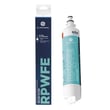
- GE refrigerator water filter RPWFE for slow dispensing or poor water flow (replace on schedule)
Why it matters
Cooling complaints are usually airflow or defrost related; fixing the root cause protects food safety, reduces compressor run time, and prevents recurring frost, leaks, and noise.
Last updated: February 2026