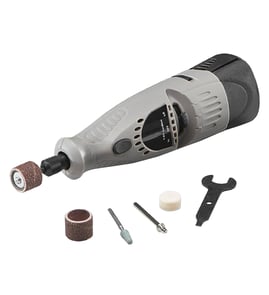

What type of tool is a RotoZip?
A Rotozip (including the Rotozip SCS01 rotary tool) is a high-speed rotary cutting tool that works like a compact, handheld router. It spins a small bit to cut, trim, and plunge-cut materials such as drywall, wood, plastic, and some tile.
What it’s used for
Most people use a Rotozip-style rotary tool for fast cutouts and detail cutting where a saw is awkward.
- Cutting outlet and switch openings in drywall
- Trimming around door jambs and baseboards
- Plunge-cutting and freehand cutouts
- Following templates or tracing lines
- Light routing and edge trimming (with the right bit and guide)
How it compares to similar tools
Here’s a quick way to think about where a rotary tool fits versus other common cutters.
| Tool type | Best for | Typical limitation |
|---|---|---|
| Rotary tool (Rotozip) | Fast cutouts, plunge cuts, tight spaces | Can wander without a guide; bit choice matters |
| Jigsaw | Curves and controlled cuts in sheet goods | Needs a starter hole for interior cutouts |
| Oscillating multi-tool | Flush cuts and small precise openings | Slower for long cuts |
| Compact router | Clean edges, controlled routing | Usually needs a base and setup time |
Choosing the right bit and setup
The “type of tool” matters less than matching the bit and control method to the material.
- Use the correct bit for drywall, wood, or tile; the wrong bit burns, chips, or breaks.
- Set cutting depth so the bit just clears the material (reduces kick and wire or stud strikes).
- Use a guide, edge, or template when you need straight lines.
- Keep a firm two-hand grip and start the motor before contacting the surface.
- Let the speed do the work; forcing the tool increases chatter and bit wear.
Why it matters
Rotary tools cut aggressively and quickly, so the right bit, depth, and guiding method improves accuracy and reduces damage to the work surface (and the bit).
For more DIY safety basics before working on powered equipment, use our guide: are diy appliance repairs safe.
Last updated: February 2026
How do I maintain a RotoZip saw?
To maintain your Rotozip SCS01 rotary tool, we focus on safe cleaning, airflow, and wear-item checks. Keep vents clear, keep the bit area free of packed dust, and inspect the cord and collet regularly so the motor runs cooler and cuts stay controlled.
Routine maintenance checklist (every use)
- Unplug the tool before any cleaning or inspection.
- Brush or blow dust off the housing and motor vents; do not push anything into vent openings.
- Wipe the exterior with a dry or slightly damp cloth; keep liquids away from switches and vents.
- Check the bit and collet for buildup; remove packed debris so the bit seats fully.
- Inspect the power cord for nicks, cuts, or loose strain relief.
What to avoid (prevents damage)
- Do not insert pointed objects (like picks, screwdrivers, or nails) into ventilation slots.
- Do not spray cleaners or compressed air at close range into the tool; use gentle airflow and keep distance.
- Do not run dull, bent, or unbalanced bits; they increase vibration and can wear bearings faster.
Quick troubleshooting: symptoms and what they usually mean
| Symptom | Most common cause | What we do first |
|---|---|---|
| Tool runs hot | Vents clogged, heavy load, dull bit | Clean vents, reduce feed pressure, replace bit |
| Excess vibration | Bent bit, loose collet, debris in collet | Reseat bit, clean collet, tighten collet |
| Intermittent power | Damaged cord, worn switch | Inspect cord, test switch continuity |
Why it matters
A rotary tool relies on airflow for cooling and a tight collet for safe cutting. Keeping vents clear and the bit properly seated helps prevent overheating, reduces vibration, and extends motor and bearing life.
Helpful DIY reference
If you suspect an electrical issue (cord, switch, or internal wiring), we use a meter-based check before replacing anything; see how to use a multimeter to test electrical parts video.
Last updated: February 2026
What number is SCS01?
SCS01 is the model number for a Rotozip rotary tool (SCS01 TYPE 1). It identifies the exact tool version so you can match the correct diagrams, accessories, and replacement parts for your specific Rotozip.
What SCS01 tells you (and what it does not)
SCS01 is not a phone code or serial number. It is the tool’s model identifier.
- Model number: SCS01 (used to look up parts and diagrams)
- Brand: Rotozip
- Tool type: rotary tool
- Version detail: “TYPE 1” helps separate revisions within the same model family
Where to find the SCS01 model number on the tool
On most rotary tools, the model label is printed on a rating plate or sticker.
- Check the housing near the motor vents
- Look around the cord entry area (corded tools)
- Check the base/foot or underside of the body
- Look for a label that includes SCS01 and often “TYPE 1”
Model number vs. serial number (quick comparison)
| Identifier | Example | What it’s used for |
|---|---|---|
| Model number | SCS01 | Matching parts diagrams and compatible components |
| Type/version | TYPE 1 | Distinguishing design revisions within the model |
| Serial number | (varies) | Production tracking; sometimes needed for service history |
Why it matters
Using the correct model number prevents ordering the wrong carbon brushes, switch, cord, collet, or housing components. Even small design changes between “types” can affect fit and wiring.
Helpful next step
If the label is missing or unreadable, use our guide: how to find your appliance model number (and what it means for parts).
Last updated: February 2026
Can you use router bits in a RotoZip?
Yes, you can use router bits in a Rotozip rotary tool when the bit shank matches the tool’s collet size and the bit is used with a stable base that controls depth. For the Rotozip SCS01, confirm the exact collet size on your tool before buying or installing any router bit.
What to verify on your Rotozip SCS01
- Collet size on the tool: Router bits must match the collet exactly (common router shanks are 1/4 inch and 1/2 inch).
- Correct base attachment: A router-style base (flat “shoe”) keeps the bit square and helps control depth.
- Bit diameter and profile: Smaller, straight bits are easier on a rotary tool; large profiles can overload the motor.
- Material match: Router bits are intended for wood and some plastics; use the correct accessory for metal or masonry.
- Tool condition: Worn collets, bent shafts, or excessive runout cause chatter and can loosen bits.
Quick fit check before powering on
| Check | Good result | What to do if it’s not right |
|---|---|---|
| Shank fit | Shank slides in smoothly with minimal play | Use a bit with the correct shank size |
| Tightening | Collet tightens firmly and holds the shank | Inspect/replace the collet if it won’t clamp |
| Clearance | Bit spins without touching the base | Re-seat the bit and adjust depth |
| Stability | Base sits flat on the workpiece | Install the proper base attachment |
Safe setup tips
- Unplug the tool before changing bits.
- Make multiple shallow passes; avoid forcing the cut.
- Clamp the workpiece and keep two hands on the tool.
- Stop if you feel heavy vibration, burning, or the bit starts to slip.
Why it matters
Router bits create side-load. If the shank does not match the collet or the base is unstable, the bit can chatter, gouge the work, or loosen, which can damage the tool and reduce control.
Related help: are diy appliance repairs safe
Last updated: February 2026