Owner’s manual
 View engine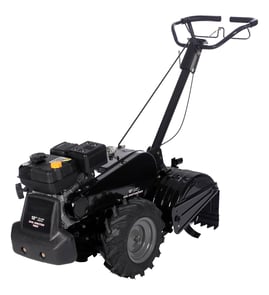



Where is the model number on a tiller?
On the Craftsman rear-tine tiller model 917293471, the model number is printed on the product ID label (decal). On most tillers, that label is typically placed on the tine shield/guard area or on the frame near the engine and controls; confirm the exact location using the 917293471 owner's manual.
Common places to check on a rear-tine tiller
Look for a rectangular sticker or metal tag with the model number and sometimes a serial number.
- Tine shield or tine guard (near the tines)
- Main frame rail on the left or right side
- Near the handle/control panel area
- Around the belt guard area
- Near the engine mounting area (on the frame, not on the muffler)
What the label usually looks like
The model number is often printed as a full number string (for this unit: 917293471). It may be grouped with other identifiers.
| Label item | What it’s used for | Example for this tiller |
|---|---|---|
| Model number | Matches the correct parts diagrams and parts list | 917293471 |
| Serial number | Identifies the specific production unit | Varies |
| Engine model | Used for engine-specific parts and tune-up items | 120402-0109-E1 |
Tips to find it faster
- Wipe dirt and oil off the frame and tine shield; labels get obscured easily.
- Use a flashlight and look along flat frame surfaces where decals stick well.
- If the tiller has been repainted, check for an outline where a decal used to be.
Why it matters
Using the exact model number ensures we match the correct Craftsman parts (like the drive belt, clutch cable, and tine shield hardware) and avoid ordering look-alike parts that do not fit.
Last updated: January 2026
How often should I change the oil in my tiller?
For the Craftsman rear-tine tiller model 917293471, we change the engine oil after every 50 hours of operation or at least once a year, whichever comes first. We also check the oil level before starting and after each 5 hours of continuous use; see the 917293471 owner's manual.
Recommended oil-change interval
Use this schedule as your baseline:
- Every use: check engine oil level before starting
- Every 5 hours (continuous use): re-check oil level
- Every 50 hours: change engine oil
- At least once per year: change engine oil even if you did not reach 50 hours
- Heavy load or high heat: change oil more often
- Dusty or dirty conditions: service more often (dirt accelerates wear)
Quick reference table
| How you use the tiller | When we change the oil |
|---|---|
| Normal seasonal use | Every 50 hours or yearly |
| Heavy load or high ambient temperature | More often than every 50 hours |
| Dusty or dirty soil conditions | More often than every 50 hours |
Oil type and viscosity tips
The manual calls for high-quality detergent oil meeting API service SF-SJ, and selecting SAE viscosity based on temperature.
- Warm weather: SAE 30 is commonly used
- Cold weather starting: multi-viscosity oils (like 5W-30 or 10W-30) can help starting, but we monitor oil level more often because consumption can increase above 32°F
- Always check level frequently: running low on oil can damage the engine
Why it matters
Fresh oil protects internal engine parts from heat and wear. On a rear-tine tiller, long run times and dusty soil can break down oil faster, so staying on schedule helps the engine last longer and keeps performance consistent.
Last updated: January 2026
What tiller is made in the USA?
If you’re specifically looking for a tiller made in the USA, Mantis is commonly identified as a brand that designs, engineers, and manufactures its tillers in the United States. For your Craftsman rear-tine tiller model 917293471, our 917293471 owner's manual covers operation, maintenance, and specifications, but it does not identify a USA manufacturing origin.
How to confirm where a tiller is made
The most reliable way is to check the product identification information on the machine itself and compare it to the documentation.
- Look for a data plate or label on the frame (often near the engine, handle base, or tine shield)
- Check for “Made in …” or “Assembled in …” language on the label
- Record the full model number and any serial number
- Compare the model number to the documentation and parts listing for accuracy
- If you’re shopping, check the carton label and the manufacturer’s product page before purchase
What we can confirm for Craftsman 917293471
The documentation for this model identifies it as a Craftsman rear-tine tiller with a 5.5 HP engine and 14-inch tine width, and it provides safety rules, maintenance guidance, and parts identification. It does not state a country of manufacture.
| Item | What to check | Where to find it |
|---|---|---|
| Country of manufacture | “Made in” statement | Product data plate/label |
| Model identification | Model and serial | Data plate and 917293471 owner's manual |
| Parts compatibility | Exact part IDs | Model parts list (example: tiller clutch cable 532110675) |
Why it matters
Country of manufacture can affect availability, parts sourcing, and your expectations for support. Confirming the exact model and label details also helps ensure you order the correct Craftsman parts (like a drive belt, clutch cable, or tine hardware) for safe operation.
Last updated: January 2026
What are the common problems with lawn tillers?
Common problems on the Craftsman 917293471 rear-tine tiller include hard starting, overheating, excessive bounce or poor handling, soil clumping, and the engine running while the tines or wheels do not move. Most issues trace back to fuel, spark, oil level, or the drive system setup; see the 917293471 owner's manual.
Most common symptoms and what they usually mean
- Engine will not start or starts poorly: old fuel, dirty carburetor, fouled spark plug, loose spark plug wire.
- Engine overheats: low or dirty oil, dirty air screen, debris on cooling fins, partially plugged muffler.
- Excessive bounce or difficult handling: soil is too dry and hard; depth stake set too aggressively.
- Soil balls up or clumps: soil is too wet.
- Engine runs but tiller will not move: tines control not engaged, drive belt out of adjustment, belt off pulleys.
Quick checks we recommend first (fast, high-impact)
- Stop safely: release the drive control bar; move the shift lever to N (neutral); move throttle to STOP.
- Check oil level and condition: low oil can cause overheating and poor performance.
- Inspect ignition: remove and inspect the spark plug; clean and regap or replace if worn.
- Confirm controls are engaged correctly: verify the tines/drive control is actually engaged before diagnosing parts.
- Look at the drive belt path and tension: a loose or off-belt can make the tiller stop moving even with the engine running.
Common causes and likely fixes (at-a-glance)
| Problem | Likely cause | Typical fix |
|---|---|---|
| Engine overheats | Low/dirty oil, dirty air screen, dirty engine, muffler restriction | Change oil, clean air screen and cooling areas, clean muffler area |
| Bounces, hard to control | Ground too dry/hard | Moisten soil, reduce depth, do shallower passes |
| Soil clumps | Ground too wet | Wait for drier conditions |
| Runs but will not move | Tines not engaged, belt issue | Engage tines control; inspect belt and pulleys |
Parts that commonly relate to “runs but won’t move”
If the engine runs but the tiller will not move, the drive system is a frequent culprit. For this model, a common wear item is the husqvarna rear-tine tiller drive belt 591372401.
Why it matters
Catching fuel, oil, and drive-belt issues early prevents hard starting, overheating damage, and loss of traction or tine rotation when you are tilling at the recommended 4 to 6 inch depth.
Last updated: January 2026