 Owner’s manual
 Error Codes


How do I clear the error code on my Samsung oven?
On the Samsung NE58F9710WS range, we clear many error conditions by canceling the active function with CLEAR, then resetting power at the breaker for about 1 minute. If the code returns immediately, it usually points to a specific failed circuit (sensor, door lock, communication) that needs troubleshooting.
Quick reset steps (safe first)
- Press CLEAR to stop the current bake, broil, or clean cycle.
- Wait 10 seconds.
- Turn the range breaker OFF for about 1 minute, then turn it ON.
- Wake the control panel if needed (some models use a “touch to wake-up” key).
- Try a simple Bake test for 5 to 10 minutes.
If the range is in Demo mode (no heat)
Demo mode looks like the oven is working, but the heating elements do not operate. On this model, we toggle Demo mode through the Options menu:
| What you do | What it means |
|---|---|
| Press OPTIONS + 8 | Opens Demo mode setting |
| Press 1 | Demo mode Off |
| Press 2 | Demo mode On |
| Press OVEN START/SET | Saves the change |
For the exact key sequence and display prompts, use the NE58F9710WS manual.
Common codes and what to check next
These are typical “function error” codes shown in the manual; if they come back after a reset, focus on the related circuit:
- IE-21 / IE-22: oven temperature sensor circuit issue; inspect the sensor harness and connector, then consider replacing the sensor.
- IE-24: overheating condition; check for blocked airflow, failed convection fan, or a control problem.
- IE-91E: door locking error; check the latch/lock mechanism and wiring.
- IE-83 / -tiE-: communication error; check wire connections between boards and the user interface.
- -dE-: divider/partition error (twin mode); verify the partition is seated correctly.
Parts that often relate to recurring codes
| Symptom | Part that commonly applies |
|---|---|
| Temperature-related codes, inaccurate temps | Range oven temperature sensor DG32-00004C |
| Door lock or lock-related errors during self-clean | Range oven door latch DG94-01334B |
Why it matters
Clearing the code gets you running again, but a code that returns right away is the range protecting itself. Addressing the underlying sensor, latch, fan, or wiring issue prevents repeat shutdowns and uneven cooking.
Last updated: January 2026
What are the most common issues with NE58F9710WS?
For the Samsung NE58F9710WS electric slide-in range, the most common problems we see involve surface burners not heating correctly, oven temperature issues, convection fan noise or no-convection, and door or control problems. Many of these symptoms trace back to a failed heating element, sensor, switch, or control board; use the owner's manual for model-specific checks and settings.
Common symptoms and likely causes
- Surface element won’t heat or cycles erratically: failed surface element, loose wiring, or a bad infinite switch
- One burner works on high only: surface element control switch contacts worn
- Oven bakes unevenly or runs hot/cold: temperature sensor out of range, airflow issues, or control problem
- Convection fan noisy or not running: worn fan motor, loose fan hardware, or obstruction
- Self-clean door won’t lock/unlock: door latch mechanism issue or switch problem
Parts that commonly fix these issues
If your symptom matches, these model-compatible parts are common solutions:
| Symptom | Part to check | Example part on this model page |
|---|---|---|
| Burner not heating | Radiant surface element | Range radiant surface element, 6-in DG47-00060A |
| Dual burner not switching sizes | Dual surface element control switch | Samsung range dual surface element control switch DG44-01006B |
| Oven temperature inaccurate | Oven temperature sensor | Range oven temperature sensor DG32-00004C |
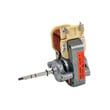
| Noisy or dead convection | Convection fan motor assembly | Samsung range convection fan motor assembly DG96-00110E |
| Door won’t lock/unlock | Oven door latch | Range oven door latch DG94-01334B |
Quick checks we recommend before replacing parts
- Confirm the range is on a proper 240V supply (a partial power loss can leave lights working but no heat).
- For a dead burner, swap cookware and try a different element size setting.
- For baking issues, verify you are using the correct bake mode and rack position.
- Listen for the convection fan during preheat; scraping or rattling points to fan hardware or motor wear.
- If a control is unresponsive, power-cycle the range at the breaker for 1 minute, then retry.
Why it matters
Heating and airflow problems affect cooking results and can overwork components like the relay control board and elements. Matching the symptom to the right part helps you avoid unnecessary returns and restores safe, consistent performance.
Last updated: March 2026
What is the error code E 0a on a Samsung oven?
On the Samsung NE58F9710WS electric slide-in range, an E 0A-type oven error is commonly tied to an overheating condition or a temperature-sensing problem. Start by power-resetting the range, then focus troubleshooting on the oven temperature sensor circuit and airflow around the control area using the NE58F9710WS owner's manual.
What to check first (safe, quick steps)
- Turn the range off, then reset power at the breaker for 2 to 5 minutes.
- Confirm the oven door closes fully and the gasket is sealing.
- Make sure oven vents are not blocked by foil, oversized pans, or a backsplash obstruction.
- If the code returns quickly, stop using the oven and move to sensor and control checks.
Likely causes and what they mean
In this model family, the manual’s troubleshooting section lists several function error codes related to the oven sensor and heating behavior (for example, sensor open/short and heating over). That points you toward these common root causes:
| What’s happening | Most common cause | What to do next |
|---|---|---|
| Oven overheats or temperature runs away | Oven temperature sensor drifting out of range | Test/replace the oven temperature sensor |
| Code appears during preheat or bake | Wiring connection issue at sensor or control | Inspect harness plugs for heat damage, looseness |
| Code appears with other odd behavior (beeping, erratic heat) | Relay/control issue | Check the oven relay control board and wiring |
Parts that commonly fix overheating or sensor-related errors
If basic resets and vent checks do not help, these model-matched parts are common next steps:
- Range oven temperature sensor DG32-00004C (measures oven temperature for the control)
- Samsung range oven relay control board DE92-02439G (switches power to heating circuits)
Why it matters
An overheating-related error can lead to poor baking results, repeated shutdowns, and potential damage to wiring, the sensor circuit, or the control. Addressing the sensor and airflow issues early usually prevents repeat failures.
Last updated: January 2026




