 Error Codes






How to find Kenmore range model number?
For a Kenmore electric drop-in range like model 62946799, the model number is printed on a rating label attached to the appliance. On most ranges, you will find it around the oven door frame (door jamb) or behind the lower storage/warming drawer area.
Where to look on a Kenmore range
Check these common label locations first:
- Oven door jamb (open the oven door and look along the frame)
- Behind the bottom drawer (pull the drawer out and look on the frame or side panel)
- Back of the range near the vent area
- Side panel edge (visible when the oven door is open)
What the label looks like
The rating label usually includes several identifiers. Use the model number for parts lookup.
| Label item | What it’s used for | Example format |
|---|---|---|
| Model number | Finds the correct parts diagrams and parts | 62946799 |
| Serial number | Identifies production run and date | Letters and numbers |
| Electrical rating | Confirms voltage/amps for safe service | 240V info |
Why it matters
Kenmore ranges often have similar-looking cooktops and oven doors across multiple models. Using the exact model number helps us match the correct bake element, door gasket, surface element switch, and other electrical parts for your specific build.
If the label is missing or unreadable
Use these practical options:
- Look for a second label behind the drawer (many ranges have more than one)
- Clean the label gently with a damp cloth so the print is readable
- Match your parts by comparing diagrams and known components, such as the terminal block WPW10245259
- If you are troubleshooting wiring or power issues, follow safe testing practices from how to use a multimeter to test electrical parts video
Last updated: January 2026
How do I reset my Kenmore electric range?
To reset your Kenmore electric drop-in range model 62946799, we recommend doing a power reset at the breaker for 1 to 5 minutes, then restoring power and retesting Bake and the surface elements. This clears many control glitches and restores normal operation.
Quick reset steps (most effective)
- Turn OFF the range circuit breaker (or remove the range fuse) in your home electrical panel.
- Wait 1 to 5 minutes.
- Turn the breaker ON.
- Set the clock (if needed), then test Bake at 350°F for 10 minutes.
- Test one surface element on Low and High.
If the range still will not heat after a reset
A reset will not fix a failed heating component or a power connection problem. Check these common causes:
- No 240V supply: one leg of power is out, so lights may work but heating will not.
- Loose/burned power connection at the terminal block.
- Failed bake element (oven will not bake or heats unevenly).
- Failed surface element switch (burner will not turn on or will not regulate).
Helpful parts to consider
| Symptom | Most likely area | Example part for this model |
|---|---|---|
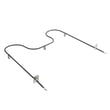
| Oven will not bake | Bake heating circuit | Bake element WP74010750 |
| Range dead or power cord connection looks burned | Power connection | Terminal block WPW10245259 |
Why it matters
Resetting clears temporary electronic control issues, but consistent no-heat symptoms usually point to a power-supply problem or a failed component (like a bake element or terminal connection) that needs inspection and repair.
Last updated: January 2026
How do you reset the F1 code on a Kenmore stove?
On the Kenmore electric drop-in range model 62946799, you reset an F1 code by fully removing power to the range for several minutes, then restoring power. If F1 returns right away or comes back during use, the problem is usually in the oven control circuit and needs troubleshooting.
Quick reset steps (safe, no tools)
- Turn the range OFF.
- Shut OFF the range circuit breaker (or unplug the range if accessible).
- Wait 5 minutes (this lets the control fully power down).
- Restore power.
- Set the clock (if needed) and try Bake for a few minutes.
If the F1 code comes back
F1 commonly points to a control sensing an invalid input (often a stuck key/touch panel issue) or an electronic control problem.
- If the code returns immediately after power is restored: suspect the control or keypad circuit.
- If it returns when you start heating: suspect a heat-related control fault or wiring issue.
- If the oven won’t heat and you are also seeing error behavior: check for obvious loose or burned connections.
What to check first
- Power supply: confirm the breaker is fully reset (OFF then ON).
- Control area wiring: look for loose connectors, corrosion, or heat damage.
- Terminal block connections: a burned connection can cause erratic control behavior (inspect the terminal block WPW10245259).
Basic troubleshooting guide
| What you see | What it usually means | What to do next |
|---|---|---|
| F1 clears and stays gone | Temporary control glitch | Keep using; monitor for return |
| F1 returns immediately | Keypad/control input fault | Inspect wiring; plan control diagnosis |
| F1 returns during Bake/Broil | Heat-related control or wiring issue | Inspect connections; test circuits |
Why it matters
An F1 code is the range telling you the control is not reading inputs correctly. Resetting power can clear a one-time glitch, but repeated F1 errors can lead to unreliable oven operation.
Last updated: January 2026
Who makes Kenmore 62946799?
Kenmore is a brand name, and the Kenmore 62946799 electric drop-in range was manufactured for Kenmore by a third-party appliance maker. The most reliable way to identify the actual manufacturer is to use the model and serial tag on the range, then match the prefix and data on that tag.
How to identify the manufacturer on your range
Use the identification tag on the appliance (not the sales receipt). On most Kenmore ranges, the tag is found:
- Along the oven door frame when you open the door
- On the lower drawer frame (if equipped)
- Behind the control panel area (less common)
Write down these details exactly:
- Full model number (62946799)
- Serial number
- Any prefix/suffix characters or additional numbers on the tag
- Electrical rating (volts/amps), which can help confirm the platform
What the model prefix means (and why it can be confusing)
Kenmore model numbers often include a prefix that points to the original manufacturer. If your tag shows only 62946799 with no visible prefix, the manufacturer is still identifiable using the full tag information and parts cross-references.
| What you have | What it tells us | What to do next |
|---|---|---|
| Full tag shows a clear prefix | Usually identifies the OEM | Use the prefix plus the full model/serial data |
| Tag shows only 62946799 | Brand model only, OEM not obvious | Use parts cross-reference and tag details |
| Tag is missing or unreadable | Manufacturer cannot be confirmed from the unit | Replace the tag if possible; use parts diagrams and photos |
Why it matters
Knowing who built the range helps you match the correct wiring layout, control style, and heating components so you order the right replacement parts and avoid fitment issues.
Parts that commonly tie back to the range’s platform
If you are troubleshooting or matching components, these parts are often platform-specific:
- Terminal block WPW10245259 (power cord connection point)
- Bake element WP74010750 (oven heating)
- Door gasket WPW10162384 (heat seal around the oven cavity)
Helpful tip for confirming you have the right model
If you are unsure the tag matches your appliance, compare the cooktop layout and control style, then use our guide: how to find your appliance model number (and what it means for parts).
Last updated: January 2026




