Owner’s manual
 Error Codes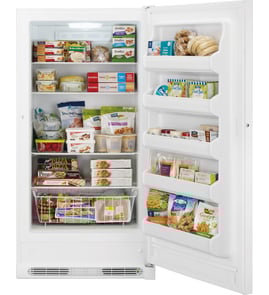




Where is the model number on a GE upright freezer?
On the GE FUF21DLRAWW upright freezer, the model and serial number label is located on the top inner case liner toward the front (inside the freezer compartment). We recommend writing down the full model and serial exactly as shown before ordering parts or scheduling service.
Where to look (fast checklist)
- Open the freezer door and look up high inside the cabinet
- Check the top interior liner near the front edge
- Use a flashlight; the label is often easier to read from an angle
- Write down both the model number and serial number
- Take a clear photo so you can zoom in later
What the label helps you do
| What you need | Why it matters | Example for this freezer |
|---|---|---|
| Model number | Ensures parts fit your exact design | FUF21DLRAWW |
| Serial number | Helps match production details for service | Listed on the same label |
Why it matters
GE can use the model and serial number to match the correct parts and specifications for your upright freezer. This is especially important for electrical and temperature-control components, where small design changes can affect fit and wiring.
Related parts you might match by model
If you are ordering common service parts, confirm the model number first, then match the part by description and ID:
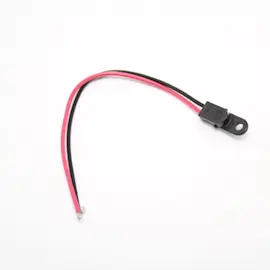
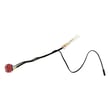
- Freezer temperature sensor WR55X27914 (temperature sensing)
- Freezer defrost sensor WR09X27221 (defrost temperature monitoring)
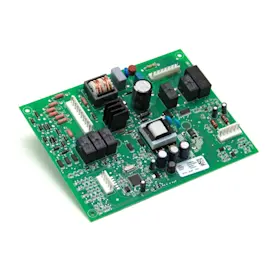
- Main board assembly WR55X30692 (electronic control)
For additional label location details and model-specific information, use the FUF21DLRAWW owner's manual.
Last updated: February 2026
Does GE make good upright freezers?
Yes. GE upright freezers are a solid, dependable choice for most homes, and the GE FUF21DLRAWW is built as a no-frost upright model designed for convenient storage, everyday usability, and straightforward temperature control. For features and operating details specific to your unit, use the FUF21DLRAWW owner's manual.
What “good” looks like for an upright freezer
A good upright freezer consistently holds safe temperatures, defrosts reliably (for no-frost models), and seals tightly so it does not waste energy or build excess frost.
Common strengths many owners value in GE uprights like the FUF21 series:
- No-frost operation (less manual defrosting)
- Easy organization (shelves, bins, drawers)
- Simple temperature adjustments and alarms (model-dependent)
- Widely available replacement parts for long-term serviceability
Quick checks to confirm your freezer is performing well
If you already own the FUF21DLRAWW, these checks tell you more than brand reputation:
- Temperature stability: stays near 0°F once fully cooled
- Door seal: gasket grips paper evenly all around the door
- Airflow: items are not blocking vents; cold air circulates
- Noise pattern: steady hum with normal cycling (not constant struggling)
- Frost pattern: no heavy ice buildup on interior panels (no-frost models)
Performance vs. repair: a simple guide
| Symptom | Most likely area | What we check first |
|---|---|---|
| Warm temps, food softening | Airflow/defrost/control | Door seal, vents, settings |
| Heavy frost or ice | Defrost system | Defrost sensor, heater, airflow |
| Runs a lot, seems loud | Sealing/dirty condenser area | Door gasket, clearance, load |
Parts that commonly affect “good performance” over time
When an upright freezer stops cooling well, it is often a control, sensor, or airflow issue rather than the cabinet itself.
For this model, examples of performance-related parts include:
- Freezer temperature sensor WR55X27914 (helps regulate temperature)
- Freezer defrost sensor WR09X27221 (supports proper defrost operation)
- Main board assembly WR55X30692 (manages cooling and defrost functions)
Why it matters
A freezer that holds a steady 0°F protects food quality and reduces waste. Good sealing and correct defrost operation also lower run time, which helps energy use and extends the life of the compressor.
Last updated: February 2026
Why is my GE upright freezer not cooling?
If your GE FUF21DLRAWW upright freezer is not cooling, start with power, control settings, and Demo mode, then check for airflow or frost issues. If the unit runs but stays warm, a failed sensor, control board, or sealed-system problem can be the cause; use the FUF21DLRAWW owner's manual troubleshooting chart to narrow it down.
Quick checks we recommend first
- Confirm the freezer is plugged in fully and the outlet has power (reset breaker or replace fuse if needed).
- Check the temperature control setting; set it to a mid-range setting and allow 24 hours to stabilize.
- Look for a lit “Demo” indicator; Demo mode prevents cooling.
- Make sure the door closes and seals; packages can hold the door open.
- Reduce door openings and verify vents are not blocked by food packages.
- Listen for the compressor and evaporator fan; unusual silence can point to a control or motor issue.
If “Demo” mode is on
The manual’s fix is to press Alarm Reset first, then press - and + while holding Control Lock for about 5 seconds to exit Demo mode.
Common causes and what they usually look like
| What you notice | Most likely area | What to do next |
|---|---|---|
| No lights, no sound | Power supply | Verify outlet power, cord connection, breaker/fuse |
| Runs but not cold | Airflow/defrost or temperature sensing | Check for heavy frost, blocked vents, warm air leaks |
| Warm with clicking or repeated start attempts | Compressor start components | Follow how to replace a freezer compressor start relay guidance |
| Frost-packed back wall, weak airflow | Defrost system | Consider defrost heater/sensor diagnostics |
Parts that commonly relate to “not cooling” symptoms
If your troubleshooting points to sensing or control problems, these model-matched parts are common suspects:
- Freezer temperature sensor WR55X27914 (temperature feedback to the control)
- Freezer defrost sensor WR09X27221 (defrost temperature sensing)
- Main board assembly WR55X30692 (electronic control that manages cooling)
Why it matters
A freezer that is running warm can spoil food quickly, and issues like a door not sealing or Demo mode can mimic major failures. Doing the quick checks first prevents unnecessary part replacement and helps you target the right repair.
Last updated: February 2026