 Owner’s manual
 Error Codes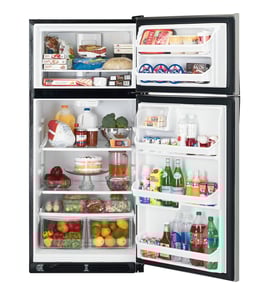



What is the difference between top mount and bottom mount refrigerators?
A top-mount refrigerator (like Hotpoint HTM18IBPWRSA) has the freezer on top and the fresh-food section below; a bottom-mount flips that layout. The biggest day-to-day difference is ergonomics: bottom-mount designs put the refrigerator compartment at eye level, while top-mount designs make freezer access easier.
| Feature | Top-mount refrigerator | Bottom-mount refrigerator |
|---|---|---|
| Freezer location | Top | Bottom (usually a pull-out drawer) |
| Most-used items (fresh food) | Lower, requires more bending | Higher, easier to see and reach |
| Freezer access | Easier for frequent freezer use | More bending or drawer access |
| Typical cost and complexity | Typically simpler | Typically more complex |
- Fresh-food access: Bottom-mount units reduce bending for produce, milk, and leftovers.
- Freezer access: Top-mount units make frozen items easier to grab quickly.
- Organization style: Bottom-mount drawers can be great for bulk frozen storage; top-mount shelves can be easier to scan at a glance.
- Space planning: Both styles need airflow clearance around the cabinet; we list the recommended clearances in the owner's manual.
Choosing top-mount vs bottom-mount is mostly about how your household uses the refrigerator. If you reach into the refrigerator compartment far more than the freezer, bottom-mount can feel more comfortable. If you use the freezer constantly, top-mount can be more convenient.
If you are comparing layouts because of fit or installation, confirm your required clearances and door swing space before moving the unit into place. The owner's manual also covers leveling guidance, which helps doors close properly and keeps temperatures stable.
Last updated: February 2026
What number should a Hotpoint freezer be on?
For a Hotpoint HTM18IBPWRSA top-mount refrigerator, set the freezer control to the midpoint (usually “3” or “4” on a 1 to 5 dial), then adjust until the freezer holds 0°F (-18°C). Use the temperature adjustment guidance in the HTM18IBPWRSA owner's manual for your exact control style.
Most Hotpoint top-mount refrigerators use a simple numbered dial where higher numbers mean colder. Start in the middle and fine-tune based on an actual thermometer reading.
- Start at the middle number on the freezer control.
- Wait 24 hours after each change before adjusting again.
- Target 0°F (-18°C) in the freezer.
- Keep the refrigerator section near 37°F (3°C).
- Avoid setting the dial to the coldest number unless you are troubleshooting warm temps.
| What you notice | What to do with the freezer number | What to check next |
|---|---|---|
| Ice cream is soft, frozen food feels “squishy” | Turn up 1 step (colder) | Door seal, airflow vents, frost buildup |
| Heavy frost on packages or freezer walls | Turn down 1 step (warmer) | Door left ajar, gasket sealing |
| Items in freezer are rock-hard and fridge is too cold | Turn down 1 step (warmer) | Control setting balance, blocked vents |
The correct dial number depends on kitchen temperature, how full the freezer is, door-opening frequency, and airflow. The dial is a relative setting, so the thermometer reading (0°F) is the real goal.
If the dial is set correctly but temperatures still drift, these model-compatible parts commonly relate to cooling performance:
- Refrigerator temperature control thermostat WR09X26874 (controls compressor run time)
- Refrigerator defrost control WR9X565 (manages defrost cycles)
- Refrigerator defrost heater WR51X10038 (melts frost off the evaporator)
- Refrigerator condenser fan motor WR60X10170 (moves air across condenser coils)
For ordering replacement parts by model number, we list parts for HTM18IBPWRSA here and you can also search on Sears PartsDirect.
Last updated: February 2026
What is the top part of a refrigerator called?
On a Hotpoint HTM18IBPWRSA top-mount refrigerator, the top section is the freezer compartment. It is designed to keep foods frozen and, on some setups, it also houses features like a freezer light and the icemaker area (if equipped). See the owner's manual for your model’s compartment features.
- Freezer shelf or shelves (position can affect icemaker bucket fit on some models)
- Freezer light or a light shield (some models do not include a freezer light)
- Airflow vents that move cold air between freezer and fresh food sections
- Door gasket that seals the freezer door to prevent frost and temperature swings
| Term | What it refers to | Where it is |
|---|---|---|
| Freezer compartment | The “top part” on a top-mount refrigerator | Upper section |
| Fresh food compartment | The refrigerator section for non-frozen foods | Lower section |
| Freezer door gasket | The seal around the freezer door | Freezer door perimeter |
| Dome light (some models) | Freezer light assembly behind a shield | Freezer ceiling or rear area |
Knowing the correct name helps you match the right parts and instructions. For example, if you are troubleshooting a light issue or replacing a seal, you will want to identify whether the problem is in the freezer compartment or the fresh food compartment.
If you are repairing or refreshing the freezer area on HTM18IBPWRSA, these model-matched parts are commonly involved:
- Refrigerator freezer door gasket (black) WR24X10185 (helps prevent warm air leaks and frost)
- 40A15/22 40A15 (appliance light bulb used for compartment lighting on applicable configurations)
You can order replacement parts for your Hotpoint HTM18IBPWRSA from the parts list for this model, or search by model number on Sears PartsDirect.
Last updated: February 2026
Why is my Hotpoint refrigerator not getting cold?
If your Hotpoint HTM18IBPWRSA refrigerator is not getting cold, the most common causes are incorrect temperature control settings, doors not sealing or closing fully, airflow blocked by food, or a failed cooling component such as the evaporator fan, condenser fan, thermostat, or defrost system. Start with the checks in the owner's manual.
- Make sure the refrigerator and freezer controls are not set to 0 (off); on some models, “0” does not remove power to the light circuit.
- Give the refrigerator time to stabilize after changes; cooling can take up to 24 hours after first plugging in or after major loading.
- Check for a door left ajar or packages holding the door open.
- Move food away from the back wall and vents; blocked vents reduce cold air circulation.
- Confirm the unit is level; leveling affects door closing and sealing.
- Listen for normal defrost sounds (sizzling, dripping, popping) during the defrost cycle.
| What you notice | Most likely area to check | Common next step |
|---|---|---|
| Freezer cold, fresh food warm | Airflow from freezer to fridge is restricted | Clear vents; check evaporator fan operation |
| Both sections warm, lights work | Cooling system not running | Check condenser fan, thermostat, compressor start components |
| Frost buildup, weak airflow | Defrost system issue | Inspect defrost heater/control; clear ice safely |
| Door pops open or won’t close | Leveling or gasket/seal issue | Adjust leveling legs; inspect gasket for gaps |
If basic checks do not restore cooling, these model-listed parts are common suspects:
- Refrigerator temperature control thermostat WR09X26874 (temperature regulation)
- Refrigerator condenser fan motor WR60X10170 (moves heat off the condenser)
- Refrigerator condenser fan blade WR60X10207 (airflow for condenser)
- Refrigerator evaporator fan blade WR60X10205 (circulates cold air)
- Refrigerator defrost heater WR51X10038 and refrigerator defrost control WR9X565 (prevents ice from blocking airflow)
A top-mount refrigerator like the HTM18IBPWRSA depends on steady airflow and a working defrost cycle. When vents are blocked, doors do not seal, or a fan or defrost part fails, temperatures rise quickly and food safety becomes a concern.
Unplug the refrigerator before cleaning, inspecting wiring, or replacing parts.
You can order replacement parts for your HTM18IBPWRSA from the parts list for this model, or search by model number on Sears PartsDirect.
Last updated: February 2026





