Owner’s manual
 Error Codes



How to tell if a Kenmore refrigerator compressor is bad?
If your Kenmore 59679319510 refrigerator is warm and the compressor repeatedly clicks, runs briefly then shuts off, or never starts while the fans still run, the compressor circuit (compressor, start device, or overload) is failing. Confirm basics first using the owner's manual.
- Verify the temperature control is turned on and set correctly.
- After a new install or power loss, allow a full 24 hours for cooling.
- Listen for normal cycling; high-efficiency compressors can run longer than older units.
- Check that doors close fully and seals are making contact.
- Make sure the condenser area is not packed with dust and airflow is not blocked.
A failing compressor often shows up as poor cooling plus abnormal sound or heat patterns.
- Repeated clicking every few minutes (overload tripping) with little or no cooling
- Loud buzzing or humming followed by a click and shutdown
- Compressor stays cool to the touch even though the refrigerator is calling for cooling
- Compressor is extremely hot and shuts off, then restarts and repeats
- Freezer and fresh food sections both warm even though interior lights and fans work
Many “not cooling” calls are caused by airflow or control issues, not a sealed-system failure.
| What you notice | More likely cause | Common next step |
|---|---|---|
| Fans run, no cooling, clicking at compressor | Start device/overload or compressor | Technician tests amp draw and windings |
| Frost buildup on back wall, weak airflow | Defrost/airflow issue | Check evaporator fan and defrost system |
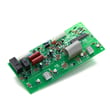
| Temps drift, odd behavior, intermittent cooling | Control problem | Consider refrigerator electronic control board WPW10503278 |
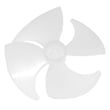
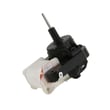
| Warm fridge, freezer partly cool | Evaporator fan issue | Inspect refrigerator evaporator fan motor WPW10128551 and blade |
A true compressor or sealed-system problem affects both compartments and can lead to food spoilage quickly. Doing the basic control and airflow checks first prevents replacing expensive parts when the real issue is a fan, defrost component, or control.
Last updated: February 2026
How to tell what model Kenmore refrigerator?
To tell what model Kenmore refrigerator you have, locate the model and serial number label on the appliance and match it to your paperwork. For Kenmore model 59679319510, the Use and Care Guide lists the model in the 596.7931* family; the full model number on the label is what you use to get the right parts and instructions in the owner's manual.
Check these common spots first (exact placement varies by style):
- Inside the fresh food compartment on a side wall
- On the ceiling of the refrigerator compartment
- Behind or beside the crisper drawers
- Along the door frame (open the refrigerator door and look around the perimeter)
- Near the bottom front area (sometimes behind the toe grille)
Kenmore refrigerator model numbers are often shown with a dot and a series prefix in the manual, but the label shows the full model you need for parts ordering.
| Where you see it | Example format | What to use for parts |
|---|---|---|
| Use and Care Guide | 596.7931* (family) | Use the full label number |
| Model/serial label | 59679319510 (full model) | 59679319510 |
Using the complete model number prevents mismatches when ordering parts that look similar but fit differently (for example, a door gasket, control board, or water inlet valve).
- Copy the model number exactly as printed (all digits, no missing characters)
- Record the serial number too; it helps identify production variations
- Save it with your purchase date for future service and maintenance reference
Last updated: February 2026
What are the common problems with Kenmore 59679319510 refrigerators?
Common issues with the Kenmore 59679319510 bottom-mount refrigerator include warm temperatures after installation or heavy use, the compressor and fans running longer than expected, normal but noticeable operating noises, ice maker not making enough ice, interior moisture buildup, and door-closing or door-seal problems. Use the owner's manual troubleshooting checks first.
- Not cooling or temperature too warm: new installation cool-down time, frequent door openings, large food load, or temperature control set too warm
- Runs a lot: warm room, frequent openings, door left ajar, or heavy load (high-efficiency compressor and fans can run longer)
- Noisy operation: pulsating, hissing/rattling, popping, or water dripping during defrost can be normal
- Ice maker not producing enough ice: water shutoff not fully open, kinked water line, ice maker not turned on, or not enough time since install
- Moisture buildup: humid room or doors opened often
- Door will not close: bins/shelves out of position, food packages blocking, crisper cover not fully seated
- Give it time after setup: allow 24 hours after installation for full cooling.
- Confirm controls are on and set correctly: adjust one setting colder, then recheck in 24 hours.
- Reduce warm air entry: minimize door openings and make sure doors fully close.
- Check ice maker basics: water supply connected, shutoff valve fully open, and water line not kinked.
- Listen for normal sounds: many “new” noises are normal as the compressor and fans optimize performance.
| Sound | Often normal? | What it points to |
|---|---|---|
| Pulsating | Yes | Fans/compressor adjusting |
| Hissing or light rattling | Yes | Refrigerant flow or items on top |
| Popping | Yes | Liner expansion/contraction |
| Water dripping/running | Yes | Defrost water draining |
If troubleshooting points to a failed component, these parts are commonly involved:
- Cooling airflow issues: refrigerator evaporator fan motor WPW10128551, refrigerator evaporator fan blade WP2169142
- Warm temps or odd behavior after power events: refrigerator electronic control board WPW10503278
- Water/ice supply problems: refrigerator water inlet valve WPW10498976
- Door sealing problems: refrigerator freezer door gasket WPW10436247
Catching airflow, door-seal, and water-supply issues early helps the refrigerator hold safe food temperatures, reduces run time, and prevents moisture, frost, and ice maker performance problems.
Last updated: February 2026
What is the bottom compartment of a fridge called?
On a Kenmore bottom-mount refrigerator like model 59679319510, the “bottom compartment” most often means the freezer compartment (the drawer/door at the bottom). If you mean the area behind the lower front cover, that section is typically the base grille/toe grille area, where leveling legs and rollers sit.
- Freezer compartment: the bottom drawer/door where frozen food is stored.
- Base grille (toe grille) area: the lower front cover below the freezer door/drawer.
- Machine compartment (service area): behind the lower cover on many refrigerators; often where airflow and some service access is located.
- If it stores food and has baskets or a drawer, it is the freezer compartment.
- If it is a snap-on or screw-on cover at the very bottom front, it is the base grille.
- If you are trying to level the refrigerator or stop doors from swinging open, you are working in the base grille area.
Our owner's manual describes the base grille as the cover that “covers the leveling screws and roller assemblies located at the bottom of the refrigerator cabinet below the freezer door or drawer.”
| Term you might use | What it usually refers to | What you do there |
|---|---|---|
| Bottom compartment | Freezer compartment | Store frozen food, check freezer temp |
| Bottom panel/cover | Base grille | Access leveling screws/rollers |
| Bottom of fridge | Base area behind grille | Cleaning, leveling, basic access |
Using the right name helps you get the right instructions and parts. For example, door closing and alignment issues often trace back to leveling screws/rollers behind the base grille, not a problem inside the freezer drawer.
Last updated: February 2026