 Owner’s manual
 Error Codes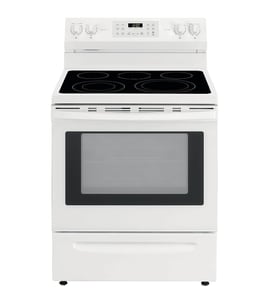









Can I look up Frigidaire parts by model number?
Yes. Looking up parts by model number is the most accurate way to get compatible replacement parts for your Frigidaire dual-fuel range model PLCS389DCB, because the parts list and diagrams are tied to that exact model configuration. Use the model number from the serial plate, then match the part by name and ID.
Where to find the model number on PLCS389DCB
The model and serial numbers are on the serial plate located at the left of the range frame; you can see it when the oven door is open, or inside the drawer along the side of the frame. For the exact location details, use the PLCS389DCB owner's manual.
Tips for reading the tag correctly
- Copy the full model number exactly as shown: PLCS389DCB
- Write down the serial number too (it can help confirm production details)
- Check both locations (oven door open area and inside the drawer) if needed
- Avoid using partial model numbers or “close” matches
How we recommend searching for the right part
Once you have the model number, narrow the match by the symptom and the part category (oven, cooktop, controls, wiring).
A reliable workflow
- Start with the symptom (no heat, uneven baking, burner won’t light, light out)
- Use the model number to pull the correct parts breakdown
- Match by part name + part ID, not just a photo
- Confirm quantity and location (left/right, front/rear) before ordering
- Compare your old part markings when possible
Common PLCS389DCB parts customers replace
These are examples of model-listed parts that often come up during troubleshooting:
| Symptom | Part to check | Example model-listed part |
|---|---|---|
| Oven light out | Bulb, socket, lens/cover | Range oven light bulb 316538904 |
| Oven temperature off | Oven temperature sensor | Frigidaire range oven temperature sensor 316217002 |
| Bake not heating | Bake element and wiring | Oven bake element 318255006 |
Why it matters
Ranges can look similar across Frigidaire model families, but burner parts, sensors, elements, and electrical components can vary by revision. Using PLCS389DCB prevents ordering a part that fits a different chassis or wiring layout.
Last updated: February 2026
How do I tell what model my Frigidaire stove is?
Your Frigidaire stove model number is printed on the serial plate; on model PLCS389DCB, it’s typically on the left side of the range frame and is visible when the oven door is open, or on the inside of the storage drawer along the side of the frame. Use the PLCS389DCB owner's manual as a location guide.
Where to look (most common spots)
Check these areas in order; we see the model and serial tag in one of these places most often:
- Left side of the range frame, visible with the oven door open
- Inside the storage drawer area, along the side of the frame
- Around the oven door frame opening (use a flashlight)
- On the drawer front frame area (after pulling the drawer out)
How to read the tag correctly
Model numbers are a mix of letters and numbers, so accuracy matters when ordering parts like an oven temperature sensor or bake element.
- Write it down exactly as shown (including any dashes)
- Watch for look-alikes: 0 (zero) vs O (letter O), 1 vs I
- Take a clear photo before you start shopping for parts
- Record the serial number too; it helps confirm production details
Quick comparison: model number vs serial number
| Item | What it tells us | Used for |
|---|---|---|
| Model number | The exact range design (example: PLCS389DCB) | Correct part fit and diagrams |
| Serial number | The unit’s unique identifier | Version breaks, service history |
Why it matters
Using the exact model number prevents ordering the wrong Frigidaire range parts (for example, a control panel seal, burner head, or oven rack that looks similar but mounts differently).
Last updated: February 2026
Why did my Frigidaire oven stop working?
If your Frigidaire PLCS389DCB oven stopped working, the most common causes are a power supply problem, a control fault (often shown as an F-code with beeping), or a failed heating circuit such as the bake element, broil element, or oven temperature sensor. Use the steps in the PLCS389DCB owner's manual to narrow it down safely.
Quick checks we recommend first
- Confirm the range has power; check house lights and the breaker (a partial trip can leave the display on but stop heating).
- If there was a power outage, turn the oven off; do not try to operate it during the outage.
- If the control is beeping and shows F1, F2, F3, or F9, press STOP/CLEAR (or CANCEL) to stop the beeping, then try reprogramming.
- If it still will not run, record the code and proceed with component checks.
- If the oven light is out too, check the bulb and socket condition.
What the symptoms usually point to
| Symptom | Most likely issue | What to do next |
|---|---|---|
| No heat in bake or broil | Heating circuit problem | Inspect elements for visible damage; test with a meter if available |
| Beeping with F1/F2/F3/F9 | Electronic control detected a fault | Clear the code, retry; if it returns, service is typically needed |
| Oven light does not work | Bulb loose/burned out, or socket issue | Replace bulb; inspect socket for heat damage |
Parts that commonly fix “stopped working” complaints
These are model-matched parts we often see involved when an oven will not heat or behaves erratically:
- Oven temperature sensor 316217002 (helps the control regulate temperature)
- Oven bake element 318255006 (primary heat source for baking)
- Oven broiler element 318255605 (top heat source for broiling)
- Range oven light bulb 316538904 (useful clue if the cavity light is also out)
Why it matters
When the control detects a fault, it can stop operation to prevent unsafe heating. When a heating component fails, the oven may power on normally but never reach temperature, leading to undercooked food and longer run times.
Last updated: February 2026





