 Installation guide
 Owner’s manual




Is there a reset on a Kenmore microwave?
Yes. On the Kenmore Elite microwave/hood combo model 72180803400, the most reliable “reset” is a power reset (unplug or switch the breaker off briefly, then restore power). If the oven is acting up during use, pressing STOP/CLEAR cancels the current operation and returns the control to idle. For control-specific steps, use the 72180803400 owner's manual.
- Press STOP/CLEAR once to cancel a cooking cycle.
- Press STOP/CLEAR to cancel an operation that is still running.
- If the display is stuck because the kitchen timer is running, cancel the timer from the timer function.
- Unplug the microwave (or turn the circuit breaker off), wait about 1 minute, then restore power.
- Confirm the door is fully closed and latched before trying to start.
| Reset method | What it fixes | What it does not fix |
|---|---|---|
| STOP/CLEAR | Cancels a running program, clears many input mistakes | No-heat problems, power supply issues |
| Cancel kitchen timer | Timer-only situations where the oven will not run | Door switch or heating failures |
| Power reset | Temporary control glitches after a surge or lockup | Failed parts like a magnetron or high-voltage components |
These checks solve most “dead” or “won’t run” complaints:
- Make sure the cord is plugged into a grounded 3-prong outlet.
- Check the household fuse/circuit breaker.
- Make sure you pressed START.
- Close the door firmly so it latches.
- Cancel any earlier operation with STOP/CLEAR, then try again.
A “reset” helps when the control is confused by an interrupted cycle or timer setting. If the microwave still will not run or will not heat after a power reset, troubleshooting usually shifts from the control to door interlocks, fuses, or heating components.
Last updated: February 2026
Why is my Kenmore 72180803400 microwave not working?
If your Kenmore Elite 72180803400 microwave/hood combo is not working, the most common causes are a power supply issue, a door that is not fully closed and latched, or a control setting that is preventing operation. Start with the basic checks in the owner's manual troubleshooting section before testing any internal parts.
- Confirm the cord is fully plugged into a grounded 3-prong outlet.
- Check your home breaker or fuse; reset the breaker or replace the fuse if needed.
- Make sure the door closes firmly and latches completely.
- Press STOP/CLEAR to cancel any previous operation, then try a simple cook cycle.
- If you were using the Kitchen Timer, cancel it and try cooking again.
- Try a different outlet (same circuit rating) to rule out a weak outlet connection.
When the fan and turntable run but food stays cold, the issue is typically in the high-voltage heating circuit.
Common parts involved include:
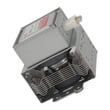
- Microwave magnetron 6324W1A001L
- Microwave high-voltage diode 6021W3B001V
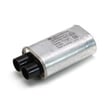
- Goldstar microwave high-voltage capacitor 0CZZW1H004C
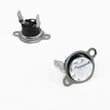
- Microwave thermal cut-off 6930W1A003K
- Normal “running” sounds but no heat.
- Intermittent heating (may point to a failing thermal cut-off or connection).
- Burning smell or arcing marks (stop using it and inspect the cavity and waveguide area).
Microwaves contain high-voltage components that can store a dangerous charge even when unplugged.
- Unplug the microwave before any inspection.
- Avoid testing or handling high-voltage parts unless you are trained.
- For internal electrical diagnosis, we recommend using a qualified technician.
| Symptom | Most likely starting point | Next step |
|---|---|---|
| Nothing works (no display) | Outlet, breaker/fuse | Verify grounded outlet power |
| Display works, will not start | Door not latched, user input | Close door firmly; press START |
| Runs but no heat | Magnetron, diode, capacitor | Diagnose heating circuit components |
Basic power and door-latch issues are fast fixes and are specifically called out in the model’s troubleshooting guidance; checking them first prevents unnecessary parts replacement and downtime.
Last updated: February 2026
Where is the fuse in a Kenmore microwave?
In Kenmore Elite microwave/hood combo model 72180803400, the internal line fuse is typically mounted behind the control panel area, near where the power cord enters and the line filter (noise filter) components are located. Use the 72180803400 owner's manual to match symptoms to the right checks before opening anything.
Microwaves contain high-voltage components that can hold a dangerous charge even when unplugged. For internal electrical access, we recommend using a qualified technician.
- Unplug the microwave or switch off the dedicated breaker
- Confirm the outlet is grounded and on a dedicated circuit
- Do not use an extension cord
- Do not operate the unit if you smell burning or see arcing
On most over-the-range microwave/hood combos, access starts at the top front.
- Remove the top grille (usually a few screws)
- Remove the control panel mounting screw(s)
- Tilt the control panel forward to reach the line fuse holder near the line filter
The troubleshooting section for this model points to basic power and door checks first.
- Check the household fuse or circuit breaker
- Test the outlet with a lamp or meter
- Make sure the door is fully closed and latched
- Press STOP/CLEAR, then start a simple cook cycle
| Symptom | Most likely area | First check |
|---|---|---|
| No display, completely dead | Power path | Breaker, outlet, then internal fuse |
| Runs but does not heat | High-voltage system | Magnetron, diode, capacitor |
| Trips breaker when starting | Door interlock circuit | Interlock switches, wiring |
- Microwave micro-switch 6600W1K001Q (door interlock switch)
- Microwave thermal cut-off 6930W1A003K (opens if overheating occurs)
A blown internal fuse is often a symptom of another problem (door switch fault, wiring short, or high-voltage issue). Fixing the root cause prevents the replacement fuse from blowing again.
Last updated: February 2026





