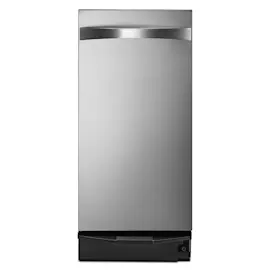
Owner’s manual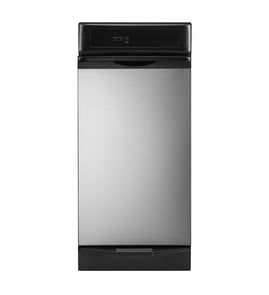




How to fix a trash compactor that won't open?
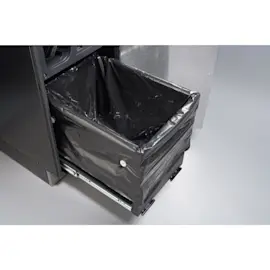
On Kenmore Elite trash compactor model 66513633100, the drawer usually will not open because the ram is not fully raised or the unit is in the EXTRA PAC cycle, which keeps the drawer locked while the ram is down. First, release the lock by lifting up on the foot pedal, then pull the handle to open the drawer.
Quick checks that solve most “won’t open” problems
- Lift up on the foot pedal; during a compacting cycle the compactor stays locked until you lift the pedal.
- Pull up on the handle after the drawer cracks open; the foot pedal only opens the drawer about 3 to 6 inches.
- Wait for the ram to return fully up; the drawer opens only when the ram is fully raised.
- Turn the Key-Knob to OFF after the cycle completes, then remove the key for safety.
- Look for a misload (bottles or cans off-center can trigger a “misload” and interrupt the cycle).
If the drawer is locked because of EXTRA PAC
EXTRA PAC holds the ram down to keep pressure on the trash, and the drawer stays locked while the ram is down.
| What you see | Most likely cause | What we do |
|---|---|---|
| Drawer will not budge and cycle seems “paused” | EXTRA PAC holding pressure | Lift up on the foot pedal to unlock, then open drawer and switch back to Normal if desired |
| Drawer opens only a few inches with pedal | Normal design | Use the handle to pull the drawer fully open |
When it’s more than a cycle lock
If the drawer still will not open after the ram is up and the pedal is lifted, focus on the door interlock and switch system.
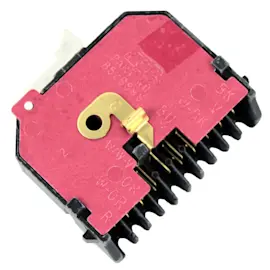
- Check the top limit and directional switch for sticking or failure: trash compactor top limit and directional switch WP777811
- Inspect the drawer area for debris that could block travel (bag folds, trash wedged at the sides)
- Unplug power before any inspection around wiring or switches
Why it matters
A locked drawer is usually a normal safety feature that prevents opening while the ram is moving or holding pressure. Forcing the drawer can bend slides, damage the latch, or tear the compactor bag.
For model-specific operating steps and cycle details, follow the 66513633100 owner's manual.
Last updated: February 2026
What is a common problem with trash compactors?
A very common trash compactor problem is the unit not running or not compacting because the drawer is not fully closed, the Key-Knob is not turned to ON, or the drawer is less than half full. On Kenmore Elite model 66513633100, these are the first items we check using the 66513633100 owner's manual.
Most common issues (and what they usually mean)
- Won’t start: power cord unplugged, tripped breaker, drawer not fully closed, Key-Knob not fully ON
- Runs but doesn’t compact: drawer is under half full (normal behavior)
- Drawer won’t open: ram is not fully raised yet, or the drawer is only “popped” open and needs the handle lifted
- Stops and returns without compacting: a “misload” (bottles/cans caught between the ram and drawer)
- Odors: messy trash residue in the drawer; bag left in too long
Quick checks we recommend first
- Plug the compactor into a grounded 3-prong outlet; reset the breaker if needed.
- Close the drawer firmly, then confirm the Key-Knob is turned fully to ON.
- If “not compacting,” load until the drawer is more than half full before expecting compression.
- If the ram returns to the up position, reload bulky items in the center (bottles/cans on their sides).
- If the drawer will not open, wait for the ram to fully raise; then lift the handle to pull the drawer out.
What “normal” looks like vs. a real problem
| Symptom | Often normal | Usually needs repair |
|---|---|---|
| No visible compaction at first | First few loads | Never compacts when over half full |
| Glass breaking noise | Yes | Grinding, repeated loud clicking |
| Drawer opens only a few inches with pedal | Yes | Drawer binds or will not slide out |
Why it matters
Trash compactors rely on safety interlocks (drawer closed, Key-Knob ON) and proper loading. Correct loading also prevents misloads that stop the cycle and can stress drive components.
Last updated: February 2026
Where is the model number on a Kenmore trash compactor?
On the Kenmore Elite trash compactor model 66513633100, the model number is typically printed on a rating label on the compactor frame just inside the drawer opening. The quickest check is with the drawer open, looking along the inside edges of the cabinet opening.
Most common places to check
We recommend checking these spots in order (use a flashlight):
- Inside the cabinet opening, along the left or right frame rail (visible when the drawer is open)
- Behind the drawer front area, on the inner cabinet face near the bottom
- Along the door or drawer opening lip where the drawer slides in
- On a side panel near the lower front (sometimes visible only when the unit is pulled out)
What the label looks like
The label is usually a small sticker or metal tag that includes the model number and other identification details.
| What you may see | What it means |
|---|---|
665.1363*** |
Model series; the asterisks are the color code shown in the 66513633100 use and care guide |
66513633100 |
Full model number used to match parts and diagrams |
Why it matters
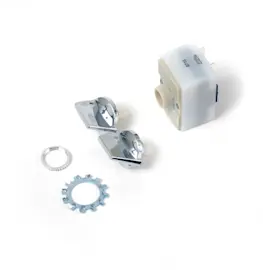
We use the exact model number to match the correct Kenmore parts for your compactor, including fit-critical items like the trash compactor cycle switch WP9872161 and the trash compactor top limit and directional switch WP777811. Even small model-number differences can change wiring, switches, and drawer hardware.
Tips if you cannot spot it right away
- Pull the drawer fully open and scan the cabinet frame from top to bottom
- Wipe dust or residue off the frame edge; labels can blend into stainless or black trim
- If the compactor is built-in, check the lower side area after sliding it forward a few inches
Last updated: February 2026