 Owner’s manual
 Error Codes





How do you reset a Kenmore electric stove?
To reset a Kenmore electric range like model 9119584691, we restore power to clear a temporary control glitch: turn the range off at the breaker (or unplug it), wait 60 seconds, then turn power back on and recheck oven and cooktop operation. See the 9119584691 owner's manual.
Quick reset steps (power reset)
- Turn OFF the range circuit breaker (or unplug the power cord if accessible).
- Wait 60 seconds (this lets the control fully discharge).
- Turn the breaker ON (or plug back in).
- Set the clock if needed; the clock starts automatically within about a minute after setting.
- Test Bake and Broil for heat, and test one surface element.
If the display shows an “F” code after resetting
An “F” plus a number typically points to a control or sensor-related fault rather than a simple glitch.
| What you see | What it usually means | What to do next |
|---|---|---|
| Display flashing F and a number; oven stops but surface works | Oven control detected a fault | Do a power reset, then check the troubleshooting section in the 9119584691 owner's manual |
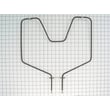
| Oven does not heat; cooktop zones OK | Oven heating circuit issue | Inspect for a failed element or wiring; consider the g.e. range bake element WB44K5012 if bake heat is out |
| Range totally inoperative | Power supply issue | Check breaker, cord, and terminal block connections (power off first) |
Why it matters
A power reset is the fastest safe way to clear minor electronic lockups. If the problem returns quickly (especially with an “F” code), the range is signaling a condition that needs troubleshooting, such as a heating circuit problem, wiring issue, or control fault.
Last updated: February 2026
Where can I find my Kenmore electric range model number?
You can find the model number for your Kenmore electric range on the appliance’s rating label, which is typically located around the oven door frame (door jamb) or on the frame behind the storage drawer. Use the exact model number to match parts and the correct 9119584691 owner's manual.
Most common model number label locations
Check these spots in order (they are the most likely on a freestanding electric range like model 9119584691):
- Oven door jamb: open the oven door and look along the frame on the left or right side
- Behind the storage drawer: pull the bottom drawer out and look on the frame rails or side panel
- Back panel: look near the power cord entry area or rear cover
- Side frame: sometimes on the lower side frame near the front
What to write down (and why)
The label usually includes more than one identifier. Recording all of them prevents ordering the wrong Kenmore range parts.
- Model number (example: 9119584691)
- Serial number (helps date the unit and confirm production run)
- Electrical rating (volts/amps), useful for diagnosing heating issues
Quick ID guide
| Label item | What it’s used for | When it matters most |
|---|---|---|
| Model number | Correct part fit and diagrams | Always, before ordering parts |
| Serial number | Production details | When parts vary by revision |
| Electrical rating | Power and heating diagnostics | When the oven will not heat or trips breakers |
Why it matters
Kenmore ranges often have multiple versions that look similar. Using the exact model number helps us match the right components (like a bake element, door hinge, or control switch) and avoid returns.
Last updated: February 2026
Why is my Kenmore Elite oven not turning on?
If your Kenmore electric range model 9119584691 will not turn on, the most common causes are a tripped breaker (or loose power cord), a control that is set to a delayed start or clean lock condition, or a failed internal component such as the wiring harness or electronic control.
Quick checks we recommend first
- Reset the range circuit breaker by switching it fully OFF and then ON (a “half-tripped” breaker can look normal).
- Confirm the outlet is supplying the correct voltage for an electric range (a partial power loss can leave the display dead or the oven unresponsive).
- Cancel any active timed feature by pressing CLEAR/OFF; then try BAKE again.
- If the door is locked from a self-clean cycle, wait for the oven to cool and the lock indicator to go out before unlocking (never force the lock handle).
- Review the control steps and special modes in the 9119584691 owner's manual.
Settings that can make it seem like the oven is “dead”
Your manual describes delayed start and self-clean features that can change when the oven turns on or when the door can be opened.
| Symptom | What it usually means | What to do |
|---|---|---|
| Oven will not start right away | Delay start is set | Cancel with CLEAR/OFF, then set BAKE normally |
| Door won’t open after clean | Oven is still above unlock temperature | Wait for cooling; unlock only when the lock indicator goes out |
| Oven shuts off unexpectedly | Stop time or cook time was set | Clear the program and re-enter settings |
When it is likely a part problem
If the range has correct power and the controls are not in a delayed or locked state, we focus on electrical failures inside the range.
Common culprits include:
- Loose or burned wire connections at the terminal block
- Damaged wiring to the control (a harness issue)
- Failed electronic control or keypad
- Failed oven element (the oven may “turn on” but never heat)
For heating failures specifically, the bake element is a frequent wear item; for this model, see the g.e. range bake element WB44K5012.
Why it matters
An electric range can lose one leg of power or have a control mode active and still appear partially functional. Doing the quick power and settings checks first prevents unnecessary parts replacement and helps you pinpoint whether the issue is electrical supply, control programming, or a failed component.
Last updated: February 2026
Why is my Kenmore electric range not heating up?
If your Kenmore electric range model 9119584691 is not heating, the most common causes are a failed bake or broil heating element, a problem in the temperature control circuit, or a wiring issue. Start by checking for visible element damage, then confirm power and continuity before replacing parts.
Quick safety first
The range manual stresses keeping flammables away and avoiding repairs unless the instructions specifically cover the task; for electrical testing or internal wiring repairs, we recommend using a qualified technician. See the 9119584691 owner's manual.
What to check (in order)
- Confirm the range has power: verify the breaker is fully on (a tripped double-pole breaker can leave the oven weak or dead).
- Look for obvious element damage: blisters, cracks, holes, or separated spots on the bake or broil element.
- Test element continuity (power off): a failed element typically shows no continuity.
- Inspect wiring at the element terminals: loose spade connectors or heat-damaged wires can stop heating.
- Check the control/switching: a failed surface element control switch can indicate broader control issues; oven heat problems can also come from a failed control or wiring.
- If the oven heats poorly: calibration, sensor, or airflow issues can mimic “not heating.”
Common symptoms and likely causes
| Symptom | Most likely cause | What we do next |
|---|---|---|
| No bake, no broil | Power supply issue, control issue, wiring harness problem | Check breaker, then inspect wiring and controls |
| Broil works, bake does not | Failed bake element | Replace the g.e. range bake element WB44K5012 |
| Bake works, broil does not | Failed broil element or support issue | Inspect broil element and mounts |
| Oven heats sometimes | Loose/burned wire connection | Inspect terminals and harness routing |
Why it matters
An oven that will not heat is often a simple heating-element failure, but continued use with damaged wiring or overheated connections can create unsafe conditions and lead to more expensive repairs.
Last updated: February 2026




