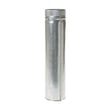
Installation guide
 Owner’s manual








Where is the fuse on a GE dryer GTX42EASJ0WW?
On the GE electric dryer model GTX42EASJ0WW, the “fuse” most people mean is the thermal safety device mounted on or near the heater housing inside the cabinet (not the home electrical box). You access it by unplugging the dryer, then removing the rear panel to reach the heater area; see the installation guide for the required power-disconnect steps.
What to check first (quick no-start checklist)
Before you open the dryer, we check the simple items that commonly mimic a blown thermal fuse:
- Confirm the dryer has full 240V power (a tripped breaker can leave the motor running but no heat, or prevent starting depending on the leg that’s out)
- Make sure the door fully closes and the door switch clicks
- Verify the cycle and timer are set to a running position (not “off”)
- Clean the lint screen and confirm airflow is strong at the exhaust hood
- If the dryer runs but overheats or shuts off, suspect restricted venting first
Where the “fuse” is located and what it does
Inside GTX42EASJ0WW, the thermal safety devices are in the heater circuit area. They open to stop heat (or stop operation) if temperatures get unsafe.
| Device type | Typical location | What you’ll notice when it fails |
|---|---|---|
| Thermal safety device (often called thermal fuse) | On or near heater housing | Dryer may not run or may have no heat |
| High-limit thermostat | Heater housing | Dryer heats briefly, then stops heating or cycles oddly |
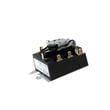
For this model, a common heater-area safety part is the dryer high-limit thermostat WE04X26139.
Why it matters
If a thermal safety device opens, it usually points to overheating from poor airflow (clogged lint screen, blocked vent, crushed duct, or lint buildup in the lint chute). Replacing the safety device without fixing airflow often leads to repeat failures.
Safe access tips (power and wiring)
We follow these basics every time:
- Unplug the dryer before removing any panel
- Turn off the breaker(s) or remove the home circuit fuse(s) before servicing
- Never leave the terminal block cover off after checking wiring
- Use a metal 4-inch duct and keep the run as short and straight as possible
Last updated: February 2026
How do I find the right GE part number?
For your GE electric dryer model GTX42EASJ0WW, the fastest way to get the right part number is to match the model number to the parts list and diagrams, then confirm the part by name and location before ordering. Use the owner's manual to verify features and configuration.
Step-by-step: find the correct part for GTX42EASJ0WW
- Confirm the model number is GTX42EASJ0WW (from the dryer’s model tag).
- Use the model’s parts diagrams to identify the exact part by section (control panel, drum, heater, door).
- Match by part name first, then confirm the part ID/part number.
- Compare your old part to the listing (shape, mounting points, wire terminals, color).
- If multiple similar parts appear, cross-check symptoms and location before buying.
Common parts customers mix up on this model
These are different parts with different jobs, even if the symptoms feel similar:
| What you see | What it usually points to | Example part on this model |
|---|---|---|
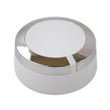
| Knob cracked or won’t turn timer | Knob only (not the timer) | Dryer timer knob (white) WE01X24552 |
| Timer won’t advance or cycles act wrong | Timer (internal switch contacts) | Dryer timer WE04X24550 |
| No heat but drum tumbles | Heating circuit issue | Dryer heating element WE11M10001 or GE dryer heater assembly WE11X21156 |
Why it matters
GE dryers use model-specific parts; ordering by appearance alone often leads to the wrong timer, thermostat, or heater component. Matching GTX42EASJ0WW to the diagram and then confirming the part ID prevents returns and repeat repairs.
Pro tips before you order
- If the dryer is not heating, also inspect airflow and lint buildup; restricted venting can trigger overheating protection.
- If the dryer runs but shuts off early, check thermostats and venting before replacing major parts.
- Keep your old part until the repair is complete so you can compare connectors and mounting.
Last updated: February 2026
What is the most common problem with a GE dryer?
The most common GE dryer problem is a “no heat” or “takes too long to dry” complaint, usually caused by a restricted venting system or a heating circuit issue. On the GE GTX42EASJ0WW electric dryer, start by checking airflow, power supply, and the lint filter.
Quick checks we recommend first (fast, high-impact)
- Clean the lint filter before every load; a full filter is a top cause of long dry times.
- Confirm the dryer is getting full 240V power; many electric dryers can tumble with only one tripped breaker but will not heat.
- Inspect the vent path for kinks, crushed duct, lint buildup, or a blocked exterior hood.
- Use only 4-inch rigid metal duct or a UL-listed transition duct; avoid plastic venting.
- Match cycle and dryness settings to the load; heavy fabrics need more time.
Most common symptoms and what they usually point to
| Symptom | Most common cause | What to do next |
|---|---|---|
| Tumbles but no heat | One breaker tripped or heating circuit failure | Reset both breakers; then test heating components |
| Clothes take too long to dry | Restricted venting or full lint filter | Clean lint filter and venting; verify proper ducting |
| Squealing or scraping noise | Worn drum support parts | Inspect glides and bearing surfaces |
| Won’t start | Power issue, start switch, timer, or safety device | Verify outlet power; then check controls and safety devices |
Parts that commonly fix these issues on GTX42EASJ0WW
If airflow and power are good, these model-matched parts are common fixes:
- Dryer heating element WE11M10001 (no-heat)
- GE dryer heater assembly WE11X21156 (no-heat)
- Dryer high-limit thermostat WE04X26139 or dryer safety thermostat WE04X25194 (overheating or heat cutting out)
- Dryer drum glide bearing WE03X37319 (noise, scraping)
- Dryer idler pulley WE03X31620 (squeal)
Why it matters
Restricted venting can cause overheating, longer dry times, and repeated heater or thermostat failures. Getting airflow right first often prevents repeat repairs and keeps drying performance consistent.
For model-specific operating tips, venting rules, and troubleshooting charts, use the owner's manual and the installation guide.
Last updated: February 2026
What are the main parts of a dryer?
On your GE GTX42EASJ0WW electric dryer, the main parts are the drum (where clothes tumble), the heating system (creates heat), the blower and venting (moves moist air out), and the controls and safety thermostats (manage temperature and cycle time). See the owner's manual for your model’s feature and care details.
Main dryer parts and what they do
- Drum: Holds and tumbles the load; GE uses an alloy steel drum designed to resist rust and corrosion from normal use.
- Heating system: Produces heat for drying (electric models use a heating element and related wiring).
- Blower and exhaust duct: Pulls air through the drum and pushes hot, damp air out through the vent.
- Lint filtration path: Lint screen plus the chute and trap area that must stay clear for airflow.
- Drive system: Motor, belt, idler pulley, and bearings or glides that keep the drum turning smoothly.
- Controls: Timer or electronic controls, plus start/power buttons and knobs.
- Safety temperature controls: Thermostats and fuses that help prevent overheating.
Common parts you may replace on this model
These are some frequently serviced items for GTX42EASJ0WW:
- GE dryer lint screen WE03X23881 (first airflow checkpoint)
- Dryer heating element WE11M10001 (no heat or weak heat symptoms)
- Dryer high-limit thermostat WE04X26139 (overheating protection)
- Dryer safety thermostat WE04X25194 (temperature safety control)
- Dryer idler pulley WE03X31620 (squealing, belt tension issues)
- Dryer timer WE04X24550 and dryer timer knob (white) WE01X24552 (cycle timing or knob damage)
Why it matters (quick troubleshooting context)
Most dryer problems trace back to one of three systems: airflow, heat, or drum drive. For example, a partially clogged exhaust duct can lengthen drying time even when the heater works normally.
Quick reference table
| System | Main job | What you notice when it fails |
|---|---|---|
| Airflow (lint screen, duct, blower) | Moves moist air out | Long dry times, hot cabinet, poor drying |
| Heat (element, thermostats) | Heats incoming air | No heat, low heat, shuts off early |
| Drive (motor, idler, glides) | Turns the drum | Squeal, thump, drum not turning |
Last updated: February 2026