Owner’s manual
 Error Codes


How to fix 26 C error code on Samsung refrigerator?
On the Samsung RF26J7500WW refrigerator, a 26C (sometimes shown as 26E) error points to a problem in the ice maker system, most often the ice maker fan or an ice maker movement/position issue. We fix it by clearing ice buildup, resetting power, and checking the ice room fan and related wiring per the owner's manual.
Quick fixes to try first
- Power reset: unplug the refrigerator (or switch off the breaker) for 2 to 5 minutes, then restore power.
- Empty the ice bin and make sure it seats fully and straight.
- Check for ice clumps or frost around the ice maker compartment; defrost if needed.
- Confirm the freezer door closes tightly and the door gasket is sealing.
- Make sure the ice maker is turned on (if your control panel has an ice on/off setting).
What usually causes the 26C / 26E code
This code is commonly triggered when the ice maker cannot complete a normal cycle or when airflow in the ice room is restricted.
| Likely cause | What you may notice | What to check next |
|---|---|---|
| Ice buildup blocking movement | Grinding, thumping, or no ice | Defrost ice room; clear jammed cubes |
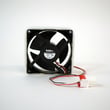
| Ice room fan not running | Frosty ice room, slow ice production | Listen for fan; inspect fan area |
| Temperature sensing issue | Ice maker acts erratic | Verify freezer temp and sensor connections |
| Loose connection | Code comes and goes | Inspect harness plugs for a secure fit |
Parts that commonly solve ice maker-related 26C problems
If the fan is noisy, stalled, or packed in ice repeatedly, replacement is often the lasting fix.
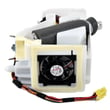
- Refrigerator ice room fan motor assembly DA31-00070E (ice room airflow)
- Refrigerator ice maker evaporator fan da97-12540g (fan assembly used in the ice maker area on some builds)
- Refrigerator temperature sensor DA32-10104N (temperature feedback that can affect ice operation)
Why it matters
When the ice room fan cannot move cold air correctly, the ice maker can freeze up or fail to eject ice; that triggers the 26C/26E code and can also reduce ice production and cause frost buildup.
For code lookups and related ice maker troubleshooting steps, we also use Samsung rf26 model french door refrigerator error codes to confirm what the display is reporting.
Last updated: February 2026
What is the manufacturer of RF26J7500WW?
Samsung is the manufacturer of the RF26J7500WW refrigerator; this model is a Samsung bottom-mount (French door style) refrigerator, and Samsung is the brand that designed and built it. For model-specific features, controls, and care details, use the RF26J7500WW owner's manual.
How we identify the manufacturer
We match the model number to the brand information for this appliance:
- Model number: RF26J7500WW
- Brand/manufacturer: Samsung
- Appliance type: Refrigerator
- Category: Bottom-mount refrigerator parts
Why the manufacturer matters
Knowing the manufacturer helps you choose compatible replacement parts and follow the correct troubleshooting steps. For example, Samsung refrigerators often use model-specific components such as:
- Temperature sensors (for accurate cooling control)
- Evaporator cover and fan assemblies (for airflow in the fresh food section)
- Water inlet valves (for the dispenser and ice maker)
- Control boards (for power and system management)
Quick reference
| Item | What it tells you |
|---|---|
| Manufacturer (Samsung) | Who built the refrigerator and sets the design standards |
| Model number (RF26J7500WW) | Which exact parts and diagrams match your unit |
| Manual | Operating instructions, error indicators, and maintenance steps |
Related tip for troubleshooting
If you are trying to confirm the brand because you are diagnosing an issue (cooling, ice maker, or display errors), we recommend using the manual first, then checking Samsung refrigerator error code guidance such as Samsung rf26 model french door refrigerator error codes.
Last updated: February 2026
What is the most common problem with Samsung refrigerators ice?
The most common ice problem we see in Samsung refrigerators like model RF26J7500WW is the ice maker stopping or jamming because frost or ice buildup forms in the ice room. That buildup is usually triggered by warm air leaks, restricted airflow, or water fill issues that cause freezing and clumping.
Most common symptoms
- Ice maker stops producing ice
- Ice clumps in the bin or ice won’t dispense
- Crushed ice only, or cubes jam in the chute
- Frost buildup around the ice room or ice container
- Water dripping or freezing near the ice maker area
What to check first (fast troubleshooting)
- Inspect door sealing and closing: Make sure the doors fully close and nothing is holding them open (bins, packages, or a misaligned drawer).
- Look for frost patterns: Heavy frost near the ice room points to warm air infiltration or airflow problems.
- Check the ice container: Remove and reinstall the bin so it seats correctly; a mis-seated bin can cause jams.
- Confirm water supply: Low water flow can cause small, misshapen cubes that clump and jam.
- Defrost the ice room if packed with ice: A full defrost restores operation and helps you confirm the root cause.
Parts that commonly relate to ice and water issues
If the basics check out, these model-matched parts are often involved in recurring ice problems:
| What’s happening | Common area | Part that may be involved |
|---|---|---|
| Ice clumps, frost, poor airflow | Ice room airflow | Refrigerator ice room fan motor assembly DA31-00070E |
| Slow fill, hollow cubes, no ice | Water supply into ice maker | Refrigerator water inlet valve DA62-04027A |
| Ice jams or bin won’t seat right | Ice storage/auger area | Refrigerator ice container assembly DA97-12604D |
Why it matters
When warm air or a weak water fill causes freezing and clumping, the ice maker can’t harvest and move cubes normally. Fixing the underlying airflow, sealing, or fill issue prevents repeat ice jams and protects components like the fan motor and valve.
Helpful references
- Use the owner's manual for your RF26J7500WW to confirm ice maker settings, bin removal steps, and any model-specific reset or test procedures.
- For broader troubleshooting steps, follow why your Samsung fridge stopped making ice and how to fix it.
Last updated: February 2026