Installation guide
 Error Codes





Where is the temperature sensor on a Frigidaire wall oven?
On the Frigidaire FGB24S5DCD gas wall oven, the oven temperature sensor is typically mounted inside the oven cavity on the rear wall, with its sensing tip protruding into the oven and a small mounting plate held by screws. You access it from inside the oven, then disconnect the wiring from the back of the unit.
- Turn off power to the wall oven at the breaker (the sensor circuit is electrical even on a gas oven).
- Open the oven door and look at the back wall of the oven cavity.
- Find a thin metal probe (usually a few inches long) attached with 2 screws.
- Note where the probe’s wires pass through the rear wall to the back of the oven.
- If you do not see a probe, check the upper rear area for a cooling fan cover and nearby harness routing (some models).
Most Frigidaire wall ovens use this basic layout:
| Task | Where you work | What you will see |
|---|---|---|
| Identify sensor | Inside oven cavity | Probe on rear wall with 2 mounting screws |
| Disconnect wiring | Behind the oven (rear access) | Sensor connector/harness plug |
| Replace sensor | Both areas | Remove screws inside; unplug connector outside |
For cabinet clearances, electrical shutoff, and safe access steps before pulling the oven, follow the installation guide.
The temperature sensor tells the electronic oven control how hot the oven is. If it is loose, out of position, or failing, you can see symptoms like inaccurate baking temperatures, long preheat times, or temperature swings.
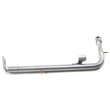
If testing confirms the sensor is bad, the correct replacement for this model is the Frigidaire range oven temperature sensor 316217002.
Last updated: January 2026
How to reset a Frigidaire wall oven?
To reset your Frigidaire FGB24S5DCD gas wall oven, turn the oven off and cycle power to clear a temporary control glitch. A reset often clears random beeping or a non-responsive keypad; if an error returns right away, troubleshooting the related circuit or part is the next step.
- Set the oven control to OFF.
- Turn power off at the circuit breaker for 1 to 5 minutes.
- Turn the breaker back ON.
- Wait 30 to 60 seconds for the electronic control to reboot.
- Set the clock, then test BAKE and BROIL.
If you are doing any hands-on checks after resetting, follow the safety and grounding guidance in the installation guide.
A reset does not fix a failed ignition or gas delivery problem. On a gas wall oven, the most common no-heat causes are an igniter that is weak, a burner issue, or a control or sensor problem.
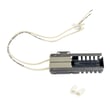
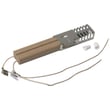
- If you do not see the igniter glow or it glows but the burner never lights, check the Frigidaire range oven burner igniter 5303935066.
- If the oven heats but temperatures are erratic, the Frigidaire range oven temperature sensor 316217002 is a common suspect.
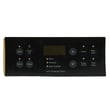
- If the display or keypad acts up (wrong selections, random beeps), the control overlay can be involved.
| Symptom after reset | What it usually points to | Example part for FGB24S5DCD |
|---|---|---|
| No glow, no ignition | Ignition circuit issue | Oven burner igniter |
| Glows but no flame | Weak igniter or gas valve issue | Oven burner igniter, gas valve |
| Overheats or underheats | Temperature feedback issue | Oven temperature sensor |
Resetting clears temporary electronic faults, but repeated failures usually mean the control is detecting a real problem. Addressing the underlying cause helps prevent nuisance shutdowns and improves baking performance.
Last updated: January 2026
What does F045 mean?
On a Frigidaire FGB24S5DCD gas wall oven, the F045 code points to a problem in the oven’s electronic control system, most often a keypad (touchpad) or control board communication issue. We focus on safe resets, wiring checks, and targeted part testing to pinpoint the failure.
- Turn the oven off at the breaker for 1 minute, then restore power and see if F045 returns.
- If the code returns immediately, stop using Bake/Broil until the cause is found.
- If the code appears after heating, check for heat-related wiring issues at the control area.
- Verify the oven is installed with proper clearances and support so heat does not build up around the cabinet cutout.
- Follow the mounting and installation requirements in the installation guide.
- Loose or oxidized ribbon connector between the touchpad and control board
- Pinched, damaged, or overheated wiring harness near the control panel
- Moisture, grease, or corrosion on the control board
- Failed touchpad (stuck key) or failing electronic oven control (EOC)
If the oven will not heat and you also suspect an ignition issue (separate from F045), inspect the igniter circuit and related wiring. A weak igniter can cause heating failures even when no error code is present.
- Inspect and test the Frigidaire range oven burner igniter 5303935066 if the bake burner will not light.
- If temperatures are erratic (overheats or underheats), test the Frigidaire range oven temperature sensor 316217002.
| Symptom you notice | Most likely area | What we check next |
|---|---|---|
| F045 returns right after power-up | Keypad or control board | Reseat connectors, inspect for corrosion |
| F045 appears during/after heating | Wiring/heat damage | Harness routing, insulation, terminal tightness |
| Oven heats poorly but no keypad issues | Ignition or sensor | Igniter glow/amp draw, sensor resistance |
An F045-related control fault can cause the oven to shut down, misread inputs, or behave unpredictably. Addressing it early helps prevent repeated lockouts and protects sensitive control components from heat and electrical stress.
Last updated: January 2026
What would cause a Frigidaire oven to stop working?
A Frigidaire FGB24S5DCD gas wall oven can stop working when it loses electrical power, has a failed ignition or temperature-sensing component, or has a control problem. Start with the basics (power and controls), then check common failure parts like the igniter and oven temperature sensor using the steps in the installation guide.
- Confirm the oven has power at the breaker or fuse; wall ovens require a dedicated, properly grounded circuit.
- If the oven was in cold storage or shipping conditions, let it sit in its final location for at least 3 hours before turning power on (cold starts can damage controls).
- Verify the control is responding (display, beeps, or indicator lights).
- Test BAKE: after about 20 seconds, open the door and check for heat.
- Test BROIL: the upper burner area should heat when set to broil.
If power is good but the oven will not heat, these parts are frequent culprits:
- Ignition failure: a weak or failed igniter can prevent the gas burner from lighting.
- Temperature sensing failure: a bad sensor can cause no-heat, overheating, or erratic temperatures.
- Gas delivery issue: a failed gas valve can prevent burner operation.
| Symptom | Most likely area | Example part for FGB24S5DCD |
|---|---|---|
| No heat on bake, no ignition | Ignition system | Frigidaire range oven burner igniter 5303935066 |
| Oven heats incorrectly or shuts off early | Temperature sensing | Frigidaire range oven temperature sensor 316217002 |
| No gas flow to burner | Gas supply control | Wall oven gas valve 5303210798 |
This oven is gas-fired but still depends on correct electrical supply and grounding for safe ignition and control operation. A simple power or grounding issue can look like a “dead oven,” while a weak igniter can stop heating even though the control seems normal.
Last updated: January 2026