Owner’s manual
 Error Codes




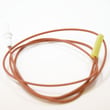
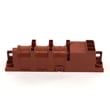
Does the NX58H5600SS have a broiler?
Yes. The Samsung NX58H5600SS gas freestanding range includes an oven broiler function. If your broil setting will not ignite or the oven will not heat, we use the same basic checks as other Samsung gas ranges: verify gas supply, ignition, and controls using the NX58H5600SS manual.
How to confirm broil operation on this model
- Set the oven to Broil and choose Hi or Lo (if offered on your control panel).
- Close the oven door to the position recommended for broiling in the NX58H5600SS manual.
- Listen for the igniter sequence (clicking or a glow bar, depending on design).
- Look for flame at the broil burner after a short delay.
- If it lights, allow a few minutes for the burner to cycle normally.
If broil will not work (quick troubleshooting)
On the NX58H5600SS, broil problems are usually caused by an ignition or gas flow issue, or a control/safety input preventing ignition.
- Confirm other gas burners work (cooktop burners or bake).
- Check that the range is not in Sabbath or Control Lock mode.
- Inspect the broil burner area for heavy grease buildup or blocked ports.
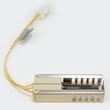
- If the igniter never glows/sparks, suspect the igniter circuit, wiring, or control.
- If the igniter glows but no flame, suspect weak igniter, gas valve, or regulator supply.
Common symptoms and what they often point to
| What you see | What it often means | What we check next |
|---|---|---|
| No glow/spark, no flame | No power to igniter or failed igniter | Wiring connections, control output |
| Glow/spark present, no flame | Gas not opening or igniter too weak | Gas valve, regulator, igniter strength |
| Bake and broil both fail | Shared supply/control issue | Gas supply, control, harness |
| Oven stalls around low temp | Ignition not sustaining | Igniter performance, valve operation |
Why it matters
Broil uses the top burner to brown and finish foods. When broil will not ignite, it can also be a clue that the oven ignition system (igniter, gas valve, or control) is starting to fail, which can affect baking performance too.
Last updated: January 2026
Does the NX58H5600SS have a self-cleaning function?
Yes. The Samsung NX58H5600SS gas freestanding range includes a self-cleaning oven cycle. Use the steps and safety notes in the NX58H5600SS user manual to start Self Clean, understand door-lock behavior, and choose the right cleaning duration.
How self-clean works on this range
Self-clean heats the oven to a very high temperature to burn off baked-on spills. After the cycle, you wipe out the remaining ash once the oven is fully cool.
- Remove oven racks, thermometers, foil, and any cookware
- Wipe up heavy spills first (especially sugary spills)
- Start Self Clean and select the cycle length (light vs. heavy soil)
- Expect the oven door to lock during the cycle and for a cool-down period
- Ventilate the kitchen; some odor and light smoke can be normal
Before you run Self Clean (quick checklist)
- Confirm the oven is empty and racks are removed (unless your manual says otherwise)
- Keep pets and children away from the kitchen during the cycle
- Turn on a vent hood or open a nearby window for airflow
- Plan for downtime; the oven is unusable until the cycle and cool-down finish
Self-clean vs. manual cleaning
| Option | Best for | What you do |
|---|---|---|
| Self Clean | Heavy, baked-on soil | Start cycle; wipe ash after cool-down |
| Manual cleaning | Light spills, quick touch-ups | Use a non-abrasive cleaner and soft cloth |
Why it matters
Using the correct self-clean settings helps protect key components like the oven door lock, control board, and temperature sensor; it also reduces the chance of smoke from leftover grease or food debris.
Last updated: January 2026
What are common problems with the NX58H5600SS?
Common problems we see on the Samsung NX58H5600SS gas freestanding range include the oven not heating or heating unevenly, surface burners that click but do not ignite, and a control panel that is unresponsive or shows error beeps. For model-specific operating checks and settings, use the NX58H5600SS manual.
Most common symptoms and what they usually point to
- Oven will not heat or takes too long to preheat: weak bake igniter, restricted gas flow, or a failing oven control/relay.
- Oven temperature is inaccurate: oven temperature sensor out of range, poor airflow, or calibration/settings issue.
- Surface burner won’t spark or ignite: dirty burner cap/head, clogged ports, wet igniter area, or a bad spark module/switch.
- Constant clicking: moisture or debris around an electrode, misaligned burner cap, or a stuck spark switch.
- Buttons do not respond or display acts up: keypad/control board issue, power supply problem, or a loose ribbon connection.
Quick checks you can do safely (before testing parts)
- Confirm the range has power (clock/display on) and the gas shutoff valve is fully open.
- For surface burners, remove grates and caps; clean and dry burner heads and ports.
- For oven heat complaints, watch the bake igniter during a bake cycle; it should glow and the burner should light shortly after.
- If the oven heats but food bakes unevenly, verify rack position and avoid blocking vents.
- If you see an error code or repeated beeping, use an error-code reference such as Samsung electric range error codes to narrow the circuit involved (many code families overlap across Samsung ranges).
What to test (typical parts involved)
| Symptom | Most likely checks | Next likely checks |
|---|---|---|
| Oven won’t heat | Bake igniter | Oven control/relay, wiring, gas valve |
| Oven not baking evenly | Temperature sensor, calibration | Igniter/burner flame pattern |
| Burner won’t ignite | Burner cap alignment, clogged ports | Electrode, spark module, spark switch |
| Dead/unresponsive keypad | Control panel/keypad | Main control board, harness connections |
Why it matters
Gas ranges like the NX58H5600SS rely on correct ignition timing and accurate sensing. A weak igniter or drifting sensor can cause long preheat times, temperature swings, and poor baking results even when the burner still lights.
Last updated: January 2026